Every day, businesses lose potential customers when visitors abandon forms without submitting them. Pre-submission lead capture solves this by collecting details like names, emails, and phone numbers as users type. This ensures you retain critical data even if visitors leave. Here’s how it works:
- What It Does: Records partial form entries in real time.
- Why It Matters: 68% of users abandon long or complex forms, costing businesses leads and revenue.
- How to Use It: Tools like MagicTag track form interactions, integrate with CRMs, and automate follow-ups via email, SMS, or chatbots.
- Key Benefits: Recover lost leads, boost conversions, and measure ROI effectively.
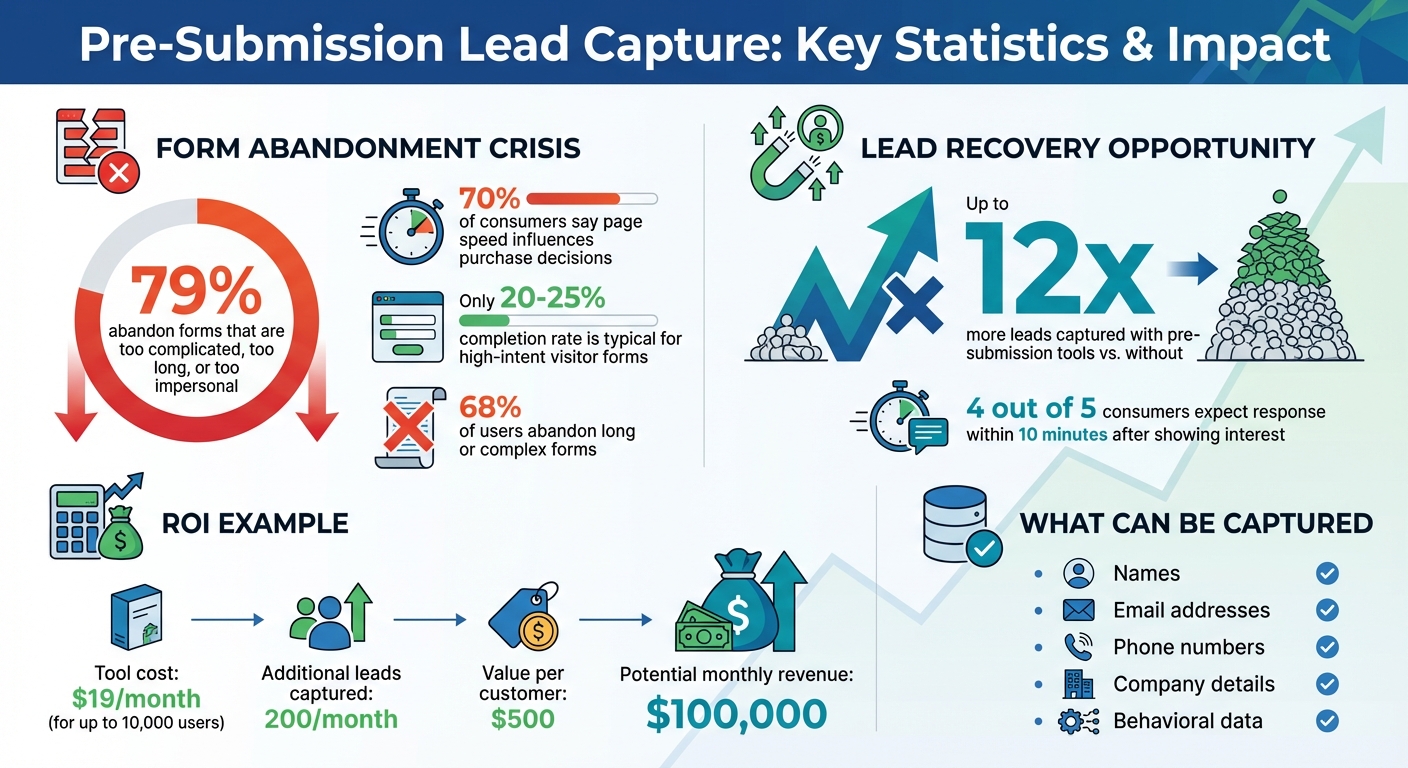
Pre-Submission Lead Capture Statistics and ROI Impact
How Pre-Submission Lead Capture Works
Pre-submission lead capture is all about tracking what visitors do while interacting with web forms - even if they don’t complete them. It collects data as users type, giving you valuable insights into high-intent visitors. Plus, it offers a chance to re-engage these users without stepping over privacy boundaries. By understanding the reasons behind form abandonment, you can work on minimizing friction and boosting the chances of capturing those leads.
Understanding Form Abandonment
Form abandonment happens when someone starts filling out a form but leaves before hitting the submit button. Did you know that about 79% of users abandon forms they find too complicated, too long, or too impersonal?. Every extra field you add can increase friction, and slow-loading pages don’t help either - 70% of consumers admit that page speed influences whether they make a purchase.
To tackle this, pinpoint the problem areas. Are the fields unclear? Is there too much to fill out? If fewer than 20–25% of users complete forms on pages designed for high-intent visitors, your form might need some work. Analyze where users click, pause, or leave the form. This information can help you smooth out the process and improve your lead capture rates.
What Data Can Be Captured Ethically?
You can ethically gather partially entered information like names, email addresses, phone numbers, and company details. Behavioral matching can even help identify anonymous visitors. Chatbots are another useful tool for collecting real-time data. However, it’s crucial to stay transparent and follow privacy laws like GDPR and CCPA. Make sure to get explicit consent, only collect what’s necessary, use SSL encryption for security, and clearly explain how the data will be used.
Key Metrics to Track User Behavior
To understand user behavior, focus on metrics like field interactions, time spent on the page, scroll depth, and exit-intent triggers (actions that suggest a visitor is about to leave). Monitoring browsing history and overall engagement can reveal patterns that signal high intent. This allows you to prioritize follow-ups with the most promising leads, making your efforts more effective.
Setting Up Real-Time Data Capture with MagicTag
How MagicTag Captures Form Data in Real-Time
MagicTag lets you capture visitor input as it happens - names, emails, phone numbers, and company details - even before they hit "submit." This means you can gather important details without waiting for form completion, all while keeping your site running smoothly.
The platform is designed with privacy in mind, adhering to GDPR and LGPD guidelines. By displaying your privacy policy near forms and collecting only actionable information, you remain transparent with users. MagicTag can help websites uncover up to 12x more leads compared to those that don’t use it. Instead of losing potential customers to form abandonment, you can transform those missed opportunities into actionable leads.
Ready to get started? Let’s walk through the setup process.
Step-by-Step Installation Guide
Installing MagicTag is quick and straightforward. All you need to do is add a small code snippet to your website. Once the code is live, head to the MagicTag dashboard to select the forms you want to track. The platform automatically identifies form fields and allows you to map them correctly, ensuring seamless data integration with your CRM.
No need to rebuild your forms or overhaul your current setup - MagicTag works on any platform, whether it’s WordPress, Shopify, or a custom-built site. The real-time dashboard offers insights into form interactions and completion rates, helping you stay on top of user activity. The Free plan is a great starting point, allowing you to track up to 1,000 users per month to see the tool in action before committing to a larger plan.
Once you’ve got MagicTag up and running, you can integrate it with your CRM to streamline lead management.
Integrating MagicTag with CRMs and Marketing Tools
MagicTag integrates seamlessly with CRMs through webhooks and APIs, connecting directly with platforms like HubSpot, Salesforce, and Pipedrive. It’s easy to map form fields to CRM fields, ensuring accurate data transfer every time.
This integration takes your workflows to the next level. For instance, if a visitor enters their email but doesn’t submit the form, your CRM can instantly tag them as “High Intent” and enroll them in an email nurture sequence. Sales teams can get real-time alerts for hot leads, while marketing teams can kick off retargeting campaigns based on the captured data.
The Starter plan, priced at $19/month, includes full API access, CRM integrations, and priority support for up to 10,000 users per month. It’s an affordable way to automate lead management and maximize your outreach efforts.
Automating Lead Recovery Before and After Abandonment
Triggering Real-Time Alerts and Workflows
When a visitor starts filling out your form but leaves before hitting submit, MagicTag springs into action. It immediately notifies your sales team with the details captured so far. For example, if someone enters their email or phone number but doesn't complete the form, your team gets an alert with that information. This allows them to follow up while your offer is still fresh in the visitor's mind.
MagicTag doesn’t stop there - it automatically creates a lead record, assigns it to a sales representative, and schedules follow-up tasks. Timing is everything, especially since 4 out of 5 consumers expect a response within 10 minutes after showing interest in a product or service.
Following Up with Email, SMS, and Chatbots
With partial form data in hand, you can initiate automated follow-ups across multiple channels. For instance, you could send a personalized email within minutes, offering assistance to help them complete their request. If the lead is particularly valuable, an SMS message might work even better.
Chatbots can also step in to provide real-time support. When MagicTag detects someone typing information but hesitating to submit, a chat window can pop up, asking if they have any questions or need help. This timely interaction can keep visitors engaged before they leave your site altogether. To be effective, these automated messages need to reach leads quickly - ideally within minutes.
Retargeting High-Intent Visitors
The data MagicTag captures doesn’t just help with immediate follow-ups - it’s also a goldmine for retargeting. Email addresses and phone numbers collected from partial form submissions can be used to create highly targeted marketing campaigns. By uploading this data to your email platform or SMS service, you can build custom audiences for retargeting efforts. These visitors have already shown interest, making them much more likely to convert than a cold lead.
To make your retargeting even more effective, segment your audience based on how much information they provided. Then, tailor your messages to match their level of engagement. Just remember to comply with U.S. privacy laws, like CAN-SPAM for email and TCPA for SMS. Always include clear opt-out options in your communications to stay on the right side of the law.
sbb-itb-77d5bc3
Measuring and Improving Lead Capture Performance
Key Metrics to Monitor
To evaluate how well you're capturing leads before they submit forms, focus on a few essential metrics. Start with the form abandonment rate, which measures the percentage of visitors who begin filling out a form but leave before completing it. If you notice high bounce rates on form pages or large exit rates from multi-step forms, it's a clear sign that abandonment is an issue.
Another important metric is pre-submission leads captured - this tracks partial form fills where you’ve at least collected an email address or phone number. Pair this with incremental revenue, which calculates the additional sales generated from these partially captured leads. Together, these metrics help you understand how many potential leads you’re reclaiming instead of losing.
Using Data to Improve Form Design
Once you’ve gathered these metrics, use them to fine-tune your form design. Look closely at where users drop off. For example, if many abandon the form at a specific field, consider reordering the fields or adding a progress bar so users know how much more they need to complete.
A/B testing can be a powerful tool here. Test changes like removing unnecessary fields, making call-to-action buttons more noticeable, or optimizing how the form looks on mobile devices. Keep an eye on how these adjustments impact your key metrics. The goal is to make the form as user-friendly as possible while tools like MagicTag continue capturing valuable data in real time.
Calculating ROI from Pre-Submission Capture
After refining your forms, it’s time to measure the financial payoff. Calculate ROI by subtracting your total lead generation costs from the revenue generated by pre-submission leads, then dividing that number by the total lead costs. These costs could include your MagicTag subscription (starting at $19/month for up to 10,000 users), as well as expenses for follow-up campaigns and staff time spent on lead recovery.
Here’s an example: If MagicTag helps you capture 200 additional leads each month, and each customer brings in $500, your potential monthly revenue could far exceed the cost of the tool. Keep tracking these metrics over time to see how well your efforts are paying off. Adjust your follow-up strategies - whether through email, SMS, or chatbots - based on what delivers the best results.
Conclusion
Form abandonment doesn’t have to mean lost opportunities. By capturing lead data in real time - before visitors hit submit - you can turn incomplete forms into actionable leads. This approach helps lower bounce rates, transforms interested visitors into qualified leads, and ensures you can engage with potential customers who might otherwise leave without providing their information. It’s a simple yet powerful way to prevent lost data and create opportunities for immediate, automated engagement.
With automated follow-ups, you can act on visitor intent right away, keeping the momentum alive. Tools like MagicTag make this process seamless, capturing up to 12x more leads, starting at just $19/month for up to 10,000 users.
The strategies in this guide - tracking user behavior, capturing data in real time, automating recovery workflows, and measuring ROI - offer a clear plan to make the most of every visitor interaction.
Start by adding MagicTag to your highest-traffic forms. Keep an eye on your pre-submission capture rates, experiment with follow-up sequences, and fine-tune your strategy based on the insights you gather. The key to turning a lost visitor into a qualified lead lies in capturing their information before they leave your site.
FAQs
How can pre-submission lead capture comply with privacy laws?
To meet the requirements of privacy laws like the TCPA, pre-submission lead capture must include clear and explicit user consent. This means users need to actively opt in - no pre-checked boxes allowed - and the opt-in option should be accompanied by straightforward disclosures explaining what they’re agreeing to. Additionally, there should always be an easy way for users to opt out whenever they choose.
Consent should be specific to the type of communication being sent, whether that’s calls, texts, or emails. It’s just as important to securely store records of this consent for future reference. Failing to follow these rules can result in hefty penalties, making compliance a critical part of ethical and lawful lead generation practices.
What metrics should I track to increase form completion rates?
To boost form completion rates, keep an eye on form views, start rates, and submission rates. These key metrics reveal where users lose interest or encounter issues, giving you a chance to fine-tune the form's design and overall experience.
For instance, if your form gets plenty of views but very few starts, it might look too complex or uninviting. On the other hand, if people start filling it out but don’t finish, you may need to simplify the questions, speed up loading times, or add helpful features like chatbots or tooltips for real-time guidance. Regularly tracking these metrics can uncover patterns and guide you in making changes that lead to better outcomes.
How does MagicTag connect with my CRM system?
MagicTag works effortlessly with your CRM system through native integrations or automation tools. This setup enables automatic data syncing, lead tagging, and follow-up workflows as soon as a lead is captured.
With this connection, your CRM updates in real-time, simplifying lead management and boosting engagement - all without the need for manual input.
