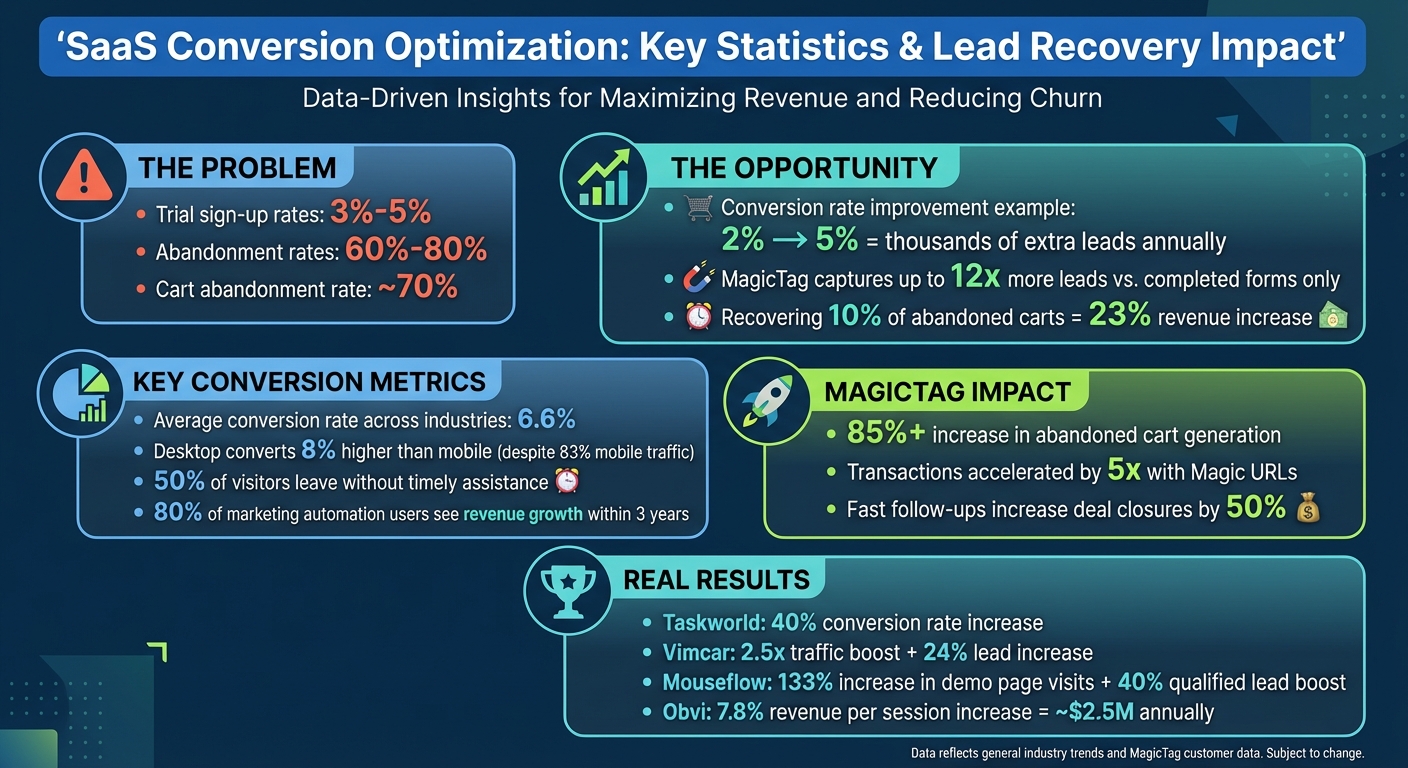
Conversion optimization for SaaS companies focuses on turning more website visitors into active users or customers. The challenge? Low trial sign-up rates (3%-5%) and high abandonment rates (60%-80%) mean most potential leads slip away. But tools like MagicTag can help recover these lost opportunities by tracking real-time form data, even from incomplete submissions, and sending it directly to your CRM for follow-up.
Key Takeaways:
- Why CRO Matters: Even a small improvement in conversion rates (e.g., 2% to 5%) can mean thousands of extra leads annually.
- MagicTag Features:
- Tracks partial form entries in real-time.
- Integrates with CRMs like HubSpot and Salesforce.
- Automates follow-ups to re-engage leads.
- Pricing: Plans start at $0/month for small websites and scale up to $299/month for enterprises.
- Boost Conversions with A/B Testing: Test headlines, CTAs, and form designs to see what works best.
- Behavior Analysis: Use heatmaps and session recordings to spot user friction points and improve your website experience.
By combining tools like MagicTag with A/B testing and user behavior insights, SaaS companies can recover more leads, optimize sales funnels, and drive higher ROI.
SaaS Conversion Optimization Statistics and Lead Recovery Impact
How to Improve Conversion Rate - 22 Strategies for Conversion Rate Optimization (with Roadmap)
Lead Capture and Recovery Tools for SaaS
SaaS businesses often lose potential customers when visitors start filling out forms but leave before submitting them. Once that happens, the lead is gone - unless you have a way to capture their information in real-time. That’s where lead recovery tools come into play, helping you turn incomplete form entries into actionable leads.
MagicTag is one such tool. It captures user details - like name, email, and phone number - as they’re typed into form fields, even if the visitor doesn’t hit submit. This allows you to follow up with individuals who showed interest but didn’t complete the process. Websites using MagicTag can identify up to 12 times more leads compared to those that rely only on completed form submissions.
MagicTag Features and Capabilities
MagicTag works by tracking interactions with form fields in real time. As soon as a visitor types something, the data is sent directly to your dashboard. The setup is quick and simple - you just add a lightweight code snippet to your website, and it starts collecting data instantly. No developer is needed.
The tool is designed to comply with GDPR and LGPD regulations, ensuring it collects data both legally and ethically. Its real-time dashboard provides immediate insights into who is engaging with your forms, even if they abandon them halfway through. This feature is especially useful for improving trial signups and demo requests.
How MagicTag Connects with CRM Systems
MagicTag seamlessly integrates with popular CRM platforms like HubSpot, ActiveCampaign, and Salesforce through webhooks and APIs. This means partial form data is automatically sent to your CRM, turning incomplete submissions into actionable leads.
These integrations also allow for automated follow-ups. For example, if someone abandons a trial signup form, your CRM can trigger an email sequence or notify your sales team right away. Studies show that about 50% of visitors leave if they don’t receive timely assistance. By automating engagement, you can capture these leads before they lose interest. Plus, the centralized data management ensures your sales funnel stays organized and efficient.
MagicTag Pricing and Plans
MagicTag offers tiered pricing plans to suit SaaS businesses of all sizes. Here's a breakdown:
| Plan | Price | Monthly User Limit | Key Features | Best For |
|---|---|---|---|---|
| Free | $0/year | 1,000 users | Real-time dashboard, basic webhook, email support | Small websites testing lead recovery |
| Starter | $19/month | 10,000 users | Full API & webhook, CRM integrations, priority support | Growing SaaS businesses |
| Business | $99/month | 50,000 users | Advanced filtering & segmentation, SLA support | Mid-size companies with high traffic |
| Enterprise | $299/month | 50,000+ users | Dedicated infrastructure, custom integrations, premium support | Large enterprises with complex needs |
The Free plan is perfect for small websites looking to experiment with real-time lead capture, offering up to 1,000 identified users per month at no cost. For SaaS businesses running marketing campaigns, the Starter plan at $19/month provides full CRM integration and advanced features without a hefty price tag.
A/B Testing to Improve Conversion Rates
A/B testing is all about comparing different versions of a webpage to see which one drives better results. For SaaS businesses, this often means testing elements like headlines, CTAs (calls-to-action), pricing, or forms - all based on real user behavior.
Here’s how it works: show version A to half of your visitors and version B to the other half, then measure which one delivers better results. To get clear insights, test only one variable at a time - this helps you isolate its impact. Experts recommend aiming for at least 100 conversions per variation to ensure reliable data. Also, run your test for 2 to 4 weeks to account for traffic changes over time.
"A/B testing is a simple yet powerful technique that involves testing two versions of a website or marketing campaign to see which one performs better."
- Jimit Mehta, Blog Author, Abmatic AI
Start with elements that directly impact your sales funnel. For instance, your headline is often the first thing visitors notice. Experiment with benefit-driven copy like “Save 10+ Hours a Week” versus feature-focused alternatives. CTAs are another great area to test - small tweaks can lead to big gains. For example, adding friction-reducing phrases like “No credit card required” or using benefit-oriented prompts such as “Try It Free for 14 Days” instead of generic ones like “Start Your Free Trial” can significantly improve click-through rates. Even small changes to form fields, like making phone numbers optional or switching from a single-page to a multi-step form, can lower abandonment rates.
To ensure your test results are reliable, focus on statistical significance. Use a p-value of 0.05 or lower to confirm your findings aren’t just due to chance. Keep an eye on external factors like holidays or overlapping marketing campaigns that could skew your data. Once you’ve identified the winning variation, roll it out and use the insights to guide your next test. A/B testing isn’t a one-and-done effort - it’s an ongoing cycle of refining and improving.
Using MagicTag with A/B Testing
MagicTag takes A/B testing to the next level by offering deeper insights into user behavior. While most A/B testing tools focus on completed actions - like form submissions - MagicTag tracks partial form entries in real time, capturing leads that might otherwise go unnoticed.
For instance, imagine testing two demo request landing pages: one with a simplified form and another with extra fields. Your A/B testing tool might show that the simpler form results in more completed submissions. But MagicTag can reveal that the extended form actually captures more total leads by tracking visitors who start filling out the form but don’t finish. These insights provide a more complete picture of user engagement and help your sales team prioritize high-quality leads.
MagicTag integrates seamlessly with tools like HubSpot, Salesforce, and ActiveCampaign via webhooks and APIs. It sends real-time, variation-tagged data directly to your CRM, giving you the ability to analyze both conversions and lead quality. This way, you’re not just increasing conversions - you’re also identifying and nurturing your most valuable prospects.
Heatmaps and Session Recordings for User Behavior Analysis
Heatmaps and session recordings give you a clear visual understanding of how users interact with your SaaS website. While traditional analytics might tell you what’s happening - like a high bounce rate on your pricing page - these tools dive deeper, helping you uncover why it’s happening. Heatmaps use color coding (red and white for high activity, blue for low) to highlight where users focus their attention on your site. Session recordings, on the other hand, capture real user sessions, making it easier to spot friction points and areas of confusion. When combined with tools like MagicTag, this data becomes even more actionable.
These tools can identify problems such as "dead clicks" (when users mistakenly think something is clickable) and "rage clicks" (frustrated repeated clicking on unresponsive elements). Scroll maps, another valuable feature, reveal how far down your page users scroll - especially important since 80.3% of viewing time tends to happen above the fold. Form analytics add another layer, highlighting fields that cause users to abandon forms due to issues like unclear labels, validation errors, or forms that take too long to complete.
Here’s how businesses have used these insights to drive real results:
- A 10% revenue increase was achieved after session recordings revealed non-interactive elements that misled users.
- Taskworld used heatmaps to analyze clicks during their signup process, fixing friction points and increasing their conversion rate by 40%.
- Vimcar implemented heatmaps across their site when conversions dipped. This led to a 2.5x boost in traffic to key pages and a 24% rise in total leads.
By segmenting data - like analyzing by device type or traffic source - you can uncover platform-specific issues and refine your user experience even further.
Connecting Behavior Data with MagicTag
Once you’ve identified user behavior patterns, MagicTag takes things a step further by turning that data into recoverable leads. Heatmaps and session recordings can show you where users struggle with forms, but MagicTag captures partial form entries - even if users don’t hit submit - so you can follow up and recover those leads.
Advanced session recordings can also track visitor IDs, device types, and locations, linking user behavior to specific leads. When paired with MagicTag, this creates a seamless connection between what users do on your site and their contact details. For example, if session recordings show users repeatedly clicking on a non-interactive element near your demo request form, and MagicTag captures their email as they start filling it out, your sales team can reach out with tailored help to clear up any confusion.
MagicTag integrates effortlessly with your existing tools. It sends real-time data to your CRM through webhooks and APIs, enriching it with behavioral insights from heatmaps and session recordings. You can even filter MagicTag leads by behaviors like "rage clicks" or "dead clicks" to focus on users who faced technical challenges. Additionally, scroll depth analysis ensures your calls-to-action are placed where users are most likely to see them before they stop scrolling.
The result? A complete picture of your leads: who they are, what obstacles they encountered, and how you can re-engage them effectively.
sbb-itb-77d5bc3
Analytics and CRM Integration for Sales Funnel Optimization
Bringing your analytics tools and CRM together provides a clear, end-to-end view of your sales funnel - from the very first interaction to closing the deal. This integration allows you to focus on driving revenue instead of just increasing lead numbers. By syncing offline events like "Sales Qualified Lead" or "Closed Won" statuses from your CRM back into your analytics platform, you can pinpoint which campaigns bring in actual revenue versus those that just generate a high volume of low-quality leads. For instance, you might find that email traffic converts at 19.3%, outperforming paid search, which converts at 10.9%. Insights like these let you adjust your budget to focus on what works. This integration also sets the stage for detailed event tracking and automated lead recovery, which we'll explore further below.
"Unifying your CRM with GA4 bridges the gap between digital engagement and bottom-line results. It's how modern businesses unlock full-funnel attribution." - Sagar Rabadiya, Co-Founder, SR Analytics
In 2023, a mid-sized B2B SaaS company linked GA4 with HubSpot using Measurement Protocol. By reallocating budgets based on "Closed Won" data, they achieved a 25% increase in total revenue. The secret? Tying specific web sessions to CRM contact records using Client ID tracking, which revealed that while some campaigns generated fewer leads, they delivered higher-value deals.
Event Tracking and Funnel Analysis
Event tracking allows you to see exactly where potential customers drop off in your sales funnel. Funnel analysis breaks this down further, showing the percentage of users who abandon each step - from landing pages to demo requests. While the average conversion rate across industries is 6.6%, this number varies widely depending on traffic source and device type.
For example, even though 83% of visits come from mobile devices, desktop users convert at a rate that's 8% higher. Tracking both macro conversions (like demo requests or purchases) and micro conversions (such as newsletter signups or pricing page visits) helps you gauge user intent early in their journey.
Consider the case of Obvi, a health and wellness brand. By using revenue-based behavior tracking, they discovered their primary call-to-action was placed below the average mobile fold height. After repositioning the button, they saw a 7.8% increase in revenue per session - adding up to roughly $2.5 million in additional annual revenue. These kinds of results are only possible when specific user actions are tracked as events and analyzed for their impact on conversions.
Tools like MagicTag enhance this process by capturing partial form data, even when users don't submit the form. When integrated with analytics, you can track events like "user started filling pricing form" or "user entered email but didn't submit." This gives you insights into drop-offs that traditional analytics might miss. By storing UTM parameters, page paths, and lead IDs in hidden form fields, you can automatically sync web behavior with your CRM.
Automated Lead Recovery Through CRM Integration
Once you understand where users drop off using event tracking, tools like MagicTag can trigger automated recovery actions to win back those leads. For example, when MagicTag captures a partial form entry, your CRM can send automated emails or SMS messages based on user behavior - like multiple visits to your pricing page or downloading a product guide.
This is crucial because it often takes eight or more touchpoints before a lead is ready to convert. Manually managing this level of follow-up isn't feasible, but automation can handle repetitive tasks, freeing your sales team to focus on high-value interactions. Back in 2019, The Mix (Thermomix's Australian distributor) streamlined their consultant onboarding process by integrating Salesforce Sales Cloud with CRM Analytics. This cut the process time from four days to just a few hours.
Behavior-based triggers also enable personalized outreach at critical moments, like when a prospect clicks on a proposal link or abandons a pricing calculator. In 2020, Legend Corporation implemented Sales Cloud and Revenue Cloud to automate their sales funnel. This reduced manual order processing by 90% and enabled 24/7 self-service ordering.
MagicTag's CRM integration goes further by enabling lead scoring based on engagement signals, company size, and budget indicators. This ensures your sales team can prioritize leads showing the highest intent - such as those who entered their email, visited the pricing page multiple times, and downloaded a case study - over less engaged prospects. This data-driven approach helps your team focus on leads most likely to close, directly improving ROI.
| Integration Feature | Benefit for Sales Funnel |
|---|---|
| Client/User ID Tracking | Links specific web sessions to CRM contact records |
| Measurement Protocol | Provides real-time server-side updates (MQL, SQL) |
| Hidden Form Fields | Embeds attribution and journey data into CRM records |
| Automated Lead Scoring | Prioritizes high-value prospects based on engagement |
Conversion Optimization Strategies with MagicTag
Building on CRM and analytics integration, these strategies transform real-time data into actionable steps to recover lost revenue. With MagicTag in place, you can turn insights into measurable results by reclaiming revenue from visitors who might otherwise leave without completing their journey.
Did you know that roughly 70% of e-commerce transactions are abandoned at the cart stage? Even recovering just 10% of these abandoned carts can lead to a 23% increase in revenue. MagicTag steps in at this critical moment, using real-time tracking to intercept potential losses and drive conversions.
"With a remarkable 85%+ increase in abandoned cart generation, Magic Checkout proves highly effective in reclaiming lost sales." - Rashmee Lahon
For SaaS companies, similar recovery tactics apply. For instance, Mouseflow's marketing team noticed high drop-off rates on their demo booking page. By introducing an exit-intent popup offering an on-demand demo, they saw a 133% increase in visits to their interactive demo page and a 40% boost in qualified leads. The key? Offering a low-pressure alternative, like an on-demand demo, instead of pushing for an immediate sales call.
By connecting MagicTag data to your CRM through webhooks, you can trigger recovery sequences within minutes, capturing leads while purchase intent is still fresh. These strategies build on earlier analytics to directly recover lost opportunities.
How to Set Up Automated Lead Recovery
Setting up automated lead recovery with MagicTag is straightforward. Start by installing MagicTag on high-value pages like checkout flows, demo request forms, and pricing calculators. Configure it to track key cart stages - such as summary, address, and payment - ensuring no lead slips through the cracks. For returning users, MagicTag pre-fills their contact details, reducing friction and increasing the chances of capturing a lead before they abandon.
Next, integrate MagicTag with your CRM using webhooks or APIs. This allows data to flow in real time and triggers automated follow-ups. For example, if a user abandons their cart at the payment stage, your CRM can send a timely email with a discount offer. If they drop off at the address stage, a simple reminder email might be enough to bring them back.
Leverage Magic URLs in retargeting campaigns. Unlike standard cart pages, Magic URLs immediately trigger the checkout modal, allowing users to return to their purchase with just one click. This streamlined process accelerates transactions by up to 5x compared to traditional checkouts.
"By leveraging the Magic URL in retargeting efforts, e-commerce stores can witness a remarkable transformation... with transactions propelled by an impressive 5x speed." - Rashmee Lahon
To further optimize recovery, segment your campaigns based on where users abandoned the process. For example, users who leave at the summary page might benefit from educational content, while those who reach the payment stage may respond better to urgency-driven messaging. Automate these follow-ups in your CRM to ensure they occur promptly, keeping the lead engaged.
Tracking ROI with MagicTag
Once automated recovery is in place, measuring ROI is essential to understand its financial impact. Start by establishing a baseline - track how many leads you capture from forms and checkout flows before implementing MagicTag. Then, compare this to the additional leads captured from partial submissions and abandoned carts.
MagicTag’s real-time dashboard makes this easy by displaying the number of users who entered information without completing a form. For example, if MagicTag increases your monthly lead capture from 1,000 to 1,850, that’s an 85% boost in leads, translating directly into higher revenue.
Next, monitor how many recovered leads convert into paying customers. By tagging these leads in your CRM, you can compare their conversion rates to those from organic submissions. For e-commerce businesses, the math is straightforward: recovering 10% of abandoned carts can increase revenue by 23%. If your store experiences 10,000 cart abandonments monthly with an average order value of $150, recovering 1,000 carts could add $150,000 in revenue each month.
For SaaS companies, track how recovered leads progress through free trials and into paid subscriptions. Combine these metrics with your customer lifetime value to get a clear picture of the revenue impact.
Finally, use attribution tracking to refine your strategy. Tag recovery emails, SMS, or retargeting ads with UTM parameters to identify which channels deliver the best results. This data allows you to focus your efforts where they matter most, ensuring maximum returns over time.
Conclusion
Conversion optimization isn't about taking shots in the dark - it’s about using tools like MagicTag to gather data, automate processes, and turn insights into revenue. Throughout this guide, we’ve seen how MagicTag strengthens your sales funnel by capturing leads in real time, analyzing user behavior, and triggering follow-ups to keep potential customers engaged.
The advantages of streamlined automation are clear. Businesses that embrace marketing automation often see revenue growth within three years, with 80% of top-performing organizations adopting these systems. When you combine MagicTag’s ability to capture up to 12x more leads with efficient CRM integration and behavioral insights, you eliminate tedious manual tasks that bog down sales teams. This frees them up to focus on what truly matters - closing deals.
"Automation handles the repetitive work so your sales team can focus on the high-impact tasks that close deals." - Salesforce
The real magic lies in combining these elements into a unified system. MagicTag’s real-time data capture and seamless CRM integration transform raw user data into targeted, automated follow-ups. Tools like heatmaps and session recordings pinpoint exactly where users encounter friction, allowing you to tackle problems with precision instead of relying on guesswork. This cohesive approach not only boosts conversion rates but also simplifies the process of turning website traffic into revenue.
From recovering abandoned carts to nurturing trial users and optimizing demo requests, the formula is straightforward: gather more data, automate smartly, and measure everything. You can start small with MagicTag’s free plan, which identifies up to 1,000 users per month, and scale as your results grow. With fast follow-ups increasing deal closures by 50%, every second counts when it comes to recovering leads.
FAQs
How does MagicTag help recover partially completed form submissions?
MagicTag provides powerful tools to retrieve data from partially completed form submissions. By pinpointing where users abandon the process and capturing the information they've already entered, it enables businesses to re-engage those potential leads. This could be through personalized follow-ups like email reminders or targeted messages, keeping the conversation alive.
When connected to your existing CRM, MagicTag ensures no incomplete submission slips through the cracks. Its automation features simplify the follow-up process, helping you recover lost opportunities and turn them into valuable conversions - all while saving time and enhancing your lead generation efforts.
What advantages does integrating MagicTag with a CRM offer?
Integrating MagicTag with your CRM gives you a real-time, centralized view of every prospect engaging with your website. This means your sales and marketing teams can operate from the same data set, cutting out the need for manual updates and reducing the likelihood of errors. When a visitor interacts with a MagicTag call-to-action, their contact information and behavior are automatically synced to your CRM. This ensures follow-ups happen quickly and with precision.
With this behavior-driven data at your fingertips, you can segment your audience more strategically, rank leads by their engagement level, and directly measure how website interactions contribute to revenue. This integration not only simplifies workflows and speeds up response times but also helps you close more qualified leads in less time - giving a noticeable lift to both your marketing ROI and sales results.
How does A/B testing help SaaS businesses boost conversions?
A/B testing, often called split testing, is a method SaaS companies use to compare two versions of a webpage, email, or in-app feature by dividing user traffic between them. The goal? To see which version performs better - whether that’s driving more sign-ups, free trials, or paid subscriptions. This process helps you make informed, data-backed decisions to boost your conversion rates.
It’s particularly useful for fine-tuning critical elements like headlines, pricing tables, CTAs (call-to-actions), onboarding flows, and free-trial prompts. Even small tweaks can lead to noticeable gains, increasing conversions by just a few percentage points - but those percentages can translate into thousands of extra dollars in recurring revenue. Beyond the numbers, A/B testing also gives you deeper insights into your audience, helps minimize drop-offs in your sales funnel, and sharpens your marketing strategies to maximize your return on investment (ROI).