67% of users abandon forms before completing them. That’s a lot of missed opportunities. The problem? Most businesses don’t know where or why users drop off. Form analytics tools like MagicTag solve this by tracking every interaction - hesitations, corrections, and abandonments - giving you a clear picture of what’s causing friction.
Here’s what you’ll learn from this guide:
- How to track form interactions with MagicTag.
- Setting up CRM integrations to link user behavior with lead profiles.
- Tips to fix problem fields and improve mobile forms.
- Steps to recover leads from abandoned forms.
- Ongoing strategies to optimize forms and boost conversions.
Using tools like MagicTag, you can analyze every step of the user journey, refine your forms, and recover lost leads. Ready to stop losing potential customers? Let’s break it down.
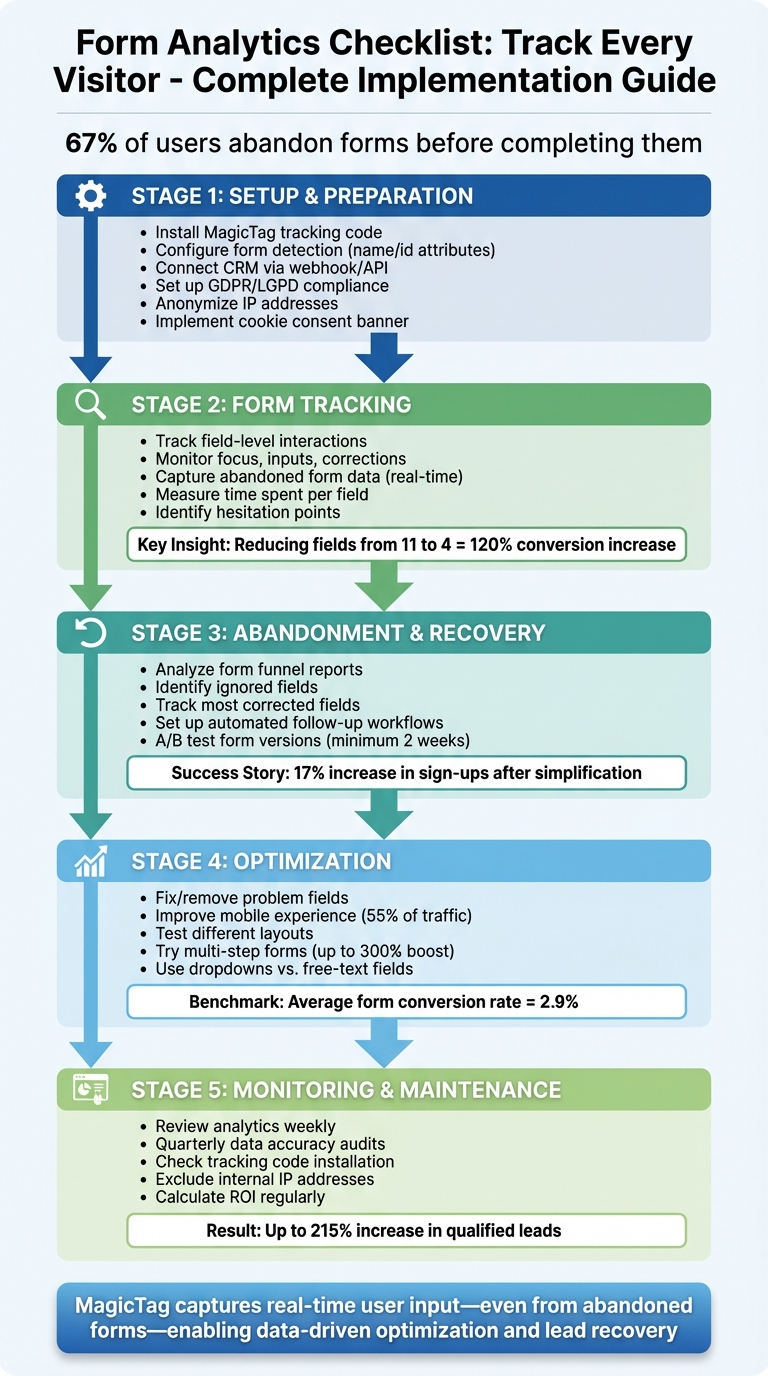
Complete Form Analytics Implementation Checklist: 5-Stage Process
Track Clicks, Buttons & Forms with Google Tag Manager – GTM Tutorial Lesson 6
Setup and Preparation Steps
To start tracking form interactions effectively, you’ll need to install and configure MagicTag. This setup ensures you’re capturing relevant data while staying within privacy regulations. The best part? You don’t need any coding skills, and the process takes just a few minutes.
Install and Test MagicTag Tracking
Begin by embedding the MagicTag JavaScript code. Once it’s installed, MagicTag will automatically detect forms with a name or id attribute, like <form name="contact_form"> or <form id="signup_form">. This means most standard forms are tracked right away without additional setup.
For better organization in your dashboard, you can assign custom names to forms using the data-magictag-name attribute. For instance, <form data-magictag-name="newsletter_signup"> makes it easier to identify specific forms in your reports.
If you’re using non-standard elements, such as multi-step forms built with <div> tags instead of the traditional <form> tag, you’ll need to add a data-magictag-form attribute to the container. For example: <div data-magictag-form data-magictag-name="checkout_flow">...</div>. To exclude specific elements from tracking - like a universal search bar - just add the data-magictag-ignore attribute to those elements.
Make sure to test all scenarios, including forms that are successfully submitted and those with errors due to missing required fields. MagicTag should only trigger tracking on successful submissions to ensure your conversion data stays accurate.
Once installed, verify that the data is being captured correctly before moving on to CRM integration.
Connect MagicTag to Your CRM
Integrating MagicTag with your CRM allows you to link anonymous user sessions with detailed customer profiles. When someone completes a form, MagicTag transfers key data - like the first-click source, pages visited, and time spent on each field - directly to your CRM.
This integration gives your sales team valuable insights before contacting leads, such as which marketing channel brought them in, the pages they interacted with, and where they hesitated during the form process. For marketing teams, this data is crucial for accurately attributing revenue to specific campaigns and channels.
MagicTag uses webhook or API integration to streamline this process. Simply define your conversion criteria (e.g., form submissions, phone calls, or live chats), and the system will automatically send the relevant lead data to your CRM.
Once your CRM is connected, the next step is to ensure your tracking setup complies with privacy regulations.
Set Up GDPR/LGPD Compliance
Maintaining privacy compliance is essential, especially since many users abandon forms due to concerns about data security. Before tracking begins, review your form fields and privacy settings to meet data protection standards.
MagicTag is built with GDPR and LGPD compliance in mind, processing only essential data. It also allows users to request or delete their data at any time. However, proper configuration is key to staying compliant.
To start, anonymize IP addresses to meet strict privacy requirements. Then, implement a cookie consent banner that clearly explains what data is being collected and provides easy opt-in or opt-out options for non-essential cookies. Adding a link to your privacy policy directly below your forms can also help build trust and reduce form abandonment.
Make it a habit to audit your setup every quarter. Check which fields are being tracked, ensure sensitive information (like credit card details) is excluded, and confirm that your consent mechanisms are functioning as intended.
Form Tracking Checklist
Once your setup is ready, the next step is to analyze how visitors interact with your forms. MagicTag provides field-level insights, showing exactly where users focus, hesitate, or abandon. This detailed tracking uncovers behavior patterns that traditional analytics might miss.
Track Activity in Each Form Field
MagicTag keeps an eye on every interaction within your form fields, tracking how users engage, navigate, and respond. It monitors field focus, inputs, corrections, and omissions.
For instance, if a specific field is often skipped or left blank, it could signal that the field is irrelevant or too cumbersome - potentially causing friction for users. On the other hand, fields with high correction rates may indicate unclear instructions or confusing input formats. Research shows that reducing the number of form fields from 11 to 4 can increase conversions by 120%. By identifying problematic fields, you can make informed decisions about which ones to simplify, adjust, or remove altogether.
You can also analyze partial entries to understand where users tend to give up.
Capture Abandoned Form Data
MagicTag records user input in real-time, even if they abandon the form midway. This helps pinpoint where users drop off.
Importantly, this data capture respects user privacy. MagicTag automatically suppresses sensitive information like credit card details and offers granular controls to exclude specific fields from tracking. You can customize which forms or fields to monitor, ensuring you only gather data essential for optimization while staying compliant with GDPR and LGPD regulations.
Measure Time Spent on Each Field
MagicTag also tracks how long users actively interact with each field, as well as how long they hesitate. These metrics can highlight fields that are overly complex, unclear, or frustrating.
For example, long hesitation times often point to unclear instructions or confusing expectations. In such cases, clearer guidance, simpler wording, or better introductory text can help. If a field requires an unusually long interaction time, consider making it optional or placing it toward the end of the form to minimize early drop-offs. Comparing these times across user segments can also reveal specific issues - for instance, if mobile users struggle with certain fields, it signals a mobile-optimization opportunity.
Form Abandonment and Lead Recovery Checklist
Once you’ve gathered insights from your form tracking data, the next step is to tackle abandonment and recover those lost leads. Here’s how you can make it happen.
Did you know that over 67% of visitors abandon online forms? That’s a huge chunk of potential leads slipping away. With MagicTag's analytics, you can pinpoint exactly where users drop off and take steps to bring them back.
Find Where Users Abandon Forms
MagicTag’s form funnel reports are like a roadmap, showing how users move through each step of your form. These reports highlight where users hesitate or quit entirely. Pay close attention to fields that are frequently skipped, take too long to complete, or are corrected multiple times - these are clear signs of friction.
MagicTag also tracks two key metrics:
- Ignored Fields: Fields left blank by users.
- Most Corrected Fields: Fields that users edit frequently.
These insights help you zero in on problem areas. Plus, session recordings and heatmaps provide extra context by showing behaviors like rage clicks or erratic scrolling, which can signal frustration.
A healthcare organization in Brazil saw a 17% increase in sign-ups after removing redundant fields, simplifying instructions, and streamlining their form.
Set Up Automated Follow-Up Workflows
Don’t let partially filled forms go to waste. By integrating MagicTag with your CRM through webhooks or APIs, you can set up automated follow-ups. For instance, if a user enters their email but doesn’t complete the form, your CRM can send a friendly reminder or offer help within minutes. These quick, personalized touchpoints can significantly improve your recovery rates.
Compare Completion Rates Between Form Versions
A/B testing is your secret weapon for optimizing forms. Try testing different layouts - reduce the number of fields, reorder them, or tweak the placement of your call-to-action button. For example, dropping from 11 fields to just 4 can boost conversions by 120%.
MagicTag makes it easy to track completion rates for each version, helping you figure out which design works best. To get reliable results, test each version for at least two weeks, ensuring you capture data across various traffic patterns and user groups.
Use these strategies to fine-tune your forms and recover those valuable leads. Every small improvement adds up!
sbb-itb-77d5bc3
Form Optimization Checklist
Use MagicTag's analytics to turn underperforming forms into high-converting assets. Drawing from insights in tracking and recovery, these strategies will help you reduce friction and increase conversions.
Fix or Remove Problem Fields
Start by tackling fields that cause users to drop off, take too long to complete, or require frequent corrections. For example, analytics once showed that an "Overview of your needs" field took an average of 1 minute and 37 seconds to complete and caused 1,732 drop-offs. The fix? Switching it to a dropdown menu for quicker selection.
MagicTag provides valuable metrics like average time spent per field, drop-off rates, and correction frequencies, helping you pinpoint problem areas. If a specific field consistently drives abandonment or takes much longer than others, simplify it. Consider breaking down complex questions into dropdowns, adding clear text prompts, or rephrasing confusing instructions. In some cases, the best solution is to remove non-essential fields altogether - especially when the average form conversion rate across industries is only 2.9%.
Improve Mobile Form Experience
With over 55% of website traffic coming from mobile devices, your forms must work flawlessly on smaller screens. MagicTag allows you to analyze mobile-specific issues, such as fields that take longer to complete or have higher abandonment rates on smartphones compared to desktops.
Make sure touch targets are easy to tap, use proper HTML field types to trigger the right keyboard (like a numeric keyboard for phone numbers), and adjust layouts to prevent on-screen keyboards from covering input fields [11, 34]. Replacing free-text fields with dropdowns, radio buttons, or checkboxes can also minimize typing and reduce mobile abandonment.
Test Different Form Layouts
A/B testing can uncover changes that drive better results. For instance, switching to multi-step forms has been shown to boost conversion rates by as much as 300%. Test different layouts, such as rearranging field orders, experimenting with button placements, or using progressive disclosure to reveal fields step-by-step.
MagicTag tracks completion rates for each variation, making it simple to see which layout works best. Keep in mind, form optimization isn’t a one-and-done task - it’s a continuous process that evolves over time.
Monitoring and Maintenance Checklist
Keeping an eye on performance is a must. Visitor behavior evolves, and regular audits help maintain strong conversion rates.
Review Form Analytics Weekly
Make it a habit to check your MagicTag dashboard every week. Look for patterns, like hesitation on certain fields, and set clear goals to address these issues. Spotting trends early can guide more effective tweaks.
Check Data Accuracy Quarterly
Every quarter, conduct a thorough audit of your form tracking. Here's what to focus on:
- Confirm MagicTag's code is properly installed on all pages using tools like Google Tag Assistant.
- Set up three data views - raw, test, and master - for better tracking management.
- Exclude your team’s IP addresses and enable bot filtering to keep data clean.
- Watch for anomalies like direct traffic exceeding 20–25% or bounce rates falling below 5% or spiking above 95%, which often signal tracking issues.
Accurate data is crucial for understanding your ROI and making informed decisions.
Calculate ROI and Adjust Your Approach
To measure ROI, compare the leads captured with the cost of your MagicTag plan. Keep an eye on conversion rates, and if you're using payment forms, track sales and refunds. Use date-range graphs to evaluate performance over time and note how changes - like simplifying fields or launching campaigns - impact results. For example, optimizing forms boosted sign-ups by 16.93% and increased qualified leads by up to 215%.
Conclusion
Building on the detailed checklist provided, every step - from initial setup to ongoing monitoring - aims to turn raw data into actionable insights. Tracking every visitor isn’t just helpful; it’s the key to replacing guesswork with informed decision-making.
With MagicTag's form analytics, you gain field-level insights into how users interact with your forms. It highlights hesitation times, refill rates, and pinpoint drop-off moments. Considering that 67% of people abandon forms before completing them, every piece of data counts. For example, when Qualicorp used these analytics to remove redundant fields and streamline their form design, they saw a 16.93% increase in sign-ups. That’s the power of using data to drive decisions.
"Form analytics provides valuable insights that can enhance your B2B, B2C, eCommerce, or SaaS marketing strategy. Just like other analytics, it helps you make data-driven decisions." - Mouseflow
Once you’ve set up tracking, identified friction points, implemented follow-up workflows, and committed to regular audits, you’ve built a solid foundation for optimizing form interactions. The real challenge lies in acting on the data - whether that means simplifying problematic fields, improving mobile usability (where over 90% of users browse), or testing different variations to see what performs best.
MagicTag also captures real-time user input - even if the form isn’t submitted - allowing you to recover lost leads and make smarter adjustments over time. The goal isn’t to achieve perfection immediately. Instead, it’s about consistent, data-backed improvements that align with actual user behavior. These insights are your launchpad for refining your lead recovery and optimization strategy.
FAQs
How does MagicTag help prevent visitors from abandoning forms?
MagicTag works to reduce form abandonment by providing real-time insights into how users engage with your forms. It tracks where visitors hit roadblocks, such as unclear fields or extra steps, and pinpoints the exact areas leading to drop-offs.
By studying user behavior, MagicTag helps you identify trouble spots and fine-tune your form’s design and structure. These focused adjustments can boost completion rates and create a smoother, more enjoyable experience for your users.
How do I connect MagicTag to my CRM?
To link MagicTag with your CRM, here's what you need to do:
- Generate a tracking code in MagicTag and embed it into your website's HTML or manage it through a tag manager.
- Configure event tracking and custom fields in MagicTag to capture the specific data you want.
- Access the API or integration settings in MagicTag to establish the connection with your CRM.
- Align the data collected by MagicTag with your CRM's contact or lead profiles to ensure everything matches up.
After completing these steps, run a test to confirm that data is transferring smoothly between MagicTag and your CRM.
How can I make sure MagicTag tracking follows privacy regulations?
To keep MagicTag tracking in line with privacy regulations, it's crucial to prioritize privacy-first practices. Make sure privacy notices are clearly visible, provide a link to your privacy policy, and verify that your tracking setup aligns with regulations like GDPR and CCPA.
Stick to data minimization principles by gathering only the data that's absolutely necessary, and always secure user consent when required. Opt for tools that have robust security certifications, like ISO 27001, to safeguard user information and ensure compliance.