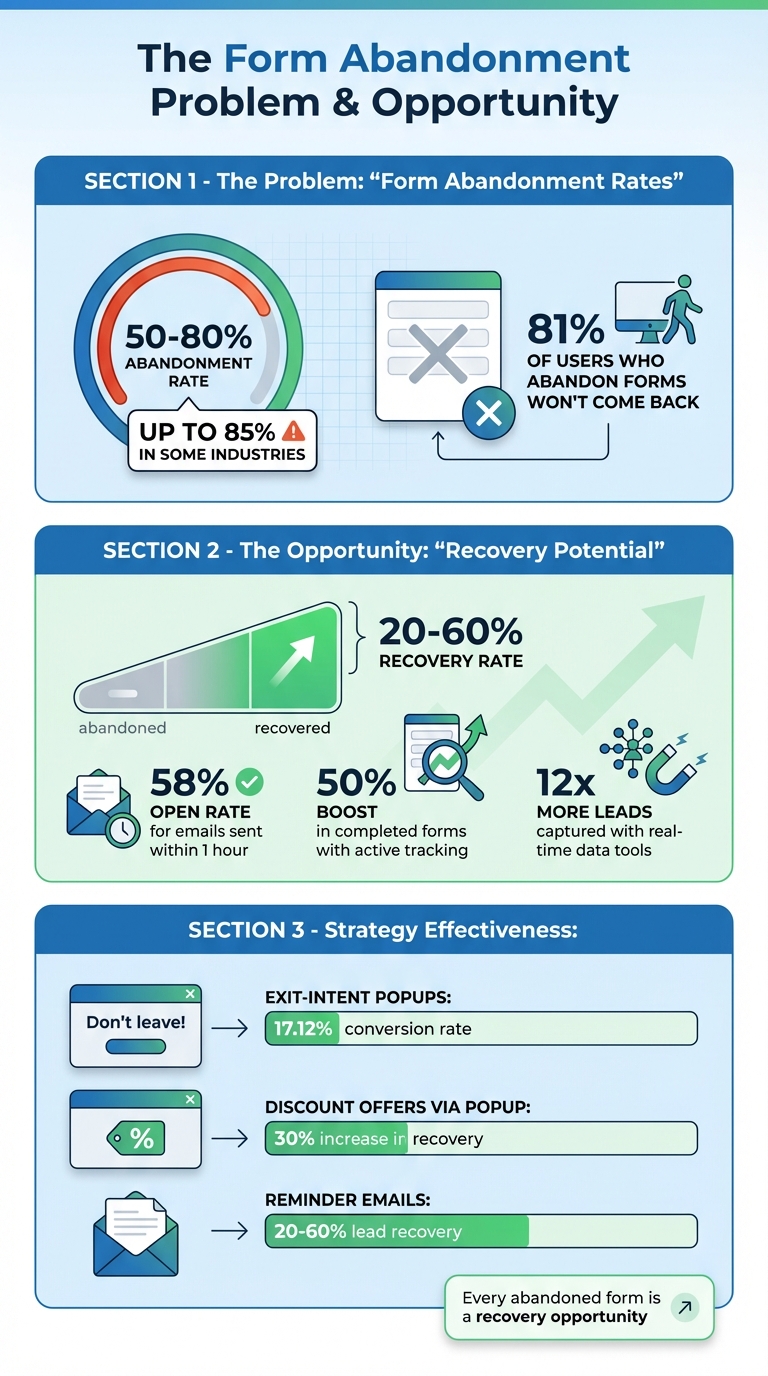
Every time someone starts filling out a form on your site but leaves without submitting, you're potentially losing a customer. Studies show that form abandonment rates range from 50% to 80%, depending on the industry. But here's the good news: you can recover 20% to 60% of those leads with the right strategies.
Here’s a quick rundown of what works:
- Find out why users leave by monitoring form interactions and identifying problem areas.
- Save partial form data in real time using tools like MagicTag, so you can follow up even if they don’t hit submit.
- Send automated emails within an hour of abandonment to re-engage leads.
- Use exit-intent popups to stop users from leaving before completing the form.
- Sync abandoned leads to your CRM for better follow-up and prioritization.
- Run retargeting ads to remind users to return and finish their form.
- Score and prioritize leads based on how far they got in the form.
Form Abandonment Statistics and Recovery Rates
Form Abandonment Tracking & Lead Recovery - Insiteful Demo
1. Find Out Why People Leave Your Forms
Before you can bring back abandoned leads, you’ve got to figure out why they’re leaving in the first place. Recent studies show that in some industries, form abandonment rates can skyrocket to as much as 85%. That’s a huge chunk of potential customers slipping through the cracks.
To tackle this, start with real-time monitoring. By tracking every click, pause, and error, you can pinpoint the exact moment users abandon your form. This data shines a light on areas where users encounter friction, helping you identify what’s going wrong.
Another valuable tool? Partial data capture. Even if users don’t submit the form, capturing the information they’ve already entered can reveal where the process breaks down. For instance, if users consistently stop at a specific question, it’s a clear sign that something about that field is causing them to leave.
Ease of Implementation for U.S. Businesses
For businesses in the U.S., setting up field-level tracking can be done in just a few hours using existing analytics tools. The trick is to focus on identifying the specific fields or questions that lead to drop-offs. For example, asking for sensitive information too early in the process often causes users to abandon forms.
Personalization and User Experience Improvements
Once you’ve identified the trouble spots, you can tailor your strategy to address them. If someone quits halfway through a loan application, their concerns will likely differ from someone who barely starts. These insights can guide you to:
- Simplify your form by cutting unnecessary fields.
- Add trust signals to reassure users.
- Adjust the layout for mobile users.
- Tweak the flow to make it smoother.
Keep in mind, 81% of users who abandon forms won’t come back to finish them. That’s why understanding these pain points is crucial. It’s your starting point for creating targeted strategies to win those users back.
2. Capture Partial Form Data in Real Time with MagicTag
Did you know that over 80% of users abandon forms after starting them? That’s a huge loss of potential leads. But with MagicTag, you can change that. This tool captures user input - like names, emails, and phone numbers - in real time, even if someone leaves before hitting submit. By saving this data instantly, MagicTag gives you a chance to follow up and re-engage those users.
How It Helps Recover Lost Leads
Tracking form activity can make a big difference. Businesses that monitor their form submissions report up to a 50% boost in completed forms compared to those that don’t actively track abandonment. MagicTag takes it a step further, helping websites capture up to 12x more leads than those without this functionality.
What can you do with this partial data? A lot. You can send follow-up emails tailored to the user or run retargeting ads to remind them about their incomplete form. And when they return, they won’t have to start over - they can pick up right where they left off, making the process smoother and more user-friendly.
Simple Setup for U.S. Businesses
Setting up MagicTag is quick and easy. It works with any website, requiring only a lightweight installation process. You don’t have to rebuild your forms - just integrate MagicTag with your existing setup.
The tool uses a small tracking code to capture data as users type. From there, a real-time dashboard shows you user progress and where they drop off. For businesses in the U.S., MagicTag is designed to comply with GDPR and LGPD standards, so you can rest assured that data is being collected responsibly.
Best of all, it fits seamlessly into your existing workflow.
Works with Popular CRM and Marketing Tools
MagicTag doesn’t just capture data - it makes it actionable. It integrates with leading CRM and marketing platforms like Salesforce, HubSpot, and email marketing tools via webhook and API connections. This means partial form data flows directly into your systems, enabling automated follow-ups.
Sales teams can view abandoned leads alongside completed submissions, while marketing teams can segment users based on how far they got in the form and which details they provided. With this kind of insight, you can turn what might have been lost opportunities into valuable leads.
3. Send Automated Emails to Follow Up on Incomplete Forms
Effectiveness in Recovering Leads
Automated follow-up emails are a reliable way to recapture interest from users who leave forms incomplete. In fact, reminder emails can recover anywhere between 20% and 60% of abandoned leads, making them a key tactic in improving conversions.
Timing is everything. Abandonment emails sent within an hour of the user leaving the form see an impressive 58% open rate. To maximize engagement, aim to send the first follow-up email within that initial hour - or at least within 24 hours - while the interaction is still fresh in the user's mind.
Personalization and User Experience Improvements
A generic email won't grab attention. Instead, use the partial information you've already collected - like their name - to craft a message that feels tailored. For example, a subject line such as "Still interested in our free demo, John?" is far more engaging than a standard reminder.
Make the process seamless by including a direct link that takes users back to where they left off, so they don’t need to start from scratch. Address potential concerns that might have caused them to abandon the form, and offer help if they ran into any issues. To sweeten the deal, consider adding a time-sensitive incentive, like a discount or bonus, to encourage them to complete the form.
These personalized touches can easily be extended into automated email sequences when paired with your CRM system.
Integration with Common CRM and Marketing Tools
Integrating your follow-up strategy with CRM and marketing tools takes automation to the next level. Platforms like HubSpot, ActiveCampaign, and Klaviyo can automatically send abandoned-form reminders. When partial form data flows into CRM systems like Salesforce or HubSpot, your sales and marketing teams can manage these incomplete submissions alongside fully completed ones.
This integration allows for multi-step email sequences to be automated. For instance, you could send the first email within an hour, follow up the next day with a new message angle, and send a third email a week later to gather feedback. Use A/B testing to fine-tune your messaging and identify the most effective offers. By automating this process, you can turn abandoned forms into completed leads while freeing up time to focus on other priorities in your business.
4. Use Exit Intent Popups to Stop Visitors from Leaving
Effectiveness in Recovering Leads
Exit-intent popups work by engaging users just as they're about to leave your site, boasting an impressive 17.12% conversion rate. When thoughtfully crafted, these popups act as a timely reminder, encouraging visitors to finish what they started - like completing a form or making a purchase.
Take this example: offering a 15% discount through an exit popup can increase recovery rates by as much as 30%. A simple call-to-action like, "Don't leave yet - grab your free guide by completing just a few more fields," can be the nudge someone needs to stay and complete their submission. These popups are triggered by user behavior, such as moving the cursor toward the close button or address bar, giving you one last chance to re-engage.
Personalization and User Experience Improvements
Generic popups often get overlooked, but personalized ones? They catch attention. By using data you’ve already collected - like the visitor's name or the specific resource they were viewing - you can make your message feel more relevant. For example, a popup saying, "Still interested in our free demo, John?" is far more engaging than a generic message.
"Deploy intelligent popups triggered when a user moves to exit the page, offering assistance or a compelling reason to stay." - Margub Alam
Instead of creating an obstacle, aim to provide value. Your popup could offer live chat support for immediate assistance or highlight a compelling incentive, like a time-sensitive discount or exclusive content. Experimenting with A/B testing is key to finding the approach that resonates most with your audience. Once optimized, these personalized popups can seamlessly connect with automated workflows for even better results.
Integration with Marketing and CRM Systems
Exit-intent popups become even more impactful when they’re part of a larger marketing strategy. For instance, when someone interacts with a popup, the data can be automatically fed into your CRM, enabling quick follow-ups. Syncing these popups with your email and SMS marketing platforms allows for targeted follow-ups and effective retargeting campaigns. This integration ensures every interaction is nurtured, ultimately leading to higher conversion rates.
sbb-itb-77d5bc3
5. Connect Abandoned Leads to Your CRM and Sales Process
Effectiveness in Recovering Leads
Adding abandoned form data to your CRM ensures potential leads don’t disappear without a trace. CRMs are essential tools for keeping track of and nurturing leads throughout the sales process. By logging every interaction, you can develop targeted strategies to re-engage prospects and guide them back into the pipeline.
A particularly helpful feature is lead scoring, which allows you to rank prospects based on their engagement and potential value. Instead of treating all abandoned leads equally, you can focus on the ones that show higher interest - like those who filled out key parts of a form or spent more time on important pages. This approach helps you prioritize your efforts and turn seemingly lost leads into genuine opportunities.
Integration with Common CRM and Marketing Tools
The next step is to integrate the recovered data into your existing systems. Tools like MagicTag capture partial form data as it’s entered and connect it directly to your CRM using webhooks and APIs - no coding required. This real-time transfer means you can act on abandoned leads immediately without waiting for a manual update.
For businesses in the U.S., it’s crucial to comply with regulations like the CCPA when collecting partial form data. To stay compliant, consider structuring your forms to collect essential contact details, such as an email address or phone number, early in the process. This ensures you can reach out to leads while respecting privacy laws.
Personalization and User Experience Improvements
Once abandoned leads are in your CRM, automation takes over to handle follow-ups. CRM tools make it easy to create workflows that send personalized reminders based on user behavior. For example, automated messages can reference the information a lead already provided, encouraging them to pick up where they left off. This personalized approach not only improves the user experience but also frees up your sales team to focus on conversations that require a human touch. By streamlining communication, you can turn abandoned forms into completed conversions.
6. Run Retargeting Ads for People Who Abandoned Forms
Retargeting ads are a smart way to complement automated emails and CRM follow-ups, giving your lead recovery strategy an extra boost.
How Retargeting Ads Help Recover Leads
When someone abandons a form on your site, retargeting ads can help bring them back. Using tracking pixels or cookies, these ads display personalized messages on platforms like Google, Meta, and LinkedIn. The big win here? Your brand stays on their radar even after they leave your site, gently nudging them to complete their submission.
By combining retargeting ads with email follow-ups and direct outreach, you create multiple chances to reconnect with potential leads. These ads can reference their incomplete action, making the messaging feel more relevant and increasing the odds of pulling them back into your funnel.
Getting Started with Retargeting in the U.S.
If you're running retargeting campaigns in the U.S., you’ll need to pay close attention to privacy regulations like the CCPA. Be upfront about your data collection practices and secure clear consent for tracking. Once that’s in place, you can create custom audiences targeting users who abandoned forms, ensuring your ads reach the right people.
To make your campaigns more effective, experiment with A/B testing for your messaging, visuals, and offers. Use tools like UTMs and behavioral tracking to fine-tune your strategy over time. Some companies find success with simple reminder ads that reference the incomplete form, while others see better results by offering incentives like discounts or exclusive content via social media.
Syncing Retargeting with CRM and Marketing Tools
For a seamless experience, connect your retargeting efforts with CRM and marketing automation tools like HubSpot, Salesforce, or ActiveCampaign. This allows you to automatically sync abandoned leads and create workflows that combine personalized email sequences with targeted ads. By delivering consistent messaging across channels, you can make every touchpoint count in your recovery funnel.
"Marketers who embrace this technology and integrate it with their CRM and automation stack will find themselves not only recovering lost leads but also creating more frictionless and intuitive user journeys that drive long-term growth." - Margub Alam
7. Score and Prioritize Your Abandoned Form Leads
When someone gets close to completing a form but doesn't finish, it often signals a stronger buying intent compared to someone who only fills in their email address. By scoring these leads, you can zero in on those most likely to convert, saving time and improving your return on investment. Examining which fields a visitor completes - and where they stop - can help you figure out whether you're dealing with a serious prospect or just a casual visitor.
Understanding Lead Behavior to Recover Abandoned Leads
Digging into partial form data can reveal both the quality of a lead and their intent. For instance, if someone abandons the form at the payment stage, it’s a good indicator that they’re closer to making a purchase than someone who drops off after entering just their name or email address. This kind of insight allows you to segment your leads more effectively.
Once segmented, you can tailor your follow-up strategies. High-intent leads - like those who nearly completed the form - might warrant immediate action, such as a personal phone call from a sales rep. On the other hand, leads showing lower engagement could be nurtured over time with a series of targeted emails.
Bringing CRM and Marketing Tools into the Mix
To make this process seamless, integrate your partial form data with your CRM system. This allows you to automate lead scoring, helping your sales team quickly identify which prospects need immediate attention. Pairing your CRM with marketing automation tools can take it a step further - triggering personalized follow-ups based on the specific data a lead submitted and where they dropped off. This ensures your outreach feels relevant and makes it easier to prioritize leads who are most likely to convert.
Conclusion
Form abandonment is a major revenue drain for businesses, with 50% to 81% of visitors leaving forms unfinished. But with the right strategies, you can turn these missed opportunities into recovered leads and conversions.
Start by identifying why visitors abandon your forms. Once you understand the "why", capture user data in real time to re-engage potential leads. Tools like automated email follow-ups, exit-intent popups, and retargeting ads can help you stay connected with prospects who showed interest but didn’t complete the form. Together, these tactics create a system that keeps your audience engaged and encourages them to take the next step.
Take it a step further by integrating abandoned lead data into your CRM. Automate follow-ups based on user behavior and focus on high-intent leads to make your sales process more efficient. This way, you’ll spend less time chasing uninterested prospects and more time connecting with those who are ready to engage. By recovering abandoned leads, you’re not just saving potential revenue - you’re also maximizing the value of the traffic you’ve already paid to bring to your site.
Think of form abandonment as a chance to learn and improve. Analyze what’s working, pinpoint areas for improvement, and refine the experience for future visitors. Start applying these strategies now, track your results, and keep optimizing. Even small gains in your lead recovery rate can add up to big revenue boosts over time.
FAQs
What are the main reasons users abandon forms on my website, and how can I identify them?
Understanding why users abandon forms on your site starts with diving into their behavior. Tools for form tracking can reveal critical insights, such as where users stop filling out the form, which fields seem to slow them down, and even the devices or browsers they’re using. Metrics like abandonment rates, time spent on specific fields, and completion trends can shine a light on potential issues - think overly lengthy forms, unclear questions, or worries about privacy and security.
To go a step further, gather direct feedback. Use surveys or exit-intent popups to ask users about their frustrations. When you combine these behavioral insights with real user feedback, you’ll be in a stronger position to tackle problem areas and fine-tune your forms to drive more conversions.
How can I effectively follow up with users who abandon forms?
To reconnect with users who abandon forms, send personalized, automated emails within 24 hours. Make sure to include a direct link so they can effortlessly resume where they left off. For situations that require quicker action, SMS reminders can serve as a fast and engaging way to grab their attention.
These approaches make it easier for potential customers to re-engage, ensuring the process remains simple and hassle-free.
How does MagicTag work with my current CRM and marketing tools?
MagicTag integrates effortlessly with your current CRM and marketing tools using automated workflows and API integrations. This setup keeps your data in sync, enabling you to craft personalized follow-ups and launch targeted campaigns across email, SMS, and social media platforms.
By using MagicTag, you can simplify lead recovery, boost engagement, and increase conversions - all without making changes to your existing systems.