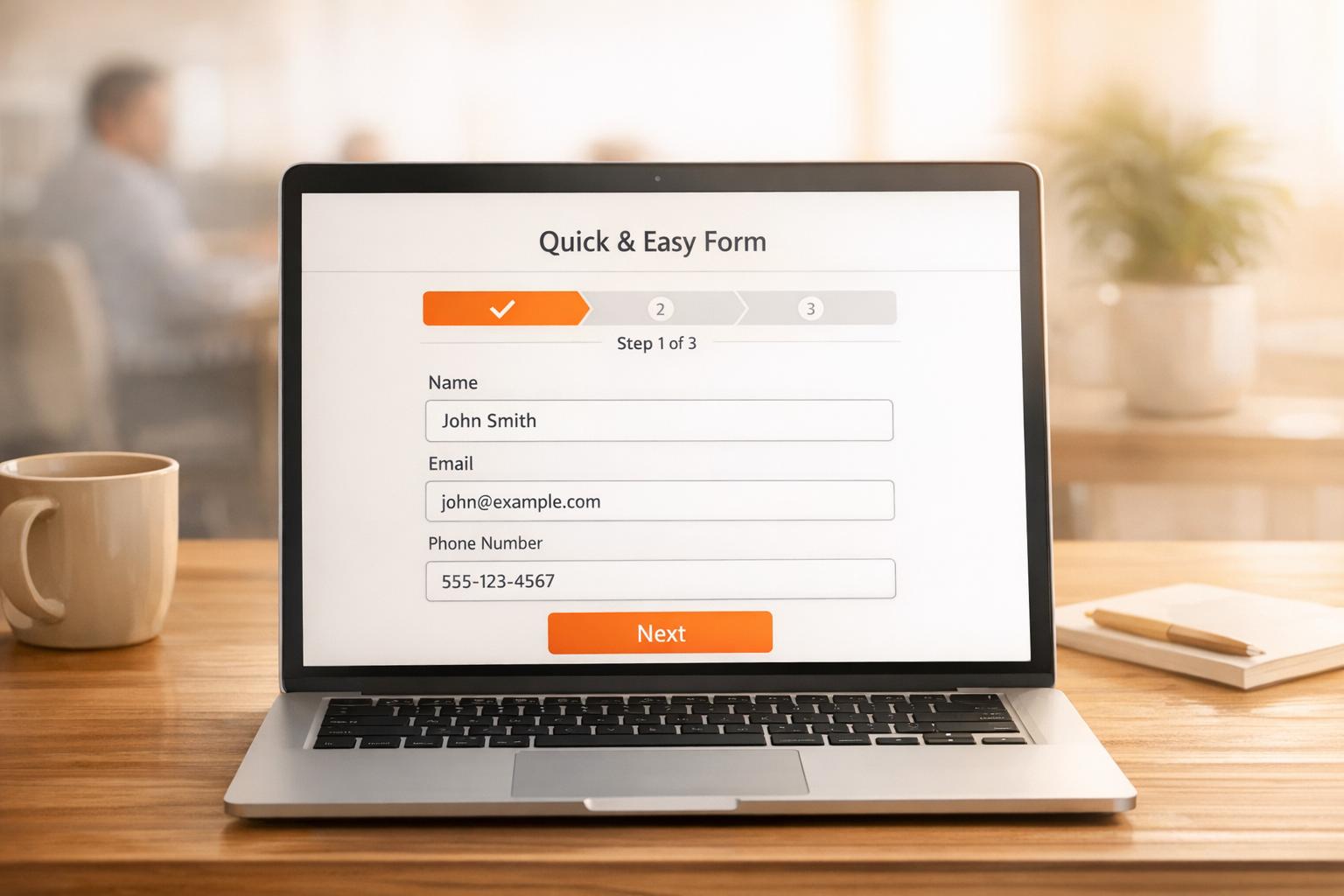
75% to 98% of website visitors leave without completing forms. This means the majority of potential leads vanish, leaving businesses with missed opportunities and lost revenue. Why? Forms create friction - too many fields, security concerns, and mobile-unfriendly designs push users away.
The solution? Real-time lead recovery, a method that collects user data as they type, without requiring a "Submit" button. Tools like MagicTag make this possible by tracking partial entries and abandoned forms. This approach can recover up to 12x more leads, enabling businesses to follow up within minutes, when interest is highest.
Key Takeaways:
- Form abandonment rates: 75%-80% on average.
- Reasons for drop-off: Long forms, security concerns, mobile issues.
- Real-time recovery benefits: Captures partial data, reduces missed leads, and integrates with CRMs like HubSpot and Salesforce.
- MagicTag results: Identifies anonymous visitors, recovers lost leads, and boosts conversions by 10%-15%.
MagicTag is simple to implement, GDPR-compliant, and works seamlessly with existing systems. By addressing form friction and acting fast on recovered data, businesses can turn lost opportunities into revenue.
How to Capture & Retarget Website Visitors Without Forms – Step-by-Step Guide
Why Forms Fail and Formless Methods Work
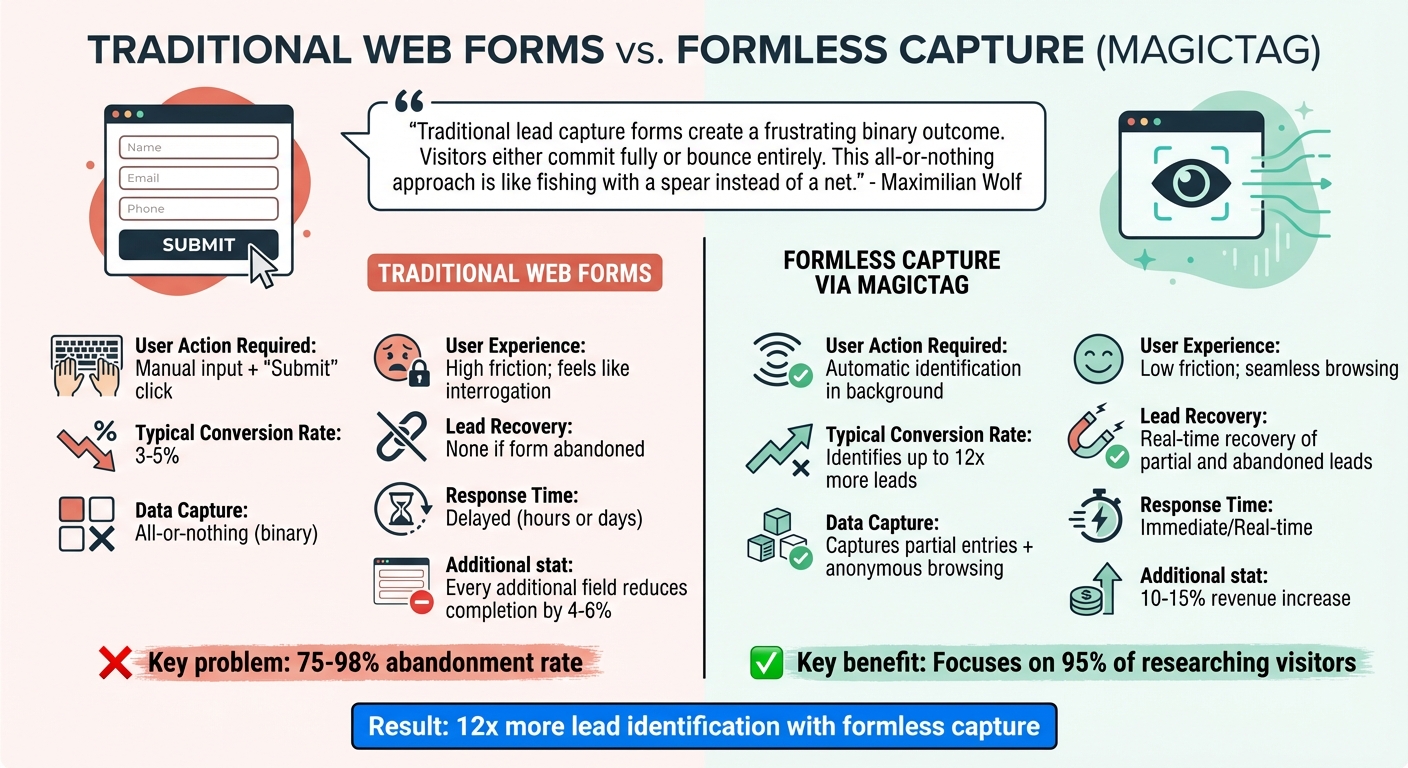
Traditional Web Forms vs Formless Lead Capture Comparison
Forms vs. Formless Capture: A Comparison
Traditional web forms often fall short because they demand full submission, leaving countless potential leads untapped. Maximilian Wolf from Lead Booster Pro explains it well:
"Traditional lead capture forms create a frustrating binary outcome. Visitors either commit fully or bounce entirely. This all-or-nothing approach is like fishing with a spear instead of a net."
The issue worsens as forms grow longer. Every additional field reduces completion rates by 4% to 6%. For instance, a form with three fields might convert at 25%, but adding just two more fields can slash that rate to 15%. Even worse, your sales team is left in the dark about who abandoned the form or why they left.
Formless capture technology turns this model on its head. Instead of relying on users to click "Submit", it tracks behavior and collects partial input automatically. This approach focuses on the 95% of visitors who are researching but not ready to buy, rather than just the 5% who are ready to commit.
| Feature | Standard Web Forms | Formless Capture via MagicTag |
|---|---|---|
| User Action Required | Manual input + "Submit" click | Automatic identification in background |
| Typical Conversion Rate | 3-5% | Identifies up to 12x more leads |
| Data Capture | All-or-nothing (binary) | Captures partial entries + anonymous browsing |
| User Experience | High friction; feels like interrogation | Low friction; seamless browsing |
| Lead Recovery | None if form abandoned | Real-time recovery of partial and abandoned leads |
| Response Time | Delayed (hours or days) | Immediate/Real-time |
This comparison highlights why real-time recovery methods are game-changing. MagicTag, for example, leverages formless capture to recover leads that traditional forms simply miss.
How MagicTag Identifies 12x More Leads
MagicTag addresses the limitations of standard forms by capturing lead data as visitors type, even before they hit "Submit" or exit the page. This real-time tracking ensures you're not just relying on the small percentage of users who complete forms. Instead, you’re collecting data from anyone who starts to engage.
The system records keystrokes and interactions in real time, identifying details like email addresses - even if visitors get distracted or abandon the form entirely. Considering that 75% to 98% of visitors who reach a form never complete it, this feature alone recovers leads that would otherwise vanish.
MagicTag integrates effortlessly with your CRM through webhooks and APIs, automatically funneling these recovered leads into your sales pipeline. And it does all this while adhering to GDPR and LGPD regulations, ensuring compliance every step of the way.
Setting Up MagicTag for Real-Time Lead Recovery
Installation Steps
Getting MagicTag up and running is quick and straightforward - no developer needed. All it takes is adding a single JavaScript snippet to your website and registering your domain through the dashboard.
First, log in to your MagicTag account, grab the JavaScript snippet, and paste it into your website. You can place it in the <header> tag or just before the closing </body> tag. If you’re using a CMS, you can insert the code via built-in settings or a tag manager.
Once the script is active, head to the MagicTag dashboard. Add your website domain (leave out the http:// or https:// part) to authorize data collection. From that moment on, MagicTag begins tracking visitor interactions, capturing email addresses and other key details in real time.
To ensure accuracy, focus on collecting email addresses. You can also gather phone numbers to improve match rates for your lead recovery efforts. For a hands-off approach, enable "automatic event detection" in the tracking settings. This feature captures form interactions automatically, so you don’t have to map fields manually.
After installation, use the MagicTag dashboard to monitor how it’s performing and to confirm everything is compliant.
Dashboard Monitoring and Compliance
The MagicTag dashboard serves as your central hub for lead recovery. It gives you a clear view of all captured leads, showing who they are, how they found you, and the pages they visited. You can sort leads by their status - "In Progress", "Submitted", or "Abandoned" - to pinpoint where visitors are dropping off in your funnel.
The dashboard refreshes every 1–2 hours, offering a near-real-time snapshot of your lead recovery progress. You can also create custom reports to compare "Anonymous Profiles" (visitors without identifiable details) to "Known Profiles" (those with email addresses). Want to see how your campaigns are doing? Track "Campaign Impressions" to confirm your recovery forms are showing up and "Campaign Conversions" to see how many visitors are sharing their information.
MagicTag takes care of compliance for you. All data is encrypted with end-to-end SSL protection, and emails and phone numbers are hashed using SHA256 to meet GDPR and LGPD standards. You have full control over your data - delete or export specific leads whenever needed. Plus, the dashboard lets you toggle specific data attributes on or off in real time, giving you precise control over what’s collected and used for targeting.
Since MagicTag captures data even before a form is submitted, it’s important to let visitors know their progress is being saved. Many businesses add a small note near their forms or include this information in their privacy policy. Being upfront about your practices helps build trust while ensuring you stay compliant with data privacy laws.
Connecting MagicTag with Your CRM
CRM Integration via API or Webhooks
MagicTag integrates seamlessly with CRMs like HubSpot, ActiveCampaign, Mailchimp, and Salesforce through webhooks or APIs. Webhooks work as a push system - when MagicTag collects a lead, it instantly sends that data to your CRM. This real-time data transfer is crucial for speed-to-lead efficiency. In fact, responding to leads within five minutes can increase qualification rates by over 20 times.
For more customized connections, you can use a REST API secured with OAuth 2.0 or developer API keys. This allows you to map specific data points - like lead IDs, email addresses, and source tags - directly to your CRM endpoints. If coding isn’t your thing, no-code platforms like Zapier and LeadsBridge provide easy ways to connect MagicTag to more than 7,000 apps. LeadsBridge even offers a "Free Forever" plan for basic syncing needs.
When setting up your integration, take the time to carefully map fields so essential details (like email, phone number, and lead source) transfer accurately. For faster updates, Zapier’s paid plans can refresh data as quickly as every minute, ensuring your CRM stays current.
| Integration Method | Speed | Technical Effort | Best For |
|---|---|---|---|
| Webhooks | Real-time (Push) | Medium (requires endpoint setup) | Instant lead alerts and follow-up |
| REST API | Real-time/Batch | High (requires coding) | Advanced workflows and detailed data sync |
| Zapier/LeadsBridge | Near Real-time | Low (No-code) | Quick connections to 7,000+ apps |
Automated Engagement Workflow Examples
Once your CRM is receiving real-time data, you can set up automated workflows to engage leads immediately. For example, sending a welcome email right after capturing a lead can increase revenue by 320%. A multi-step workflow might include enrolling the lead in a nurture sequence, sending an SMS confirmation, and notifying your sales team via Slack or Microsoft Teams - all at the same time.
Take Veo, a sports technology company, as an example. From 2022 to 2024, they used Zapier to automate their lead management. By routing thousands of monthly leads from social media ads to ActiveCampaign and Pipedrive, they reduced their cost-per-lead by 20%, achieved a 7.5% lead conversion rate, and doubled their company size in just 1.5 years.
"Since we started using Zapier, so many of our processes have become more efficient and have allowed us to have more time executing and less time compiling data and insights."
– Corey Egan, Director of CRM, Orchard
You can also enhance your strategy by implementing lead scoring, which prioritizes high-engagement leads and routes them to the right sales reps automatically. Using a CRM to manage and automate lead data has been shown to boost conversion rates by 300%. Additionally, leveraging CRM-driven personalized product recommendations can increase average order value by up to 369% and conversion rates by 288%.
sbb-itb-77d5bc3
Maximizing Lead Recovery with MagicTag Features
Cart Abandonment Recovery Setup
Cart abandonment is a massive challenge, with up to 81% of potential leads slipping away before completing their purchase. MagicTag's Continuous Capture feature tackles this issue head-on by saving critical customer information - like name, email, and phone number - as it’s entered. Even if users don’t click "submit", their details are stored, creating a recovery list in real time.
Here’s a real-world example: In May 2025, a real estate firm partnered with FredoCloud to automate follow-ups using HubSpot CRM, n8n, and OpenAI's GPT API. By sending personalized email and WhatsApp messages, they managed to re-engage 60% of lost leads, increase conversions by 40% in just 30 days, and reduce manual workload by over 50%.
"Companies that respond to leads within the first five minutes are nine times more likely to convert than those who wait even an hour." – Swajan, Automation Expert
Speed is everything. To make the most of MagicTag, enable Continuous Capture in your dashboard and connect it to your CRM. This allows you to send follow-up emails or SMS messages within five minutes of abandonment. Use analytics to spot high drop-off points, then tweak field order or remove unnecessary steps to improve the user experience. With your recovered leads organized, you can fine-tune your engagement strategy by segmenting and remarketing to different groups.
Filtering and Remarketing Options
Once you’ve set up real-time lead capture, MagicTag’s filtering tools kick in to help you make sense of the data. Leads can be segmented based on where they abandoned the process and what actions they took. For instance, someone who left at the pricing field might respond well to a discount, while a user who entered their email but didn’t proceed to payment might need a nudge with a trust-building message.
To take it a step further, use behavioral lead scoring to prioritize your efforts. Assign values to actions like downloading a resource, revisiting your pricing page, or spending time on key product pages. This helps you separate high-intent leads from those who might need more nurturing. Why does this matter? Nurtured leads tend to make purchases that are 47% higher in value than those who aren’t nurtured.
MagicTag integrates seamlessly with your CRM, automatically routing high-scoring leads to your sales team while keeping lower-intent ones in email workflows. You can also set up conversion pixels to exclude users from retargeting campaigns after they’ve made a purchase, saving on ad spend. To keep things manageable, limit your segmentation to four key groups - this prevents your team from getting overwhelmed.
Tracking Results and Scaling with MagicTag
Tracking Conversions with Analytics
MagicTag’s dashboard gives you a live snapshot of your leads, categorizing them into "In Progress", "Submitted", or "Abandoned". This level of detail is critical, especially when you consider that 81% of people abandon at least one online form, and 67% won’t return if they face issues. With this data, you can pinpoint where users drop off and make adjustments to improve their experience.
The tool also provides field-level insights. For example, it can identify which parts of your form - like phone number fields - cause the most abandonments. It even tracks typing patterns and hesitation to uncover sources of friction. You can export this recovery data as a CSV file to measure how many opportunities you’ve regained and how much revenue you’ve recovered.
Recovering abandoned forms can increase revenue by 10%-15%. To calculate your ROI, compare your average response time (total response minutes divided by total inquiries) to the ideal benchmark of under five minutes. Companies that respond within five minutes are 100 times more likely to convert leads compared to those that wait 30 minutes or more.
These tools not only help you recover leads but also provide the insights you need to choose the best pricing plan for your business’s growth.
Selecting the Right Pricing Plan
MagicTag offers four pricing options tailored to your monthly lead volume.
- The Free plan supports up to 1,000 identified users per month and includes basic webhook support and email assistance.
- If your lead volume ranges between 1,000 and 10,000 users monthly, the Starter plan costs $19/month and provides full API access, CRM integrations, and priority support.
- For businesses managing 10,000 to 50,000 users, the Business plan is available at $99/month, offering advanced filtering, segmentation tools, and SLA support.
- High-traffic sites handling over 50,000 users can opt for the Enterprise plan at $299/month, which includes dedicated infrastructure, custom integrations, and premium support.
Automating lead management through MagicTag can cut manual errors by 25% and boost revenue by 29%. By choosing the plan that matches your lead volume and goals, you’ll ensure that real-time lead recovery continues to drive your conversions forward.
Conclusion
Traditional forms present a tough challenge: users either complete all the fields and hit submit, or they abandon the form entirely. With abandonment rates hovering between 75% and 80%, this outdated model leads to substantial revenue loss that businesses can't afford to overlook. It's clear that a smarter, more flexible approach to lead recovery is essential.
That's where MagicTag steps in. This tool captures lead data instantly as users type, identifies anonymous visitors, and enables follow-ups within that crucial five-minute window. By reclaiming abandoned leads and transforming previously invisible traffic into actionable opportunities, MagicTag fills the gaps that traditional forms leave behind.
The numbers don't lie. Recovering abandoned forms can boost revenue by 10%–15%, and real-time lead recovery delivers an average 12% increase in closed deals. Plus, integrating real-time recovery with your CRM streamlines follow-ups, making them faster and more efficient. Considering how much more expensive it is to acquire new customers compared to re-engaging warm leads, the return on investment is undeniable.
MagicTag offers scalable solutions to fit businesses of all sizes. Whether you're starting with the free plan for up to 1,000 users or upgrading to an Enterprise option for managing high traffic, MagicTag integrates seamlessly with your existing CRM. It automates follow-ups, eliminates manual errors, and works on any website without requiring a developer. Plus, it adheres to GDPR standards while identifying up to 12x more leads than websites without it.
FAQs
How does MagicTag comply with GDPR while capturing real-time data?
MagicTag takes GDPR compliance seriously by embracing privacy-by-design principles. This approach ensures users have control over their data, with clear consent options and the ability to manage their preferences. Transparency is key, and MagicTag provides clarity on how data is collected and used.
The platform also includes tools that uphold data subject rights, such as options for users to request access to or delete their personal data. These measures allow businesses to capture leads in real time while maintaining compliance with GDPR standards. For a deeper dive into these features, check out MagicTag's privacy documentation or contact their support team.
How do I connect MagicTag to Salesforce for seamless lead management?
Integrating MagicTag with Salesforce is straightforward and doesn't require any coding skills. To get started, log into your MagicTag account and navigate to the Integrations Hub. From there, choose Salesforce as your destination app and authenticate the connection by signing into your Salesforce account and granting the necessary permissions.
After the connection is established, use MagicTag's visual mapping tool to match its fields - such as name, email, or company - with the corresponding lead fields in Salesforce. Once you've completed the mapping, activate real-time data syncing to ensure that any leads captured by MagicTag are automatically sent to Salesforce. To confirm everything is set up correctly, submit a test lead and check that it appears accurately in Salesforce. If all looks good, turn on the integration and keep an eye on its performance to maintain smooth lead management.
How can businesses evaluate MagicTag’s effectiveness in recovering lost leads?
To understand how MagicTag is performing, focus on tracking a few key metrics. Start by keeping an eye on the number of recovered leads compared to your total leads. If you notice a growing recovery rate, it’s a clear sign that MagicTag is helping you capture opportunities that might have otherwise slipped through the cracks. Next, evaluate the conversion rate of recovered leads - how many of them actually turn into paying customers. Another useful metric is the average time it takes from re-engagement to conversion. If this time is shrinking, it suggests MagicTag’s real-time alerts and automation are making your sales process more efficient.
For a more comprehensive picture, look at the revenue generated from recovered leads and compare it to the cost of your MagicTag subscription. This will give you a clear sense of your ROI. You can also dig into engagement metrics, like email open rates and click-through rates, to see how well MagicTag-triggered follow-ups are connecting with your audience. By regularly reviewing these numbers, you’ll be able to measure MagicTag’s impact and ensure it’s delivering real results for your business.