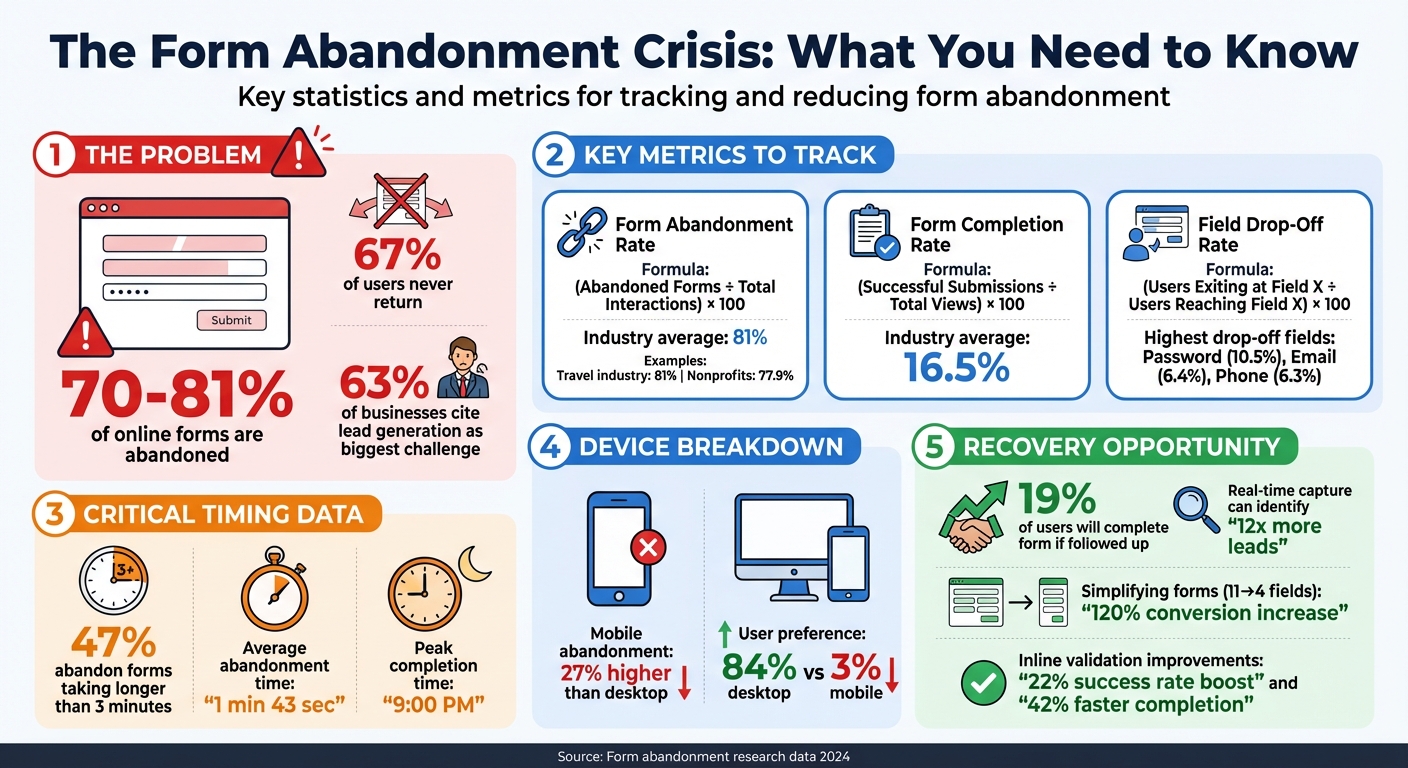
Form abandonment is a common issue: 70–81% of online forms are left incomplete, and 67% of those users never return. This leads to lost leads, wasted marketing spend, and missed revenue opportunities. However, by tracking user behavior and making smart adjustments, you can recover lost leads and boost form completion rates.
Here’s what you need to know:
- Key Metrics: Track form abandonment rate, completion rate, and field-level drop-off to pinpoint problem areas.
- Real-Time Data Tools: Tools like MagicTag save user input as they type, letting you recover incomplete submissions.
- Optimization Tips:
- Simplify forms by removing unnecessary fields.
- Use single-column layouts for faster completion.
- Add inline error validation and progress bars.
- Optimize for mobile users, who often face higher abandonment rates.
- Follow-Up Strategies: Use CRM integrations to re-engage users with automated emails or SMS campaigns.
Form Abandonment Statistics and Key Metrics Guide
How to Measure and Decrease Form Abandonment
Key Metrics for Tracking Abandoned Forms
Tracking the right metrics can help you understand why users abandon forms and where the process breaks down. For small businesses in the U.S., this is especially important - 63% of businesses identify lead generation as their biggest hurdle. Fixing form-related issues is often a more cost-effective solution than increasing ad spend. Let’s dive into the metrics that can shed light on user behavior.
Form Abandonment Rate and Completion Rate
The Form Abandonment Rate tells you how many users start filling out your form but leave before finishing. On the other hand, the Form Completion Rate measures what percentage of all visitors who view your form actually complete it. Here's how to calculate each:
- Abandonment Rate = (Abandoned Forms ÷ Total Interactions) × 100
- Completion Rate = (Successful Submissions ÷ Total Views) × 100
For example, if 200 people start your form but only 50 complete it, the abandonment rate is a staggering 75%.
On average, abandonment rates hover around 81%, with completion rates sitting at just 16.5% based on data from 1.5 million visitors. Industries like travel face abandonment rates as high as 81%, while nonprofits see slightly lower rates at 77.9%. These numbers highlight a common trend: users often begin forms but fail to finish them.
Field-Level Drop-Off and Interaction Metrics
While overall abandonment rates provide a big-picture view, they don’t pinpoint the exact problem. That’s where Field-Level Drop-Off Rate comes in. This metric shows the percentage of users who leave at a specific field. To calculate it:
- Field Drop-Off Rate = (Users Exiting at Field X ÷ Users Reaching Field X) × 100
For instance, if 100 users reach the phone number field but 40 leave without completing it, that’s a 40% drop-off - a clear sign that the field might be causing frustration.
Other interaction metrics help identify where users struggle:
- Field Return Rate: Tracks how often users go back to correct a field, often signaling unclear instructions or overly strict validation.
- Time Spent in Fields: Measures how long users hesitate on specific fields. If certain fields take significantly longer, users might be confused or searching for information.
- Rage Clicks: Repeated clicking on a field or button can indicate technical glitches.
Fields like passwords and email addresses tend to have higher drop-off rates, likely due to complexity or validation errors.
Reporting Views and Formats
To make the most of your data, segment it by device type, traffic source, and time period. For instance, mobile forms often underperform, with abandonment rates 27% higher than desktop. While 84% of users prefer desktop forms, only 3% favor mobile forms. If mobile abandonment is a recurring issue, it might be time to simplify your forms for smaller screens.
Breaking down data by traffic source is equally important. If your Google Ads traffic has a 90% abandonment rate compared to 70% for organic search, it could mean your ad messaging isn’t aligned with user expectations.
Regular reporting, such as weekly trend analysis, helps you catch problems early - especially after site updates or design changes. Timing also plays a role. Many users complete forms around 9:00 PM, when they’re more likely to be at home and have the time to focus. For small businesses, it’s critical to note that 47% of users abandon forms that take longer than 3 minutes to complete, with the average abandonment happening at just 1 minute and 43 seconds.
By understanding these metrics, you can fine-tune your forms and recover leads that might otherwise be lost.
| Metric | Calculation | What It Reveals |
|---|---|---|
| Form Abandonment Rate | (Abandoned Forms ÷ Total Form Starts) × 100 | How many users quit before completing the form |
| Form Completion Rate | (Successful Submissions ÷ Total Form Views) × 100 | How effective your form is overall |
| Field Drop-Off Rate | (Users Exiting at Field X ÷ Users Reaching Field X) × 100 | Pinpoints fields causing users to leave |
| Field Return Rate | Number of times users return to correct a field | Highlights unclear instructions or validation issues |
| Time-on-Field | Average time spent on a single field | Indicates complexity or confusion |
How to Implement Abandoned Form Tracking
Now that you're familiar with the key metrics, let's dive into setting up abandoned form tracking. You can do this even on a tight budget by using free analytics tools or pre-built plugins.
Event-Based Tracking Using Analytics Tools
For a cost-effective and flexible solution, consider pairing Google Tag Manager (GTM) with Google Analytics 4 (GA4). Both tools are free and allow for extensive customization. Start by creating a GTM container, adding its code snippet to your website's header, and setting up custom triggers to monitor form activity, such as when a form is started but not completed.
Here’s how it works: Set triggers for key events like form_start (when a user clicks into the first field) and form_submit (when the form is successfully completed). To track abandonment, use the beforeUnload event - a browser function that activates when someone leaves or closes the page. This event triggers a dataLayer.push() to send interaction data just before the page unloads. To ensure this data is transmitted, set the "transport" field to "beacon."
To avoid false positives, add exclusion logic to confirm the form wasn’t submitted successfully. This ensures abandonment events are only logged when users leave without completing the form. While GTM offers powerful customization options, it does require some technical expertise, so you might need a developer's help.
Field-Level and Behavioral Tracking
Event tracking tells you when users abandon a form, but it doesn’t reveal why. That’s where field-level tracking and behavioral tools come into play. Field-level tracking monitors how users interact with individual fields - tracking clicks, time spent, and "field returns" (when users revisit a field to correct errors).
For instance, in a Knowlarity case study, tracking revealed an 18% drop-off rate at the "company name" field. Removing this field led to an 11% increase in the company's overall conversion rate.
Behavioral tools like session recordings and heatmaps go even further, showing how users experience your form. Platforms like Howuku (which offers a free version) and Fullstory capture mouse movements, clicks, and scrolls. These tools can highlight issues like "rage clicks" - repeated clicks on a field or button, often signaling technical glitches or confusing design.
| Tracking Method | Implementation Difficulty | Key Benefit |
|---|---|---|
| GA4 Advanced Segments | Low | Easy to set up; no extra code needed if GA4 is active. |
| GTM Custom HTML Tag | Medium/High | Tracks full interaction history and last field touched. |
| Real-Time Capture Plugins | Low | Saves partial data (email/phone) for lead recovery. |
| Session Replays/Heatmaps | Low/Medium | Visualizes user frustrations and technical issues. |
These tools not only highlight problem areas but also provide insights to help you optimize your forms.
Real-Time Data Capture with MagicTag
To recover leads from abandoned forms, MagicTag offers a real-time data capture solution. This tool automatically saves partial entries - like names, emails, and phone numbers - as users type.
Here’s a staggering fact: Over 80% of users abandon forms they start filling out. MagicTag works continuously, capturing valuable contact information from partial entries and sending real-time notifications to your team. This allows you to follow up with potential leads while your brand is still fresh in their minds. Additionally, it acts as a safeguard, saving submissions in case of form errors or site glitches.
By capturing data as it’s entered, MagicTag bridges the gap between tracking and lead recovery. It integrates seamlessly with CRMs, Google Sheets, and email platforms via webhook or API, enabling you to trigger automated nurturing campaigns. The tool is lightweight, works across any website, and complies with GDPR/LGPD regulations, offering secure, encrypted data handling. Businesses using MagicTag report identifying up to 12x more leads compared to those without real-time capture.
To maximize recoverable data, place key contact fields like email and phone number early in your forms. This simple adjustment, combined with MagicTag’s capabilities, can significantly boost the number of leads you can re-engage.
Next, we’ll explore strategies to reduce form abandonment and convert the leads you’ve recovered.
sbb-itb-77d5bc3
How to Reduce Form Abandonment
After identifying where users are dropping off, the next step is to address those problem areas. By making thoughtful adjustments, you can significantly increase the number of users who complete your forms. Here’s how to make your forms more approachable and user-friendly.
Improving Form Design and Usability
One of the quickest ways to reduce form abandonment is to simplify. The less information you ask for, the more likely users are to finish. Start by reviewing your form and removing any non-essential fields. For instance, cutting down from 11 fields to just 4 can result in a 120% increase in conversions.
The layout of your form also plays a big role. Research shows that single-column forms are completed 15.4 seconds faster on average than multi-column designs. A straightforward, vertical flow keeps users focused and moving forward. UX expert Elke Bretz emphasizes the importance of clear labeling:
"Field labels should not be continued within the field, and then disappear as a user clicks into the field. This proves messy for users who tab between fields. Instead, fields should be clearly labelled above and aligned to the left".
For longer forms, consider using conditional logic to show users only the questions that are relevant based on their previous answers. If you're running an e-commerce checkout, avoid forcing users to create an account - 24% of people will abandon a form rather than register. Instead, offer a guest checkout option and allow account creation after the purchase is complete.
Optimizing your forms for mobile devices is essential. Use tap-friendly elements like checkboxes and dropdown menus to minimize typing. Features like type-ahead suggestions for addresses and input masks for phone numbers can help users enter information correctly. For multi-step forms, include progress bars so users can see how much they have left to complete.
Security concerns are another major reason people abandon forms, with 29% citing this as an issue. Adding small bits of explanatory text (microcopy) near sensitive fields can help. For example, next to a phone number field, you might include a note like, "We’ll only use this to send updates about your order." This kind of transparency builds trust and reassures users.
Once your form design is improved, the next step is to analyze where users are still running into trouble.
Using Analytics to Identify Friction
Your analytics data can pinpoint where users abandon forms, but understanding why requires a closer look. Start by examining field-level metrics to identify problem areas. For example, the password field tends to have the highest abandonment rate at 10.5%, followed by email at 6.4% and phone number at 6.3%.
If users spend too much time on a field or repeatedly return to it, this often signals confusion or unclear instructions.
It’s also helpful to segment your data by device type and traffic source. If mobile users have a lower completion rate than desktop users (e.g., 35% on mobile vs. 50% on desktop), session recordings can reveal usability issues like small buttons or keyboard overlays blocking the screen.
Another telling metric is time spent in the promo code field. Users who abandon e-commerce checkouts spend an average of 20 seconds in this field, compared to just 3.5 seconds for those who complete their purchase. This suggests that users may leave to search for discounts. To address this, consider hiding the promo code field or automatically applying the best discount available.
Once you’ve analyzed the data, you can fine-tune your forms through testing.
Testing and Iteration
Improving form design is an ongoing process that works best when paired with data-driven testing. A/B testing lets you compare different versions of your form to see which changes lead to better completion rates.
Focus on high-impact changes, like reducing the number of fields or switching from multi-column to single-column layouts. Forms designed with usability in mind achieve a 78% one-try submission rate, compared to just 42% for those that don’t follow best practices. Testing inline validation - where errors are flagged as users type - can boost success rates by 22% and reduce completion times by 42%.
Automated tools like Selenium or Cypress can monitor your forms regularly, running tests every 5 to 60 minutes to catch bugs before they impact users. Always test changes in a staging environment to ensure everything works correctly before updating your live site.
When testing, order your fields strategically. Placing the easiest fields first takes advantage of the psychological principle of commitment, making users more likely to stick with the form. Testing in incognito mode can also help you spot issues that might not appear for returning users with cached data.
These small, iterative improvements can lead to higher conversions and smoother integration with tools like MagicTag for real-time data capture. Keep in mind that 67% of users who abandon a form won’t return, but 19% will complete it if you follow up to re-engage them. By combining smart design, data analysis, and proactive outreach, you can make a big difference in your form completion rates.
Recovering Lost Leads with Real-Time Form Data
Improving form design can reduce abandonment, but real-time data capture ensures that no lead is permanently lost. By recording partial data as users type, you can turn incomplete submissions into actionable opportunities for your sales and marketing teams. Here's how real-time data capture can transform abandoned forms into valuable leads.
Capturing Partial Data in Real Time
Traditional analytics tools only track completed forms, leaving you in the dark about users who drop off midway. Real-time data capture changes the game by recording information field-by-field as users type. Even if someone closes the tab, you can still preserve key details like their name, email, or phone number.
Take MagicTag, for example. This tool captures user data in real time, identifying up to 12x more leads by monitoring form fields as users interact with them. Even incomplete entries are saved, creating multiple chances to re-engage users.
This approach can lead to a 10% to 12% boost in conversions on average. Plus, about 19% of users are likely to return and complete a form if you follow up with them via email or phone. MagicTag makes this process simple with a lightweight installation that works across any website - no developer needed.
Routing Recovered Leads to CRM
Once you've captured partial data, the next step is integrating these leads into your sales workflows. MagicTag integrates seamlessly with CRMs like HubSpot or Salesforce using webhooks and APIs, ensuring recovered leads flow directly into your existing pipeline rather than sitting idle in a dashboard.
You can configure your tracking tool to submit data after a period of inactivity - typically around five minutes - so you capture the most complete version before sending it to your CRM. From there, automated follow-ups like drip email sequences or SMS reminders can be triggered immediately.
For instance, if a user abandons the form after entering their email but skips the phone number field, your CRM can tag this lead and send a follow-up email within minutes - keeping your brand fresh in their mind. MagicTag’s real-time dashboard lets you monitor these interactions in real time, and its webhook functionality allows you to connect with tools like Zapier or APIs for broader compatibility.
Segmenting leads based on where they abandoned the form lets you personalize your follow-ups. If someone drops off at the pricing field, for example, you could send them a discount code or a case study to address potential concerns.
Compliance and Building Trust
After capturing and integrating partial data, maintaining user trust is crucial. Security concerns are responsible for 29% of form abandonments, so handling data responsibly is non-negotiable. MagicTag complies with GDPR and LGPD, meeting strict data protection standards in Europe and Brazil.
For U.S. audiences, transparency is essential. Including privacy assurances near sensitive fields can reassure users. For instance, adding microcopy like "Your information will not be shared" near email fields has been shown to increase conversions by 19.47%. Avoid phrases like "We will never spam you", which can feel less professional.
If you're collecting data in regions with strict regulations, include a GDPR consent checkbox early in the form to ensure users understand how their data will be stored and used - even if they don’t complete the submission. MagicTag allows you to configure consent mechanisms to align with your privacy policy.
Lastly, avoid capturing sensitive data like credit card details in partial form entries. Focusing on basic contact information - such as name, email, and phone number - lets you recover leads while maintaining security and compliance standards. This balance ensures you can re-engage users without compromising their trust.
Implementation Checklist
Getting started with abandoned form tracking is straightforward. First, review your current forms and eliminate unnecessary fields - 27% of users abandon forms simply because they’re too long. Use conditional logic to hide questions that don’t apply and keep only what’s essential. This step helps you identify where users are dropping off.
Next, set up field-level tracking to pinpoint exactly where users abandon the form. In Google Tag Manager, configure triggers for user interactions and field changes to track drop-off points. Tools like MagicTag make this easier by capturing real-time data with minimal setup. This tracking forms the backbone of your form optimization efforts.
To reduce user frustration, implement inline validation to provide immediate feedback for errors as users fill out the form, rather than waiting until submission. Make sure to include a visible link to your privacy policy, and if you’re collecting data in areas governed by regulations like GDPR, add a consent checkbox early in the form.
Another step is to set up automated CRM workflows to send follow-up emails within 15–60 minutes of abandonment. MagicTag integrates seamlessly with CRMs through webhooks and APIs, making it easier to recover lost leads.
Finally, use exit-intent popups to offer incentives or assistance just as a user is about to leave the page. These popups work hand-in-hand with your automated CRM follow-ups to ensure no potential lead slips through the cracks. Regularly monitor your real-time dashboard to identify new friction points, and run A/B tests on factors like form length, field order, and messaging. Keep in mind that 19% of users will return to complete a form if you follow up and re-engage them, so even partial entries are worth pursuing.
FAQs
How can I use drop-off data to improve form completion rates?
When you analyze field-level drop-off data, you can identify the exact spots in your form where users are abandoning the process. Once you know where the issues lie, you can work on simplifying confusing fields, cutting out unnecessary steps, or reorganizing the form to make it flow more smoothly. After making these adjustments, keep an eye on how they affect completion rates over time.
To take it a step further, consider using tools like MagicTag. This tool captures user data in real-time, even if the form isn’t submitted. By doing so, you can recover potential leads and use that information to strengthen your remarketing strategies, ultimately driving more conversions.
What are the best ways to follow up with users who leave forms incomplete?
To reconnect with users who abandon forms, act quickly by sending personalized follow-ups within 24 to 48 hours. Your message should directly address the point where they left off. For instance, if someone filled in their name and email but didn’t complete the form, acknowledge their initial interest and guide them toward the next step.
Tools like MagicTag can be a game-changer here. By capturing partial form data in real-time, you can retrieve essential details like names, emails, or phone numbers - even if the form wasn’t fully submitted. This allows you to create more focused messages, refine your remarketing strategies, and greatly increase the likelihood of turning these incomplete forms into successful conversions.
How can capturing data in real-time help recover leads from abandoned forms?
Real-time data capture lets you gather user details - like names, emails, and phone numbers - as they type into form fields, even if they abandon the form before hitting submit. This gives you the opportunity to follow up with potential leads and pinpoint where users tend to drop off during the process.
By digging into this data, you can uncover trends, refine your form design, and craft tailored re-engagement strategies to increase conversions. Tools such as MagicTag simplify this process by syncing with CRMs, helping businesses recover missed leads and improve remarketing campaigns with ease.