98% of website visitors leave without sharing their details. This means you're likely losing valuable leads every day. But what if you could identify these anonymous visitors and turn them into actionable opportunities?
Here’s the good news: tools like reverse IP lookup, browser fingerprinting, and real-time form tracking can help you understand who’s exploring your site - even if they don’t fill out a form. These methods allow you to:
- Identify companies visiting your website and track high-intent actions like viewing pricing pages.
- Sync visitor data directly into your CRM for immediate follow-ups.
- Recover abandoned carts by targeting visitors with personalized outreach.
Privacy laws like GDPR and CCPA make compliance essential, but with the right strategies, you can stay within legal boundaries while recovering up to 12x more leads.
Key takeaway: Real-time tracking bridges the gap between anonymous traffic and qualified leads, giving your sales team the tools to act fast and close more deals.
Website Visitor Tracking Statistics and Lead Recovery Impact
Outbound Using Website Visitor Data
Why Track Website Visitors in Real Time
Tracking website visitors in real time can completely change how you approach lead generation. Instead of waiting for occasional form submissions, real-time tracking lets you identify companies as they explore your site. You'll know which businesses are checking out your products or services and even which specific pages they’re viewing. This kind of insight opens the door to finding hidden opportunities, integrating seamlessly with your CRM, and recovering abandoned carts at just the right moment.
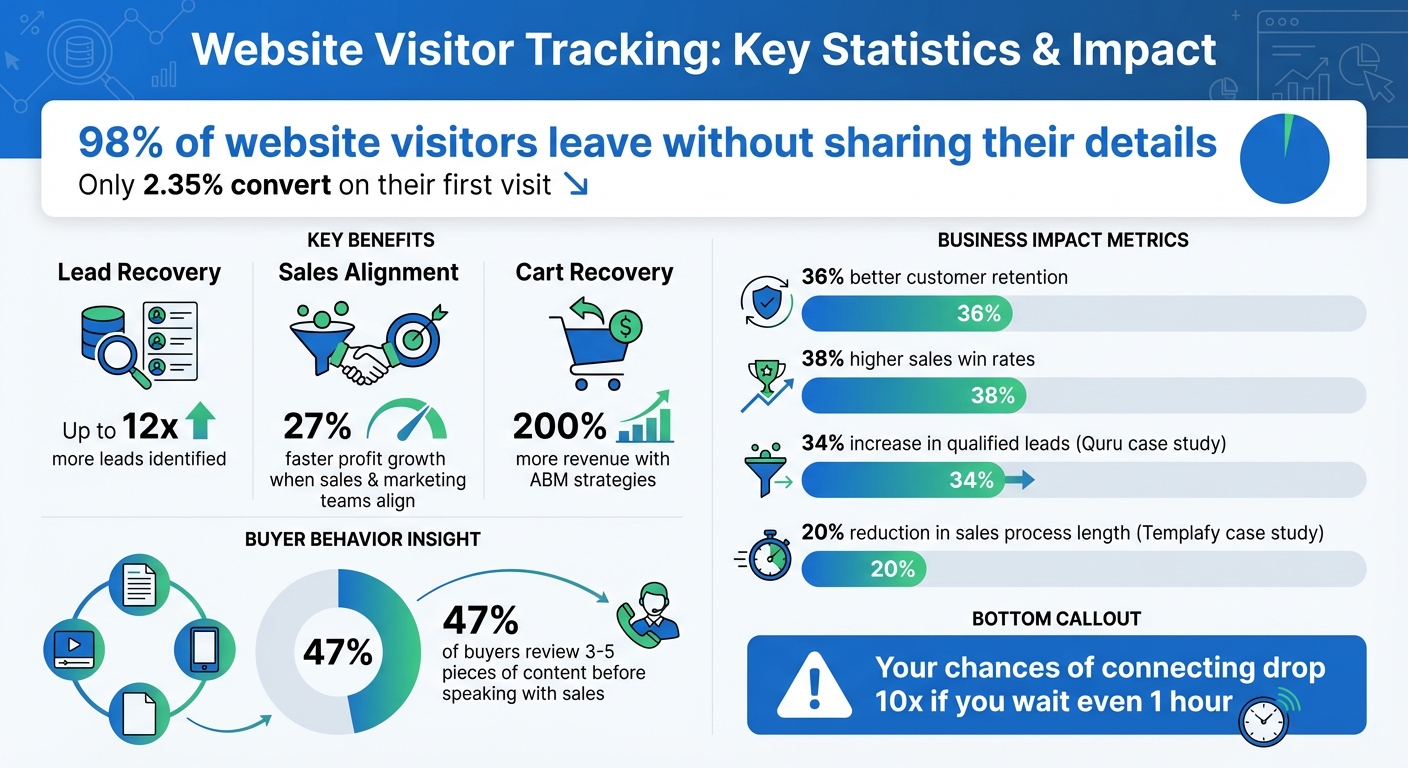
Here’s a staggering statistic: only 2.35% of website visitors typically convert on their first visit. That means nearly 98% of your traffic leaves without a trace. Real-time tracking helps recover those lost leads by uncovering the companies behind those anonymous visits. You’ll gain access to first-party intent data, showing exactly which high-value pages - like pricing or demo pages - are being viewed in the moment. This gives your sales team a golden opportunity to reach out while interest is still fresh.
When sales and marketing teams work together effectively, the results speak for themselves. Companies that align these teams enjoy 27% faster profit growth, 36% better customer retention, and 38% higher sales win rates. Real-time tracking ensures both teams are on the same page, focusing on high-intent prospects, which reduces friction and speeds up the lead-to-close process.
Finding Hidden Business Opportunities
Most website visitors browse anonymously, representing untapped potential. These are people actively researching solutions, comparing products, and deciding if your offering fits their needs. Without tracking, you’d never know they were interested.
By identifying which companies are visiting your site and analyzing what they’re viewing, you can prioritize outreach based on clear buying signals. Take Quru, for example. Under the leadership of CEO Steve Jackson, they used visitor identification to automatically send leads to their Pipedrive CRM. This approach resulted in a 34% increase in qualified sales leads from their existing web traffic.
Real-time tracking also sharpens your content strategy. For instance, Triuvare, an IT services agency, discovered that their "ICT Tendering Guide" attracted high-intent visitors. By tracking which companies accessed this resource and reaching out immediately, they significantly boosted the ROI of their content marketing efforts.
Better CRM and Automation Integration
Real-time tracking tools can automatically push visitor data - like company name, industry, size, and browsing behavior - straight into your CRM. This eliminates manual data entry and the need to wait for form submissions. Instead, you get detailed lead records that include pages visited, time spent, and how often they return.
You can even automate lead routing. For example, if a company from your target account list visits your pricing page, your CRM can instantly notify the assigned sales rep. This ensures follow-ups happen while the prospect’s interest is at its peak.
A great example of this is Templafy. By integrating visitor identification with LinkedIn and Zapier, they cut their sales process by 20%. Traffic Manager Casper Rouchmann shared:
"So far we've reduced the length of our sales process by 20% and the marketing team is generating substantially more targeted leads for sales than before."
Real-time tracking goes beyond just basic firmographics. Since nearly half of buyers (47%) review 3–5 pieces of content before speaking with a sales rep, capturing early-stage behavior provides a complete view of their journey. This not only enriches your CRM but also enables immediate action on high-value prospects.
Recovering Abandoned Carts in E-commerce
E-commerce businesses often face a common challenge: visitors browse products, add items to their cart, and then leave without completing their purchase. Real-time tracking helps you identify these high-intent visitors and take immediate action to recover those potential sales.
By knowing which companies or individuals abandoned their carts, you can launch personalized remarketing campaigns based on the exact products they viewed. Instead of generic ads, you can send targeted emails, recommend specific products, or even have a sales rep reach out directly for high-value opportunities.
Johanna Rytkonen, Marketing and Communications Manager at Triuvare, emphasized the importance of quick follow-ups:
"It is very important to contact them as soon as possible, as that has proven impact on which provider the customer will choose."
Real-time alerts give you the chance to act before the prospect moves on to a competitor.
For B2B e-commerce, real-time tracking doesn’t just identify anonymous sessions - it reveals the companies behind those abandoned carts. This allows you to customize your recovery efforts based on the company’s size, industry, and past interactions. Businesses using Account-Based Marketing (ABM) strategies with real-time visitor data have seen up to 200% more revenue from their marketing efforts.
3 Methods to Identify Anonymous Visitors
Turning anonymous website traffic into identifiable leads requires smart tracking strategies. Each approach works differently, so understanding them can help you pick the best fit for your business. Here are three reliable techniques to uncover who’s visiting your site in real time.
Reverse IP Lookup for Company Insights
Reverse IP lookup uses a visitor’s IP address to identify the company they’re associated with - no cookies required.
Here’s how it works: when someone from a company visits your site, tracking software captures their IP address and matches it to third-party databases. This reveals details like the company name, industry, headquarters location, employee count, and even social media profiles. Advanced tracking tools also filter out ISPs, bots, and spam traffic, ensuring you’re only seeing genuine business visitors - not residential users. This makes it easier to follow up with leads immediately.
One major perk? This method doesn’t rely on cookies. As third-party cookies are being phased out by major browsers, IP-based tracking is becoming a key way to maintain targeted outreach while staying compliant with privacy regulations.
Many businesses have seen success with this approach. You can set up alerts for visits to high-intent pages - like pricing, demo requests, or product comparisons - so your sales team can act while interest is fresh. Plus, you can sync this data with your CRM to update existing accounts, create new leads, or export lists for targeted marketing campaigns.
Browser Fingerprinting and Device-Level Tracking
Browser fingerprinting identifies individual devices by analyzing unique details like operating system, browser type, and screen resolution.
By studying these patterns, statistical algorithms can determine a visitor's identity based on their device characteristics and behavior. Unlike IP tracking, which focuses on identifying the company network, browser fingerprinting hones in on individual devices. This is especially helpful for distinguishing between multiple users accessing your site from the same office.
For the best results, combine browser fingerprinting with reverse IP lookup. Use IP tracking to identify the organization, then apply fingerprinting to track specific individuals within that company. Configure your tracking software to send notifications - via Slack or email - when high-intent visitors return to key pages like pricing or demos.
Real-Time Form Field Data Capture
Most visitors leave your site before completing a form, but real-time form field data capture lets you collect information as they type - even if they never hit submit.
Using JavaScript SDKs, you can capture key details like email, name, or company as visitors start filling out forms. These tools create persistent profiles for anonymous visitors by tracking their page views and searches. Once a visitor types in an identifier like an email address, their previous browsing history is merged into a known contact profile. Modern SDKs can even feed this data directly into your CRM, triggering alerts for your sales team or personalizing the visitor’s experience while they’re still on your site.
Anna Hyatt, Co-Founder of Knock Knock App, highlights the importance of speed:
"Your chances of connecting with a lead drop by over 10x if you wait even an hour after they show interest."
To make the most of this method, keep initial forms short by asking only for essentials like email or phone number. Use progressive profiling to gather more details over time. Place these forms on high-intent pages - like pricing or product pages - to capture data at critical moments. Don’t forget to include clear language about how the data will be used and an opt-in checkbox to stay compliant with GDPR and CCPA. Offering incentives like early product access, personalized recommendations, or discounts can also encourage visitors to share their information.
How to Use MagicTag for Real-Time Visitor Identification

MagicTag transforms real-time visitor data into actionable leads, perfectly aligning with lead recovery strategies. It’s quick to install, easily integrates with your website and sales tools, and doesn’t require technical expertise. Once set up, it can help you identify anonymous visitors and convert them into valuable opportunities.
Installing MagicTag on Your Website
Getting started with MagicTag is simple. Begin by adding a lightweight JavaScript code snippet to your website's header. Log into your MagicTag account, head to the setup page, and copy the provided tracking code. Then, paste this code into the <head> section of your site, typically accessible through your CMS settings.
Once the script is live, MagicTag will automatically start collecting visitor data across all pages. It tracks IP addresses, behavior patterns, and even form field inputs as visitors type - even if they don’t hit submit. To confirm everything is working, check the real-time dashboard. If visitor activity appears within a few minutes, you’re good to go.
After installation, the next step is connecting MagicTag to your CRM for seamless data transfer.
Connecting MagicTag to Your CRM
MagicTag integrates effortlessly with popular CRMs like Salesforce, HubSpot, and Pipedrive, syncing visitor data in real time. These integrations can also trigger workflows, like sending Slack alerts for high-intent visits.
To connect, go to the "Integrations" menu in your MagicTag dashboard and select your CRM platform. Log into your CRM to authorize the connection - it takes less than two minutes.
Once connected, MagicTag will automatically sync visitor information. New leads will be created instantly, and existing contact records will be updated with the latest behavioral insights, ensuring your sales team has all the data they need.
Using the Real-Time Dashboard
With your CRM linked, you can monitor visitor activity in real time through MagicTag’s dashboard. It provides a detailed view of active visitors, identifying them at the company level with information such as company name, industry, location, and employee count. For even deeper insights, MagicTag can track individual details like job titles, LinkedIn profiles, and work emails, allowing your team to connect with decision-makers while they’re still engaged.
The dashboard also offers custom filters to help you organize visitors based on specific criteria, such as industry, location, or on-site behavior. For instance, you can create a feed for visitors who viewed more than 14 pages or spent over four minutes on your demo page. Additionally, you can upload your existing customer list as a suppression filter to avoid targeting current clients and focus solely on new leads.
To ensure timely action, enable instant notifications via Slack or email. This way, your sales team can receive alerts whenever high-value prospects visit key pages, allowing them to initiate personalized outreach while the visitor is still browsing your site.
sbb-itb-77d5bc3
MagicTag Pricing Plans
Once you've reviewed MagicTag's real-time tracking features, it's time to pick a plan that matches your site's traffic and support requirements. MagicTag offers four pricing options, each tailored to different user identification limits, integration needs, and support levels. Here's a breakdown to help you decide.
The Free plan is perfect for smaller websites or businesses just starting with visitor tracking. It comes at no cost - $0/month - and supports up to 1,000 identified users per month. This plan provides access to a real-time dashboard, basic webhook functionality, and email support.
If your traffic starts to grow, the Starter plan might be a better fit. For $19/month, it increases the user limit to 10,000 identified users per month. This plan also unlocks full API access, CRM integrations with tools like Salesforce and HubSpot, and priority support for quicker assistance.
For businesses with more substantial traffic, the Business plan offers robust features at $99/month. It supports up to 50,000 users monthly and includes advanced filtering, segmentation tools, and SLA-backed support for reliability.
Finally, for enterprises with high-volume traffic, the Enterprise plan at $299/month removes user limits entirely. It provides dedicated infrastructure, custom integrations tailored to your needs, and premium support with direct access to MagicTag's technical team.
Pricing and Features Comparison
| Plan | Price | Description | Features | Limitations |
|---|---|---|---|---|
| Free | $0/month | Up to 1,000 users/month | Real-time dashboard, basic webhook, email support | Limited to 1,000 users/month |
| Starter | $19/month | Up to 10,000 users/month | Full API + webhook, CRM integrations, priority support | Limited to 10,000 users/month |
| Business | $99/month | Up to 50,000 users/month | Advanced filtering, segmentation, SLA support | Limited to 50,000 users/month |
| Enterprise | $299/month | 50,000+ users/month | Dedicated infrastructure, custom integrations, premium support | None |
Select a plan that aligns with your current traffic and anticipated growth over the next 6–12 months.
Best Practices for Lead Recovery with MagicTag
Once MagicTag starts tracking your website visitors, turning anonymous traffic into qualified leads requires a thoughtful approach. By focusing on monitoring, segmentation, and compliance, you can boost your lead recovery results significantly.
Using Real-Time Dashboards Effectively
MagicTag's dashboard is your command center, showing key visitor actions like page views, session duration, and scroll depth. To get the most out of it, set up custom feeds that group visitors based on specific behaviors. For instance, you could track visitors who spend over two minutes on your pricing page or those who view your demo request form but don’t submit it. These high-intent actions should be your priority.
Take it a step further by setting up email or Slack alerts for visits from high-value accounts. Imagine a Fortune 500 company landing on your case studies page - your team would know instantly and could act quickly. Use lead tagging to classify visitors as "unqualified", "competitor", or "hot prospect", ensuring your team focuses on the most promising opportunities. Syncing this data with your CRM enriches existing profiles or creates new leads seamlessly.
One example of this in action comes from Triuvare, where precise tracking improved content ROI. Johanna Rytkonen, Marketing and Communications Manager, shared:
"If you are implementing content marketing, some of your content is for people who are closer to the buying decision and some for people who are in early stages."
This kind of tracking allows for better segmentation and more effective follow-ups. MagicTag's dashboard simplifies these processes, making it easier to act on valuable insights.
Segmentation and Targeted Remarketing
Real-time data from MagicTag enables you to refine your lead recovery strategy through precise segmentation. Filter visitors by firmographics - like industry, company size, or location - and behaviors such as pages visited, time spent on-site, or repeat visits. Export these segmented lists to fuel Account-Based Marketing (ABM) campaigns on platforms like LinkedIn or Google Ads. This approach can significantly increase revenue potential. For instance, a tech company with 500+ employees that frequently visits your pricing page might need a more tailored outreach strategy than a small business browsing your blog.
Personalization is the key to success. If a visitor spends time on your integration documentation, mention those integrations in your follow-up email. Research shows that personalized outreach aligned with the buyer's journey can lead to a 72% higher conversion rate. MagicTag’s behavioral insights make this level of customization possible, helping you connect with prospects in a more meaningful way.
Staying GDPR/LGPD Compliant
MagicTag focuses on identifying companies rather than individuals, operating under Article 6(f) of GDPR, which refers to "Legitimate Interest". However, compliance requires transparency and careful documentation.
Update your privacy policy to clearly explain that visitor identification is used for sales and marketing purposes. Provide an easy-to-find opt-out option for companies that don’t want to be tracked, and process these requests within 48 hours. Keep detailed records of your compliance measures.
While personalized 1:1 sales outreach is allowed under legitimate interest, automatically adding identified contacts to email marketing campaigns without explicit consent can violate GDPR. Use MagicTag data to guide your sales team's direct outreach efforts, but always obtain separate consent before enrolling anyone in automated marketing sequences. Non-compliance can lead to fines of up to €20 million or 4% of annual global turnover. MagicTag’s company-level tracking helps you stay compliant while enabling targeted and timely lead recovery efforts.
Conclusion
A staggering 98% of website visitors remain anonymous, with only 2.35% converting into leads - leaving a huge opportunity untapped. Real-time visitor tracking can bridge this gap by transforming anonymous traffic into actionable insights.
With MagicTag, you can capture visitor data even as they type, no form submission required. This means identifying up to 12x more leads. Plus, instant notifications alert your sales team the moment high-intent prospects visit crucial pages like pricing or demo sections. Timing is everything - reaching out while your brand is still top of mind significantly boosts conversions.
By combining reverse IP lookup, behavioral segmentation, and GDPR-compliant tracking, MagicTag integrates seamlessly with your CRM. Configure alerts for high-value pages, enabling immediate, tailored outreach to prospects when it matters most.
Plans start at $0 for up to 1,000 users, proving that success isn’t just about traffic - it’s about understanding your visitors and acting fast.
FAQs
How do I stay GDPR-compliant while tracking website visitors in real time?
To maintain GDPR compliance while tracking website visitors, prioritize gathering non-personal, company-level data instead of personal information. Make sure to display clear and easy-to-understand cookie banners, obtaining explicit user consent before enabling any tracking cookies. Your privacy policy should clearly outline your tracking practices and include straightforward opt-out options for users.
It's also crucial to collaborate with third-party services that adhere to GDPR regulations. Sign data-processing agreements with these providers and ensure they respect individuals' data rights. By taking these measures, you can achieve a balance between effective website tracking and respecting user privacy.
What are the advantages of connecting website visitor tracking data to a CRM?
Integrating website visitor tracking data with your CRM can completely reshape your sales approach. By combining this data, you can expand lead profiles with detailed company and contact information, giving your team the tools they need to craft personalized outreach and respond quickly to potential customers.
This integration also allows you to rank leads based on their behavior, send real-time alerts to your sales team, and increase conversion rates. Aligning visitor tracking with your CRM not only sharpens decision-making and streamlines operations but also helps drive revenue growth - all while staying compliant with privacy regulations.
How can reverse IP lookup identify anonymous website visitors?
Reverse IP lookup takes a visitor's IP address and links it to the company or organization that owns it. This turns anonymous website traffic into valuable business details, like the name of the company, which can then be used to identify leads and personalize outreach strategies.
With this information, businesses can better understand potential customers and implement targeted actions to boost their website's conversion rates - all while adhering to privacy regulations.