Tired of losing 98% of your website visitors to anonymity? MagicTag changes the game by collecting user details - like emails and phone numbers - as they’re typed into forms, even if the form isn’t submitted. This data syncs directly into HubSpot, helping you recover up to 12x more leads and engage with prospects faster.
Here’s what MagicTag does for HubSpot users:
- Real-time data collection: Capture visitor details as they type.
- Improved lead quality: Shorten sales cycles by identifying prospects earlier.
- Tailored outreach: Use visitor behavior to personalize follow-ups.
- Mobile-friendly: Overcome form-fill challenges on mobile devices.
- Flexible plans: Options range from free to enterprise-level, scaling with your needs.
Setup is simple: install the MagicTag script, connect it to HubSpot via API, and create workflows to manage leads. Businesses using MagicTag report a 37% boost in lead quality and a 28% reduction in sales cycle length.
Start turning anonymous visitors into actionable leads today by combining MagicTag with HubSpot.
How to Use Hubspot to Generate Leads and Send Automated Emails for FREE.

What You Need Before Getting Started
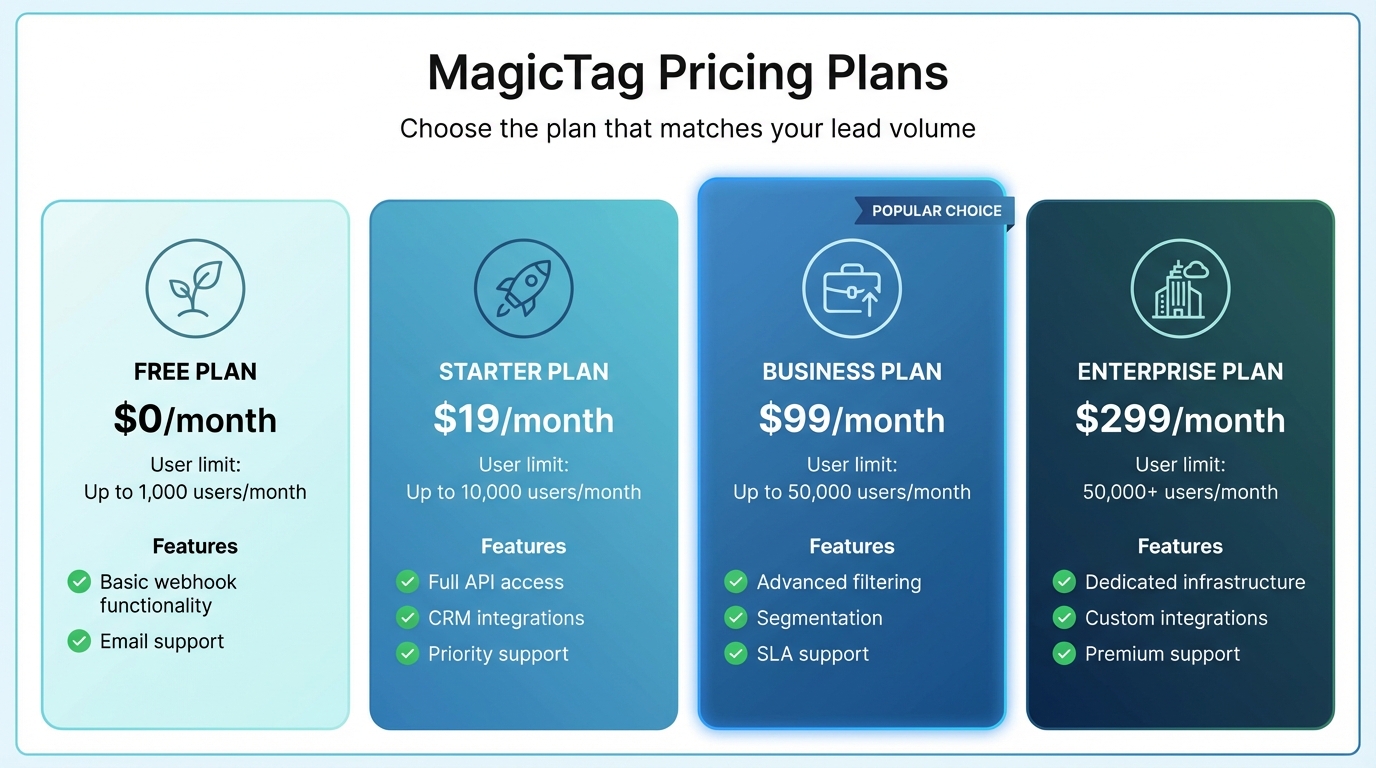
MagicTag Pricing Plans Comparison for HubSpot Integration
To integrate MagicTag with HubSpot, make sure you have these essentials in place:
HubSpot Account and Access
First, you'll need an active HubSpot account, which can be free or paid - MagicTag works with both. Keep in mind that API rate limits depend on your HubSpot plan. To get started, use OAuth 2.0 or developer API keys along with a HubSpot Super Admin account. From there, create a Private App by navigating to Integrations > Private Apps and enabling full CRM and CMS permissions. MagicTag will only access the data you specifically authorize.
Once your HubSpot account is set up, choose the MagicTag plan that aligns with your lead volume.
MagicTag Plan Selection

MagicTag offers four pricing tiers to accommodate different user needs:
- Free Plan: Tracks up to 1,000 users per month, includes basic webhook functionality, and provides email support.
- Starter Plan ($19/month): Increases the limit to 10,000 users and unlocks full API access, CRM integrations, and priority support.
- Business Plan ($99/month): Designed for higher traffic, it supports up to 50,000 users and adds advanced filtering, segmentation, and SLA support.
- Enterprise Plan ($299/month): Ideal for enterprise-level traffic, it handles 50,000+ users and includes dedicated infrastructure, custom integrations, and premium support.
Lastly, ensure you have access to your website to install the necessary tracking script.
Website Access for Script Installation
You’ll need backend access to your website to install the MagicTag tracking script. Place the script just before the closing </body> tag on every page you want to track. Many CMS platforms like WordPress, Shopify, Wix, and Squarespace have built-in code injection tools to simplify this process.
For a streamlined setup, use Google Tag Manager. Create a Custom HTML Tag, set it to trigger on All Pages, and the script will deploy site-wide without requiring direct code edits. The setup is lightweight and won’t affect your site’s performance.
How to Set Up MagicTag with HubSpot
Once everything is prepared, you can integrate MagicTag with HubSpot in just a few simple steps. The process is quick and straightforward.
Install the MagicTag Script on Your Website
To start, copy your unique tracking script from the MagicTag dashboard. Paste it just before the closing </body> tag on every page of your website. If you're using a CMS like WordPress, you can add the script in the footer.php file or use a Header and Footer plugin. For those using Google Tag Manager, create a new Custom HTML Tag, paste the MagicTag script into the HTML field, and set the trigger to All Pages to ensure site-wide deployment.
Configure a Webhook in MagicTag for HubSpot
MagicTag connects to HubSpot through a Private App. In your HubSpot account, click the settings icon and navigate to Integrations > Private Apps. Create a new app and give it a name, such as "MagicTag Integration." Under the Scopes section, enable all permissions for both CRM and CMS to ensure seamless data flow. Once the app is created, HubSpot will generate a private API key - copy this key immediately. Head back to your MagicTag admin panel, click the HubSpot button, paste the API key, and enable the CRM Contact Register feature. This setup ensures smooth data integration and allows you to automate lead handling within HubSpot.
Create a HubSpot Workflow for Lead Management
Now it’s time to turn the captured data into actionable leads. In HubSpot, go to Automation > Workflows and create a contact-based workflow. Set the enrollment trigger to activate whenever a contact is created or updated with a specific property indicating they came from MagicTag. From there, you can add actions to assign leads to sales representatives, include them in targeted email campaigns, or tag them based on their form interactions. You might want to create separate workflows for different behaviors, like cart abandoners versus newsletter signups, to better tailor your follow-ups.
Test the Integration and Verify Results
Once everything is set up, test the entire process to ensure it’s working as expected. Submit a form on your website using your email address to simulate a lead. Check the MagicTag dashboard to confirm that the data appears in the real-time tracking panel. Then, log in to your HubSpot CRM and search for the email address. If the integration is successful, the new contact should appear with all the details you entered. If the contact doesn’t show up, double-check your permissions and review your HubSpot workflow enrollment settings to troubleshoot any issues.
sbb-itb-77d5bc3
Benefits of Using MagicTag with HubSpot
Boosted Lead Recovery and Conversion Rates
MagicTag captures visitor data in real time, even as they type, allowing you to recover leads that traditional forms often miss. Businesses leveraging MagicTag can collect up to 12x more leads compared to relying solely on completed form submissions. When paired with HubSpot, this data flows seamlessly into your CRM, enabling automated follow-ups. For instance, if a visitor starts entering their email on a pricing page but leaves without submitting, HubSpot can automatically enroll them in a nurture campaign, sending them case studies or special offers to encourage a return.
Tailored Marketing and Automation
Identifying leads early gives you a head start in personalizing your HubSpot campaigns. MagicTag provides insights into who’s visiting your site and what they’re doing, allowing you to set up if/then branches in HubSpot workflows. This means you can send tailored content based on specific actions, like visiting a pricing page or downloading a resource. Plus, real-time sales alerts notify your team the moment a high-value lead revisits, enabling immediate follow-up via email or phone. HubSpot users have reported a 6x increase in leads within six months of using lead tracking and management tools. MagicTag enhances this further by ensuring no lead goes unnoticed, scaling effortlessly as your lead volume grows.
Flexible Scalability for Growing Businesses
MagicTag’s pricing adapts to your growth, making it a fit for businesses of all sizes. Whether you’re a startup testing lead recovery strategies or a large enterprise handling heavy web traffic, MagicTag integrates smoothly with HubSpot while maintaining consistent performance and data flow as your needs expand.
Compliance and Data Security You Can Trust
MagicTag aligns with HubSpot’s GDPR framework, ensuring your business retains full control over visitor data. The platform offers complete auditability of data operations, while custom integrations use OAuth 2.0 authorization to ensure data access is granted only with explicit consent. API access is also limited by user permissions, reducing the risk of unauthorized data manipulation. This robust compliance and security framework protects your business and your leads while supporting effective lead recovery and personalized marketing strategies.
Conclusion
MagicTag works hand-in-hand with HubSpot to capture visitor details in real time - ensuring you don’t lose out on potential leads when as much as 98% of visitors typically leave without filling out a form. As visitors begin typing into your forms, MagicTag instantly syncs their information into your HubSpot CRM, setting the stage for immediate follow-up.
This instant data capture not only boosts lead quality but also helps shorten sales cycles. When combined with HubSpot's automation tools, it ensures timely and effective follow-ups that keep prospects engaged and interested. These benefits align perfectly with the straightforward setup process outlined earlier.
Getting started is simple: install the script, link your webhook, and activate automated follow-ups. Whether you’re testing the waters with the free plan (covering up to 1,000 users per month) or managing larger enterprise volumes, MagicTag scales effortlessly to match your growth - no complicated integrations or IT headaches required.
With these advantages in mind, take the step today to turn invisible visitors into real opportunities. By combining MagicTag with HubSpot, you can automate outreach based on visitor behavior and close deals faster by connecting with prospects at the exact moment they’re evaluating your solution.
FAQs
How does MagicTag identify website visitors before they fill out a form?
MagicTag employs cutting-edge tracking techniques to capture insights about your website visitors even before they fill out a form. By utilizing tools like cookies and session data, it observes user behavior in real-time, giving you a head start in identifying potential leads.
This early detection paves the way for tailored interactions and improved strategies to re-engage leads, all while integrating effortlessly into your HubSpot workflows. Importantly, MagicTag adheres to privacy regulations, ensuring user data remains safeguarded.
What are the benefits of using MagicTag with HubSpot?
Integrating MagicTag with HubSpot lets you identify and connect with website visitors much earlier in their journey, transforming anonymous traffic into qualified leads. By syncing real-time visitor data and form submissions directly into HubSpot, you get a full, up-to-date picture of each prospect. This means better lead scoring and faster follow-ups.
The integration also takes care of repetitive tasks like syncing contact details, launching personalized email campaigns, and updating lead statuses automatically. This not only saves time but also minimizes manual errors, freeing up your team to focus on building relationships instead of managing data. With access to fresh behavioral data, you can craft highly targeted and timely messages that resonate with your audience.
On top of that, MagicTag boosts HubSpot’s reporting capabilities by providing deeper insights into visitor behavior, the pages that drive conversions, and opportunities for lead recovery. These insights help you make informed decisions that can improve conversion rates, boost revenue, and enhance the overall customer experience.
How does MagicTag keep my data secure and compliant?
MagicTag puts data security and privacy at the forefront with its "privacy-by-design" framework, ensuring your information is well-protected from the ground up. All data is handled within isolated virtual environments, which keeps it secure and prevents any mix-ups or overlaps. On top of that, every action is meticulously logged, giving teams the ability to track activity and step in if necessary.
To comply with strict industry regulations, MagicTag is both HIPAA-compliant and SOC 2 Type II-certified. These certifications guarantee the secure management of sensitive data, such as protected health information (PHI). The platform also employs top-tier measures like advanced encryption, robust access controls, and continuous monitoring to keep your data safe.
Another key feature? MagicTag’s AI doesn’t store or learn from past activities, effectively eliminating any risk of data leakage. These safeguards ensure your information remains secure and fully aligned with U.S. regulatory standards.