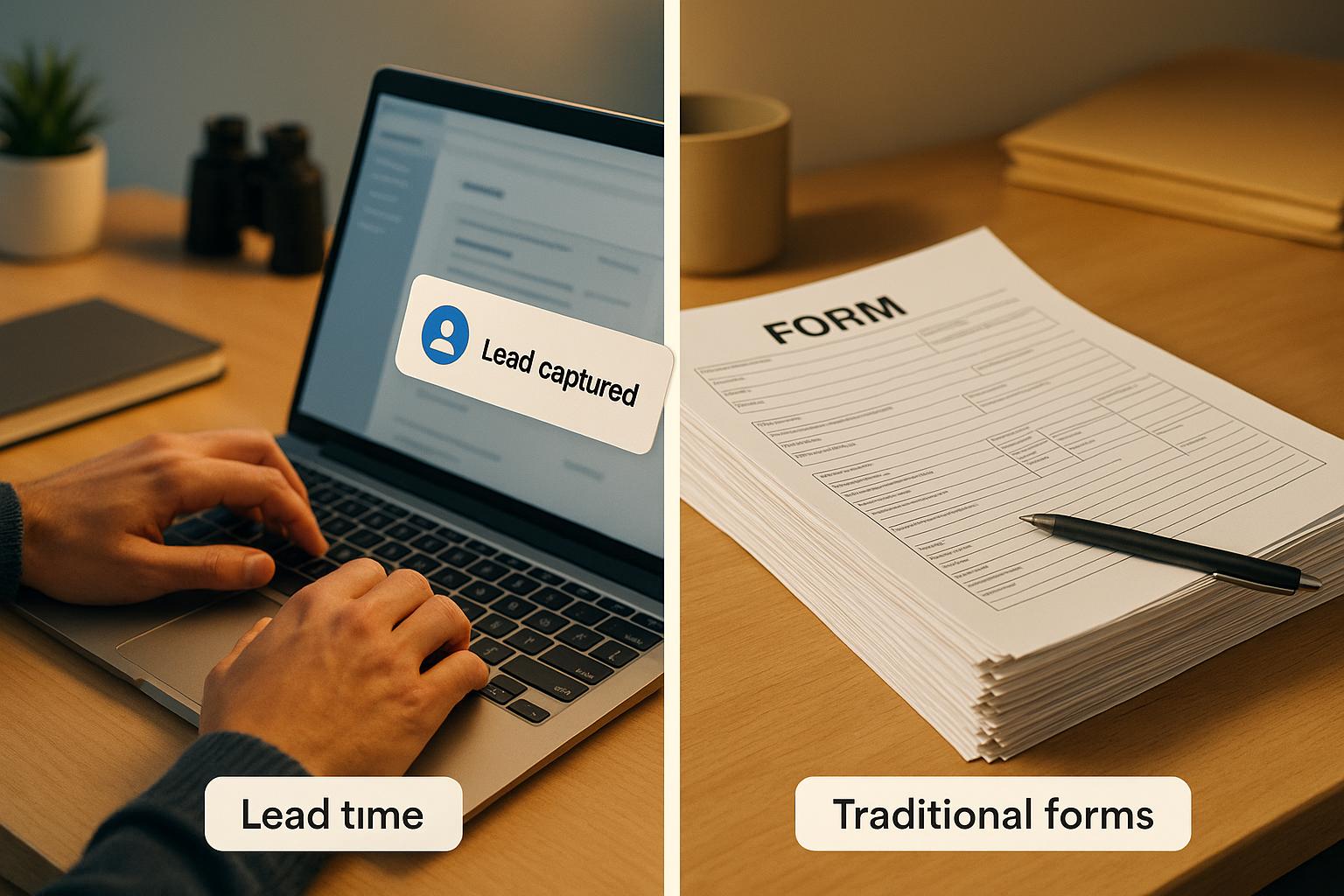
Most forms fail to secure user emails before submission, losing up to 98% of potential leads.
Here’s the issue: Many visitors abandon forms mid-way due to distractions, long forms, or technical issues. Without capturing their email early, you lose the chance to reconnect. Real-time email capture solves this by saving user data as they type, ensuring you retain partial information even if they abandon the form.
Key Takeaways:
- 75%–98% of users abandon forms before submitting.
- Abandoned forms result in lost revenue - up to $500 per lead in some cases.
- Real-time email capture secures user data instantly, allowing follow-ups.
- Common issues like long forms, CAPTCHAs, and privacy concerns drive abandonment.
- Tools like MagicTag can integrate with CRMs to automate recovery emails.
Start capturing emails before submission to recover lost leads and improve your lead capture rate.
Form Abandonment Tracking & Lead Recovery - Insiteful Demo
sbb-itb-77d5bc3
Why Users Abandon Forms Before Submitting
Form Abandonment Statistics and Revenue Impact by Industry
Common Reasons Users Leave Forms Incomplete
People abandon forms for a variety of reasons, including security concerns, overly long forms, technical issues, and more.
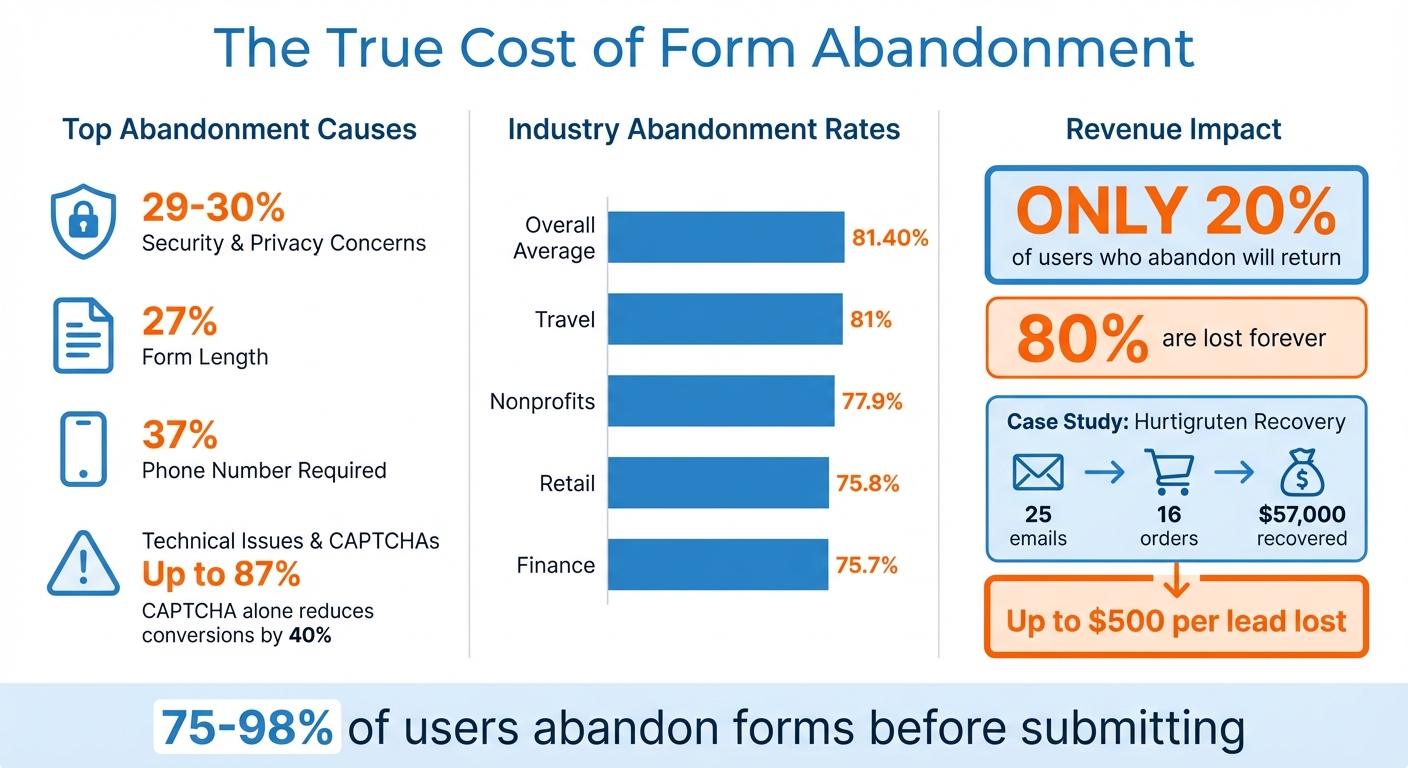
Security and privacy worries top the list, causing 29% to 30% of form abandonments. If users don’t see HTTPS in your URL or can’t find a clear explanation of how their information will be used, they’re likely to leave. Right behind this is form length, which contributes to 27% of abandonments. Too many questions can overwhelm users, discouraging them from even starting.
Then there’s technical friction. Issues like slow-loading pages or frustrating CAPTCHAs can skyrocket abandonment rates to as high as 87%. Even a small delay in page load time can have this effect. CAPTCHAs, while designed to block bots, often end up blocking real users too - reducing conversions by up to 40%.
"If form abandonment was a living, breathing monster, its favorite snack would be CAPTCHA." - Jen Swisher, Akismet
Another major culprit? Requiring a phone number. This single field drives 37% of users to abandon forms. Make it optional, and you could almost double your completion rates. On top of that, excessive design elements or overly complicated forms create additional friction. More than 67% of users encountering any complication will abandon the form for good.
Every one of these friction points isn’t just an inconvenience - it’s a direct hit to your revenue, as shown below.
How Much Revenue You Lose from Abandoned Forms
The financial impact of form abandonment is massive. With an 81.40% average abandonment rate, four out of five potential leads are lost before they even hit "submit."
Here’s how abandonment rates stack up across industries:
| Industry | Abandonment Rate |
|---|---|
| Travel | 81% |
| Nonprofits | 77.9% |
| Retail | 75.8% |
| Finance | 75.7% |
Take Norwegian cruise line Hurtigruten as an example. In July 2021, they manually targeted users who had started booking but didn’t complete payment. By sending just 25 personalized follow-up emails, they recovered 16 orders, generating $57,000 in revenue. Without this effort, that money would have been lost entirely.
And here’s the harsh reality: only 20% of users who abandon a form will return through another channel. The other 80%? They’re gone - along with any chance to convert them into paying customers. For businesses working with tight marketing budgets, this isn’t just a missed opportunity. It’s money you’ve already spent to attract leads, slipping right through your fingers.
How Real-Time Email Capture Solves This Problem
How Real-Time Capture Technology Works
Real-time capture technology works by recording information as users type, instead of waiting for them to hit the submit button. For example, the instant someone enters their email address and moves to the next field, the system securely stores that data. If the user decides to leave your site without completing the form, you still have their contact details.
MagicTag employs a lightweight script that runs quietly on your website. As visitors fill out forms, the technology checks the data in real time - validating email addresses, catching typos, and flagging disposable domains. This all happens seamlessly, ensuring bad data doesn't make its way into your CRM. The system can handle invalid entries in two ways: it can either display an inline error message to the user or tag the problematic data in the background, allowing you to filter it out later without disrupting the user experience.
If a visitor abandons the form after entering their email, the system acts immediately by sending a follow-up email to re-engage them. Beyond just capturing the email, the technology can combine it with behavioral data, such as the pages they visited, referral sources, or even IP-based company details. This creates a visitor profile before the form is fully completed. With this proactive approach, you can recover leads who might otherwise have been lost.
What You Gain from Real-Time Email Capture
Real-time email capture addresses form abandonment at its root, closing a major gap in lead generation. You can identify these gaps using a form abandonment analyzer to see exactly where users drop off. One of its biggest benefits is recovering lost leads. Instead of losing potential customers when they abandon forms, you capture their email while they’re still interested. This allows you to reconnect with users who may have been distracted, ran into technical issues, or simply changed their minds mid-process.
Another critical benefit is the improvement of data quality. Did you know that 30% of emails submitted through lead forms are fake, invalid, or disposable? Real-time validation ensures these bad entries are caught immediately, saving you from the headaches of "ghost" leads. These fake entries can trigger costly automations, inflate your cost per lead, and mess up your analytics. Plus, even a small bounce rate - like 2% - can harm your sender reputation.
"Verifying after submission is too late. Once that bad email hits your CRM, it's already triggered automations, inflated your cost per lead, and thrown off reporting. You need to catch it before submission." - LeadCapture.io
Additionally, real-time capture allows you to personalize follow-up communications. For instance, if a visitor shares their email and job title but doesn’t complete the form, you can craft a recovery message that acknowledges the data they’ve already provided. This sets the foundation for the targeted recovery strategies discussed in the next section.
How to Set Up Lead Recovery Before Form Submission
Collecting Data Gradually with Progressive Profiling
Capturing leads before they hit "submit" can significantly boost your conversion rates and revenue. One effective method is progressive profiling, which gathers information over time. Start with the basics - just a name and email address - on the first interaction. When that same individual returns to access more resources or attend a webinar, the form recognizes them and requests additional details, like their job title or company size, while skipping fields they’ve already completed.
This method aligns with user expectations. For instance, forms with just three fields have a 25% conversion rate, while those with six or more fields see conversions drop to 15%. Breaking forms into smaller, manageable steps can boost conversions by up to 300%. The key is to ask for information that matches the value of what you’re offering. For example, an email address might suffice for downloading a basic guide, but requesting a phone number makes sense if you’re offering a personalized consultation.
Tailor your questions to the buyer’s journey. At the awareness stage (top of the funnel), stick to basic contact details. In the consideration stage (middle of the funnel), gather information like job title or industry. By the decision stage (bottom of the funnel), you can ask for more specific details, such as a phone number or budget. Tools like MagicTag can capture this data in real time as users type, ensuring you retain partial information even if they abandon the form. Once you have this data, trigger automated workflows to recover the lead immediately.
Setting Up Automated Recovery for Incomplete Forms
Once you’ve captured partial data, the next step is to integrate it with your CRM and set up a recovery process. Timing is crucial - send the first recovery email within 2–4 hours of abandonment, while interest is still high. Follow up with a second email the next day and a third that includes added value or incentives. This structured approach helps recover abandoned form leads that might otherwise slip away.
Make your recovery emails personal. Reference the information the user has already provided. For instance, if they entered their email and job title but didn’t finish the form, mention those details in your message. Drip campaigns triggered by partial data capture have click-through rates three times higher than standalone emails. Since 40% to 90% of form abandonments occur at either the first or last step, your strategy should address both initial hesitation and last-minute doubts.
Behavioral triggers, like exit intent (when a user’s mouse moves toward closing the tab), can also help. A well-timed final prompt can encourage users to complete the form before leaving. For example, in September 2023, ConvertKit implemented Akismet to combat spam. This move, led by Senior Engineer John Lunsford, blocked spambots for over 400,000 creators, saving them up to 20 hours of manual work per month and improving their email sender reputation.
Connecting MagicTag with Your CRM and Marketing Tools
MagicTag simplifies lead recovery by integrating with platforms like HubSpot, Mailchimp, and ActiveCampaign using webhooks and APIs. This ensures captured lead data syncs with your CRM in real time. To make this work seamlessly, map form fields correctly - for example, linking "email" to "email address" or "job_title" to "job title." This creates a continuous flow of information across your marketing channels.
You can also use hidden fields to capture referral and IP data, enriching your lead profiles. Instead of relying on intrusive CAPTCHA systems, opt for background anti-spam tools. Studies show that approximately 30% of users abandon forms specifically during the CAPTCHA step. By replacing CAPTCHAs with less disruptive solutions, you can further reduce friction and improve form completion rates.
Tracking Performance and Improving Results
Metrics to Track for Lead Recovery
Start by keeping an eye on your email capture rate - this measures how many form visitors provide their email address, even if they don’t hit the submit button. Compare this to your traditional post-submission rate to understand the improvement. Research shows these metrics can boost conversion rates by up to 19% and improve user satisfaction by 15%.
Another key tool is field-level analytics, which pinpoint where users hesitate or abandon a form. Mike Hakob, Co-Founder of FormStory, emphasizes its importance:
"Proper form abandonment tracking is needed to gain insights into why users are bailing out and optimize forms to convert more visitors into leads and customers".
Pay attention to field duration - long pauses often signal that labels or instructions are confusing. Also, track your lead recovery rate, which tells you how many abandoned forms you successfully re-engage through automated follow-ups.
Lastly, don’t forget about data hygiene metrics. Categorize captured emails as "Valid", "Invalid", "Disposable", or "Catch-all." This helps prevent inflated costs per lead and ensures your reporting stays accurate. These insights let you fine-tune your strategy and improve efficiency.
Testing Different Approaches to Find What Works Best
Once you’ve established these metrics, use them to drive your A/B testing efforts. A/B testing eliminates guesswork by relying on data to make decisions, often leading to about 10% higher conversion rates. Focus on testing one variable at a time - form layout, the number of fields, button text, or the timing of recovery emails. For instance, multi-step forms, which break longer forms into smaller sections with progress indicators, convert 86% higher than single-step forms.
A great example comes from an October 2015 experiment by MECLABS. They worked with a partner offering downloadable reports. The original process required four steps to access the reports, but they simplified it to just two steps. The result? A 364% increase in email submissions, all without compromising lead quality.
User testing can also provide valuable insights. Watching participants complete your forms helps uncover pain points. Even conducting 1–5 user tests per year has been linked to higher satisfaction and better outcomes. Small tweaks, guided by direct observations and data, can lead to significant improvements.
Conclusion: Capture Leads While They're Still on Your Site
Relying only on form submissions means missing out on as much as 98% of potential leads. Traditional forms force visitors into an all-or-nothing scenario - either they fully commit, or they leave without a trace. That’s a lot of missed chances to connect with potential customers.
Real-time lead capture changes the game. Instead of waiting for users to hit "submit", it records contact details as they’re typed. This approach ensures you don’t lose leads to distractions, overly complex forms, or technical glitches. Even an incomplete submission can turn into a valuable email address, giving you the chance to follow up personally and guide visitors back to complete their actions.
With MagicTag, integrating real-time lead capture into your existing CRM and marketing tools is seamless. It even automates personalized follow-ups, helping you act on leads right away. Plus, with a free plan for up to 1,000 identified users, it’s easy to start recovering abandoned leads immediately.
Don’t wait for visitors to vanish - capture their information while they’re still engaged. By acting in the moment, you can turn potential losses into actionable opportunities.
FAQs
How does capturing emails in real time help recover leads?
Real-time email capture grabs a prospect's email address the moment they start typing it - often before they even click "Submit." This approach lets you act quickly by sending reminders or re-engagement emails, helping to recover leads that might otherwise slip away. By catching the email early, you avoid the usual risks of losing contacts during the post-submit process.
Another perk? Real-time capture ensures the email addresses you collect are valid, cutting down on fake or incorrect entries. This means fewer wasted leads and better protection for your email deliverability and sender reputation. With cleaner, more reliable data, you can nurture leads more effectively and boost your conversion rates.
Why do users leave forms before submitting them?
Users often stop filling out forms because of trust concerns or friction during the process. Trust issues pop up when a site feels unreliable or unsafe. For example, if the branding looks unfamiliar, the URL isn’t secure, or the form asks for too much sensitive information, people may hesitate. Even small details like a CAPTCHA can feel intrusive and push users away.
Friction is another big reason users abandon forms. Long or overly complicated forms, too many required fields, vague instructions, or technical problems like slow loading times and poor mobile design can frustrate users. When filling out a form feels like a chore, people are more likely to leave without completing it.
To prevent this, focus on making forms simple, showing clear security signals, and creating a smooth, user-friendly experience. These steps can keep users engaged and boost your conversion rates.
How can businesses connect real-time email capture to their CRM for better lead management?
To link real-time email capture with your CRM, start by grabbing the email address as soon as the user starts typing it into a form. Use a webhook or API call to immediately send the email (along with any other fields) to your CRM. Make sure the data is mapped to the right fields in your system. To keep your database clean, enable tools like duplicate-checking and real-time email validation to filter out fake or invalid addresses.
Once the email is in your CRM, you can set up automated actions. For example, assign the lead to the appropriate team member, add it to an email nurturing workflow, or even score the lead based on the information collected. Using progressive profiling, you can gradually gather more details - like their job title or company - over time, syncing these updates back to the same record. This approach keeps your data accurate, speeds up follow-ups, and boosts lead quality, paving the way for better conversions.