MagicTag and Braze work together to rescue leads from incomplete forms and improve customer engagement. MagicTag captures user data in real time as visitors interact with forms, even if they don’t submit them. Braze then uses this data to trigger personalized messages across channels like email, SMS, and push notifications. This integration helps businesses quickly re-engage potential customers before they lose interest, boosting conversions and streamlining marketing efforts.
Key Points:
- MagicTag: Collects user details (e.g., name, email) as they’re typed into forms using a simple setup.
- Braze: A customer engagement platform that personalizes communication based on user behavior.
- Integration Benefits:
- Sends partial form data from MagicTag to Braze in seconds.
- Enables targeted campaigns like abandoned form follow-ups.
- Reduces data analysis time by 70% and shortens development timelines.
By combining MagicTag’s data collection with Braze’s engagement tools, businesses can recover lost leads and deliver timely, tailored messages that drive results.
Setting Up MagicTag and Braze Integration
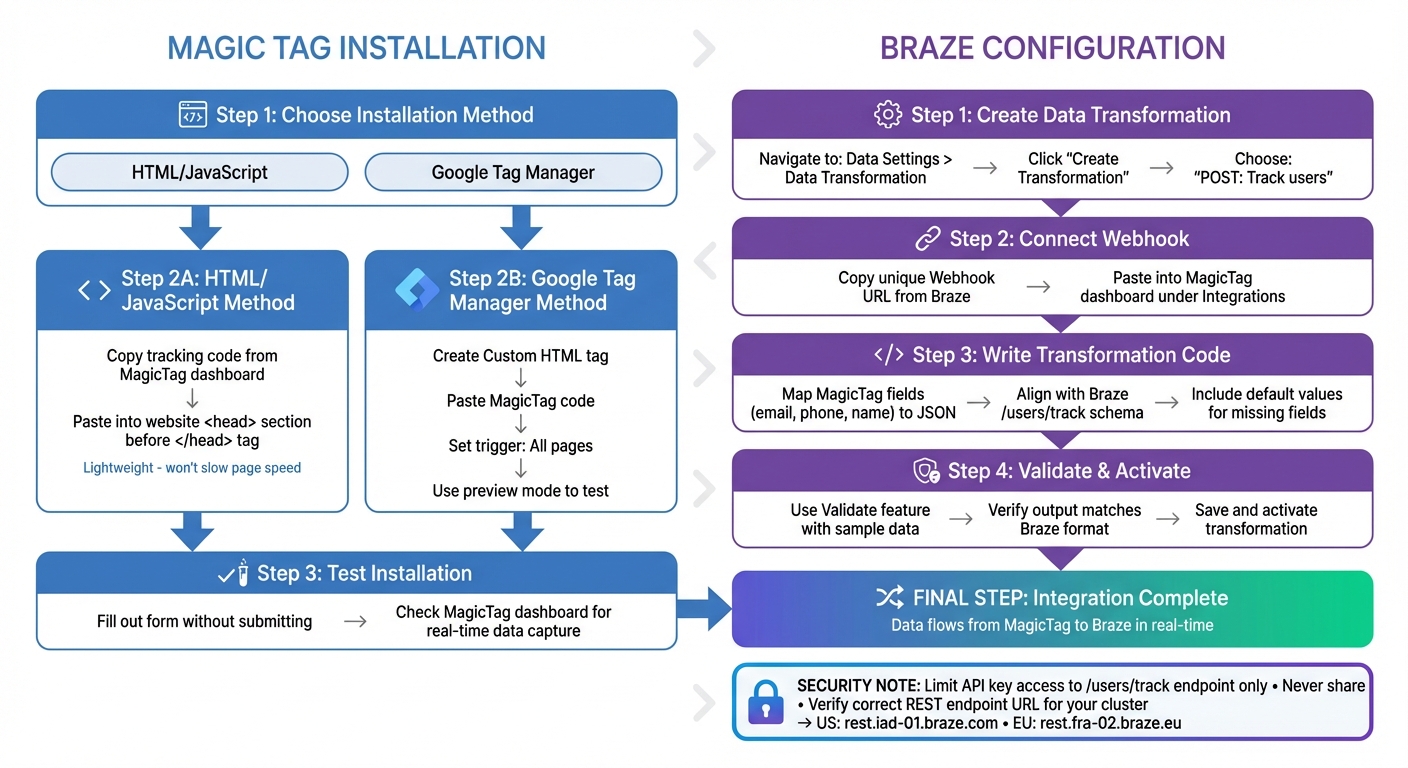
MagicTag and Braze Integration Setup Guide
To get MagicTag and Braze working together, you’ll need to tackle two main tasks: installing MagicTag on your website and setting up Braze to receive the data MagicTag captures. Here's how to make it happen.
Installing MagicTag on Your Website
MagicTag is compatible with all website platforms - whether you’re using WordPress, Shopify, custom HTML, or landing pages. You have two ways to install it: through a direct HTML/JavaScript snippet or via Google Tag Manager (GTM).
For the HTML/JavaScript method, log in to your MagicTag dashboard, copy your unique tracking code, and paste it into your website’s <head> section before the </head> tag. The script is lightweight, so it won’t slow down your page. Once installed, MagicTag will immediately start capturing data as visitors type into your forms.
If you prefer Google Tag Manager, create a new Custom HTML tag, paste your MagicTag code into it, and set it to trigger on all pages. Use GTM’s preview mode to confirm the tag fires correctly before publishing.
After installation, test the setup by filling out a form on your site. Move between form fields without submitting, then check your MagicTag dashboard to ensure partial form submissions are being captured in real time. Once you see the data flowing, you’re ready to configure Braze for seamless integration.
Configuring Braze Webhooks for MagicTag
Braze uses its Data Transformation feature to process incoming MagicTag data, updating user profiles and logging events automatically. To set this up, go to Data Settings > Data Transformation in your Braze dashboard and click Create Transformation. Choose POST: Track users as the destination - this ensures MagicTag data updates user profiles in real time.
Braze will generate a unique Webhook URL for your transformation. Copy this URL and paste it into the webhook settings in your MagicTag dashboard under the Integrations section. This step tells MagicTag where to send the captured form data.
Next, in the Transformation code section, write JavaScript that maps MagicTag’s fields (like email, phone, and name) into a JSON object that aligns with Braze’s /users/track schema. Be sure to include default values for any missing fields.
Before activating the transformation, use the Validate feature to test your code with sample data. This ensures the output matches Braze’s format. Once validated, save and activate the transformation to start processing live data.
"The best practice is to: Only enable the specific endpoints that are intended for your use case [and] Never, EVER share your API key with anyone." – Allan, For Now Marketing Blog
When setting up API keys for the integration, limit access to the /users/track endpoint. This follows the principle of least privilege and helps keep your Braze account secure. Also, confirm that you’re using the correct REST endpoint URL for your Braze cluster. For example, US instances typically use rest.iad-01.braze.com, while European instances use rest.fra-02.braze.eu. Using the wrong cluster will prevent data from transmitting successfully.
Using MagicTag Data in Braze Campaigns
MagicTag's integration with Braze unlocks the potential for highly targeted campaigns. By transforming the data captured - like names, emails, phone numbers, and form interactions - into actionable insights, you can deliver personalized messages that engage users at just the right time.
Mapping MagicTag Data to Braze Custom Events
Once the integration is set up, the next step is organizing the data for Braze campaigns. MagicTag sends data to Braze through its webhook integration. A practical way to use this is by logging a custom event whenever MagicTag captures a partial form submission. For example, you might label these events as "Lead Captured" or "Form Abandoned" for easy identification in Braze.
Each custom event can include up to 256 properties, providing detailed information like first name, email, phone number, and form type. For instance, if someone leaves a demo request form incomplete, you could log a "Demo Form Abandoned" event with properties such as first_name, email, and form_type.
To make the most of this data:
- Map persistent details like email addresses and phone numbers as standard attributes (e.g.,
email_address,phone_number) so they can be reused across campaigns. - Use custom event properties for session-specific information, such as the last product viewed or the service the user showed interest in.
To segment users based on these properties, go to Data Settings > Custom Events in Braze, select the "Lead Captured" event, and click Manage Properties. Enable the properties you want to filter by - like form_type or product_interest - to create targeted audiences. For example, you could focus on users who abandoned a pricing form within the last 24 hours.
| Data Type | Implementation | Purpose |
|---|---|---|
| Name/Email | Standard Attributes | Personalizing email or SMS headers |
| Form Field Data | Custom Event Properties | Triggering recovery flows based on user input |
| Submission Date | Custom Event Timestamp | Re-engaging users after a set period of inactivity |
| Product Interest | Custom Attributes | Long-term nurturing and targeted promotions |
This structured data sets the stage for automated, personalized campaigns.
Creating Personalized Campaigns in Braze
With MagicTag data, you can craft campaigns that respond to user behavior. For instance, when a "Lead Captured" event is logged, Braze can automatically send a personalized email like:
"Hi {{${first_name}}}, we noticed you were checking out our pricing. Need help deciding?"
Using Liquid templating, you can customize messages with tags like {{${first_name}}} or {{event_properties.form_type}}. Always include a fallback value, such as {{${first_name} | default: 'there'}}, to ensure smooth messaging.
Real-world examples show the power of this approach. Peacock’s "Year-In-Review" campaign, led by Sr. Director of CRM Annabella Goff, used behavioral data to reduce churn by 20% and increase upgrades by 6% within 30 days. Similarly, MoneySuperMarket boosted conversions by 25% with real-time messaging tailored to user behavior.
"We went from sending a single static message to our entire audience at once, to sending a series of messages that responded to our audience's behavior and reached them when they were most likely to engage."
- Seth Gourson, Marketing Manager, Lumos Labs
You can also apply conditional logic to refine your campaigns. For example, send an SMS follow-up if a phone number is available, or default to email if it’s not. Segment users based on how often the "Lead Captured" event occurs to adjust your recovery strategy accordingly.
Canva demonstrated the impact of personalized messaging by increasing open rates by 55% and click rates by 47%, proving that tailored content consistently outperforms generic campaigns.
sbb-itb-77d5bc3
Monitoring and Optimizing Performance
Once you've set up your integration and campaigns, the next step is to keep a close eye on performance and resolve any issues that arise. Regular testing, analysis, and troubleshooting are key to ensuring your lead capture and recovery flows operate efficiently.
Testing Lead Capture and Recovery Flows
Before scaling up, it's important to validate the data flow between MagicTag and Braze. One way to do this is by enabling verbose logging (e.g., adding ?brazeLogging=true to URLs or using braze.toggleLogging()). This will show real-time debugging messages, helping you confirm that events are triggering as expected.
To verify performance, check Braze's "Overview" dashboard. For example, after a test user interacts with a form, you should see an immediate increase in session metrics. When testing lead recovery flows, you can trigger "Action-Based" criteria by updating a custom attribute (like lead_score) or adding an email address. If leads are being sent to a CRM like Salesforce, monitor webhook activity to confirm "MQL" status updates and ensure your threshold logic is working as intended.
For testing campaigns, you can set Canvas re-eligibility to "0 seconds" to capture all status updates. Consider this example: in October 2025, Grubhub's Campus program used Braze Canvas to create a multi-step onboarding journey, encouraging students to link their campus cards and activate subscriptions. The results? An 836% ROI increase, 20% more orders, and a 188% growth in Grubhub+ Student signups.
Once you've confirmed that data capture is functioning properly, you can move on to analyzing campaign performance.
Analyzing Campaign Performance in Braze
Braze provides built-in analytics tools that allow you to track metrics like opens, clicks, and conversions in real time. Use control groups to measure the effectiveness of your campaigns. For instance, in December 2025, Peacock's CRM team, led by Sr. Director Annabella Goff, tested a "Year-In-Review" campaign. The results were impressive: a 20% reduction in churn over 30 days and a 6% increase in free-to-paid subscription upgrades compared to the control group.
"Three years in, we've used Braze to test and optimize messaging cadence, creative, audience targeting, content choice, and more to become very relevant to our consumer experience."
- Annabella Goff, Sr. Director, CRM, Peacock
A/B testing is another powerful tool. Experiment with different messaging variations using MagicTag data. For example, in October 2025, foodora leveraged BrazeAI Intelligent Timing to optimize message delivery. By shifting from fixed schedules to AI-driven send-time optimization, they achieved a 41% conversion rate and reduced unsubscribe rates by 26%.
For more in-depth insights, you can export engagement data to platforms like Snowflake or use Braze Currents for lifecycle analysis. After analyzing your campaign's performance, it's time to address any technical issues that might be holding you back.
Troubleshooting Common Issues
One common challenge is data latency. Batch processing can delay data by over 24 hours, which can hinder real-time lead recovery. Switching to live streaming can solve this problem. For example, in 2024, MoneySuperMarket adopted live streaming data and increased message send rates from 500 to 25,000 per minute, boosting conversions by 25%.
If the Braze Web SDK isn't loading, ad blockers or Content Security Policy restrictions might be the culprits. For server-side rendering frameworks like Next.js, using dynamic imports ensures the SDK runs only in the browser, avoiding potential conflicts.
Webhook failures often stem from incorrect API endpoints or missing OAuth tokens. To prevent this, ensure OAuth 2.0 flows are correctly configured and tokens are managed properly. Before launching large-scale campaigns, assess your system's capacity and set rate limits in Braze to avoid crashes during peak message volumes.
Lastly, use the SDK Debugger and test applications to confirm that sessions and custom events are being recorded accurately. Addressing these issues early will help maintain smooth operations and ensure your campaigns deliver the results you’re aiming for.
Conclusion
MagicTag combined with Braze is changing the game for lead recovery. It captures user data in real time - even if forms are left incomplete - and seamlessly integrates it into Braze's engagement platform. This setup enables instant responses to customer behavior, eliminating the need for manual segmentation, lead scoring, or campaign coordination. By blending real-time form data capture with sophisticated engagement triggers, this integration creates a smooth and responsive customer experience.
The results speak for themselves. Campaigns powered by this duo show noticeable increases in conversions, improved messaging efficiency, and higher engagement rates.
"Braze has helped us leverage the data that we already have and drive both engagement and acquisition at the speed we couldn't dream about before."
- Oksana Kovalenko, Head of Data Product, Virgin Red
The true strength lies in automation. Metrics reveal up to 2.6X more app opens, 1.8X higher opt-in conversions, and 2.4X better re-engagement through API-triggered campaigns. When you pair MagicTag's real-time data capture with Braze's behavioral triggers and AI-driven personalization, you’re not just recovering leads - you’re creating a dynamic, responsive system that delivers measurable growth. These results highlight the value of streamlined, automated processes.
Key Takeaways
Here are some actionable steps to get started:
- Focus on one impactful journey first, like an abandoned cart or welcome series, and build from there based on results.
- Use behavioral branching in Braze Canvas to tailor content depending on user actions, such as completing onboarding or remaining inactive.
- Take advantage of Intelligent Timing to send messages when recipients are most likely to engage.
- Map MagicTag's real-time form data to Braze custom events (e.g., "checkout started" or "cart updated") to trigger personalized recovery campaigns.
- Set up webhooks to automatically pass Marketing Qualified Leads (MQLs) to your sales team in Salesforce once they meet your lead-scoring criteria.
FAQs
How does MagicTag collect data from incomplete forms?
MagicTag helps marketers recover leads by gathering data from forms, even when users don't fully complete them. While the exact technical details of how it collects partially-filled forms aren't extensively documented, its primary goal is to simplify and automate lead capture. This makes it a powerful tool for streamlining marketing efforts.
By integrating with platforms like Braze, MagicTag enables smooth tracking and personalization, helping marketers work more effectively. To dive deeper into how it manages incomplete forms, it's worth exploring the platform's features focused on form tracking and data recovery.
How do I integrate MagicTag with Braze for lead recovery?
To get MagicTag working with Braze, you’ll need to start by integrating the Braze Web SDK into your website. This is essential for any site where MagicTag forms will be used. You can add the SDK using a package manager or set it up through Google Tag Manager with Braze’s pre-built Initialization Tag. Once it’s in place, configure the SDK with your Braze API key and any custom settings using Braze.configure() or a configuration file. This step ensures Braze can track user interactions seamlessly.
After that, embed your MagicTag form on a Braze landing page. Use the {% landing_page_url %} Liquid tag in the form’s action or button link. This tag allows Braze to link form submissions directly to user profiles, making it easy to capture leads as tracked events.
Lastly, map your form fields to Braze’s custom attributes or events - like a “lead_recovered” event - through the Braze dashboard. Enable real-time data syncing and test the setup to confirm that submissions trigger personalized messages as intended. This integration simplifies lead recovery and helps boost your conversion rates.
How can businesses use MagicTag data to enhance Braze campaigns?
Businesses can integrate MagicTag data into Braze effortlessly by connecting form submissions directly to user profiles. When a MagicTag-generated landing page URL is included in a Braze message, any form submissions automatically link to existing profiles, avoiding duplicate entries. Key details like email addresses, product preferences, or purchase intentions can be mapped as custom attributes (e.g., magic_tag_interest, magic_tag_lead_score) to help organize data and enhance targeting.
Once imported into Braze, this data becomes a powerful tool for segmentation, real-time triggers, and personalized messaging across multiple channels. For instance, users with a high magic_tag_lead_score might receive a $25.00 discount email on 12/31/2025, while those showing interest in specific products could get push notifications about relevant updates. By keeping these attributes updated, businesses can set up automated workflows that send timely, tailored messages, boosting lead recovery and increasing conversion rates.
Marketers can implement this by embedding the MagicTag landing page tag into their Braze campaigns and setting up audience rules to utilize the custom attributes. This creates a seamless system where MagicTag captures leads, Braze enriches user profiles, and personalized messaging drives better engagement and results.