MagicTag with Drift simplifies lead recovery by capturing form data as users type and combining it with Drift’s real-time engagement tools. This integration ensures that even abandoned forms turn into opportunities for businesses to connect with potential leads.
- MagicTag: Logs user details (like email or phone) as they type, even if they leave without submitting the form. Works with platforms like WordPress, Shopify, and Webflow.
- Drift: Uses AI-powered chatbots to engage visitors instantly, route leads to sales teams, or automate follow-ups.
- Integration Benefits: Connects partial form data to Drift, enabling personalized messages, automated campaigns, and faster lead recovery.
Key Stats:
- Businesses recover 15-20% of abandoned leads.
- Combined tools can capture up to 12x more leads and boost conversions by 39%.
This setup is quick and involves adding a MagicTag snippet, configuring webhooks, and syncing data to Drift. Together, these tools help businesses turn incomplete forms into actionable leads while speeding up engagement.
Setting Up MagicTag with Drift
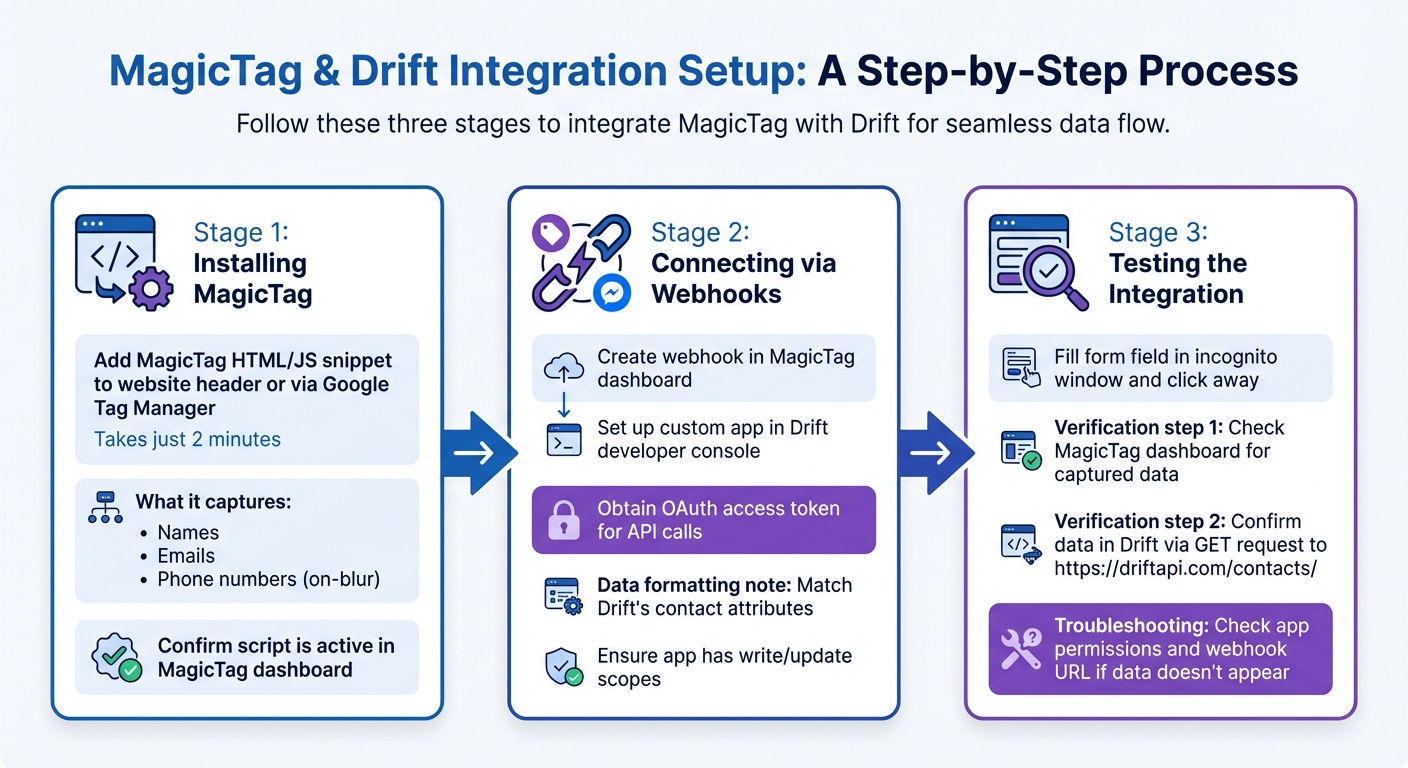
MagicTag and Drift Integration Setup Process
Integrating MagicTag with Drift involves installing the snippet, setting up a webhook, and ensuring the data flow is working smoothly.
Installing MagicTag on Your Website
To get started, add the MagicTag HTML/JS snippet to your website's header or deploy it using Google Tag Manager. The entire setup takes just a couple of minutes. Once active, MagicTag begins capturing user details like names, emails, and phone numbers as they’re typed and the user moves on (on-blur).
"Installed through Google Tag Manager in seconds, and it immediately started tracking names, emails, and phone numbers in real time." - Emily Davis, Entrepreneur
After installation, log into your MagicTag dashboard to confirm the script is active. From there, configure the webhook connection to Drift to enable seamless data syncing.
Connecting MagicTag to Drift via Webhooks
To sync captured data with Drift, create a webhook in the MagicTag dashboard. This webhook will send lead details to Drift as soon as MagicTag captures them. On the Drift side, you’ll need to set up a custom app in the Drift developer console to obtain an OAuth access token for API calls.
Ensure the data - such as email addresses and phone numbers - is formatted to match Drift’s contact attributes before sending it via POST requests. Also, make sure your Drift app has the right permissions (scopes) to write or update contact information. For testing purposes, you can route webhooks to a local server to inspect the data mapping before going live.
Once the webhook is configured, you’re ready to test the integration.
Testing the Integration
After setup, it's time to verify that everything is working as expected. Open your website in an incognito window, fill out a form field, and click away. Then, check the MagicTag dashboard to ensure the data is showing up.
"Watching user data appear in real time is mind-blowing. MagicTag gave us immediate visibility we never had before." - Sarah Thompson, Web Developer
Next, confirm that the data has reached Drift by making a GET request to https://driftapi.com/contacts/ using your OAuth access token. If the data doesn’t appear, double-check your custom app permissions and the webhook Request URL in Drift’s settings. Testing different scenarios - like partial form completions, multiple field entries, or using various browsers - will help confirm the integration is capturing all leads accurately. Ensuring this connection works flawlessly is key to leveraging every captured lead in your recovery strategy.
How to Use MagicTag with Drift
Once you've set up the integration, it's time to leverage MagicTag and Drift to recover leads, automate follow-ups, and engage visitors effectively. Here’s how you can turn collected data into meaningful interactions.
Recovering Leads from Abandoned Forms
MagicTag works by capturing visitor details - like their name, email, and phone number - as they type, even if they don't submit the form. This data is instantly sent to Drift via a webhook, allowing you to re-engage these leads right away. To make the most of this, head to Drift's Playbooks and create a new bot flow targeting contacts tagged with "abandoned_form." Set up engagement rules to trigger a chat pop-up with messages like, "Need help finishing your request?" or "Complete your signup for a free trial?"
This conversational strategy has proven to recover 15-20% of abandoned leads in similar setups. Timing is everything here. If a visitor enters their email but doesn't submit the form, Drift can use that information to send a personalized message within seconds. This quick action keeps leads from slipping away and gives your team another opportunity to turn interest into action.
In addition to immediate recovery, the captured data can also be used for automated follow-ups.
Automating Lead Nurturing Campaigns
MagicTag doesn't just stop at capturing form details - it also pushes this data, including behavior tags, directly into Drift. From there, you can create automated chatbot sequences or email nurturing campaigns. Start by mapping MagicTag data to Drift's custom contact attributes. Then, build Playbook workflows that target specific segments, such as "partial_submit" users or visitors to certain pages.
For example, you can automate drip campaigns for leads based on their actions, ensuring personalized messaging at the right time. This approach can cut manual follow-up efforts by 50%, allowing your team to focus on more critical, high-value conversations while Drift handles the initial touchpoints.
Increasing Conversions with Real-Time Engagement
The combination of MagicTag’s instant data capture and Drift’s live chat capabilities creates a highly effective conversion tool. When MagicTag identifies events like "form_partial", you can set Drift Playbooks to trigger real-time bot responses. Use dynamic fields - like the visitor’s name or the product they were viewing - to make the interaction more personal.
To measure success, track metrics such as time-to-engagement (aiming for under 30 seconds) and recovery rates through Drift Analytics. Tests have shown that live chat routing can boost conversions by 25%, and when paired with account-based data, results can improve by as much as 40%.
sbb-itb-77d5bc3
Tips for Optimizing the Integration
Making the most of your integration is key to turning collected data into actionable insights that drive results.
Managing Data Flow Between Platforms
Start by mapping each MagicTag field to a corresponding Drift attribute. Focus on essential details like first name, last name, email, company, and behavioral tags such as "abandoned_checkout" or "incomplete_demo_request". Use consistent naming conventions and standardize formats for phone numbers and dates to ensure smooth data exchanges between systems.
Test the webhook connection to confirm that custom fields appear in Drift's Contacts within an hour. If you're using Google Tag Manager, double-check that widget IDs and embedded scripts are set up correctly. For websites with heavy traffic, consider upgrading to MagicTag's Business plan ($99/month). This plan allows you to filter and categorize leads based on intent or data type before syncing them with Drift, reducing unnecessary clutter in your database.
Once your data flow is running seamlessly, you can move on to segmentation for more precise engagement.
Segmenting Leads for Better Targeting
With a smooth data pipeline in place, segmenting your leads becomes much easier and more effective. Assign meaningful tags to abandoned leads, such as "high-intent-demo-abandoner" or "low-intent-newsletter-abandoner", and sync these with Drift to create targeted Playbooks.
You can also organize Account Lists or Groups based on criteria like industry, revenue, or where a lead is in their journey. This helps route conversations to the right sales reps. To make interactions feel more personalized, use tokens like the company name or industry in your chat messages.
Tracking and Improving Performance
Keep an eye on lead volume generated from on-blur events compared to traditional form submissions. MagicTag can uncover up to 12x more users than standard forms. To measure success, track how many recovered leads convert into paying customers after engaging with Drift.
Leverage Drift Analytics to monitor key metrics like routing efficiency and engagement rates. Aim to keep the time-to-engagement below 30 seconds from data capture to chat initiation. If certain form fields are frequently abandoned, use this information to refine your form design. Lastly, set up a data pipeline that integrates MagicTag, Drift, and your CRM (like Salesforce). This ensures your sales team has full visibility into each lead's journey, including which forms were abandoned and how they interacted with Drift.
Conclusion
Pairing MagicTag with Drift transforms the way businesses handle lead capture and engagement. MagicTag grabs contact details as soon as a visitor starts typing into a form - even if they don’t hit submit - while Drift steps in with real-time, personalized conversations to turn those incomplete leads into real opportunities. Together, they don’t just recover lost data - they spark immediate, meaningful interactions.
This collaboration tackles one of the biggest challenges in online marketing: form abandonment. By recovering partial form data and enabling instant follow-ups while visitors are still on your site, you create more chances to connect. The smooth transition between data collection and engagement ensures no lead slips through the cracks, giving you more opportunities to convert curious visitors into loyal customers.
What’s even better? The setup is quick and easy. MagicTag starts capturing data right away, syncing seamlessly with Drift to activate tailored conversations based on what your visitors do. This approach not only boosts your contact list but also helps recover lost revenue and speeds up your sales process by re-engaging leads in real time.
Whether you’re running a small business or managing high traffic at an enterprise level, this integration gives you the tools to make sure every potential lead counts. It’s a clear example of how smart automation can take your digital marketing efforts to the next level.
FAQs
How does MagicTag gather form data even if a user doesn’t hit submit?
MagicTag operates with a lightweight script that tracks user input as it happens. When visitors type into form fields - whether it's their name, email address, or phone number - this information is securely captured, even if they navigate away without hitting "submit."
This way, you won't miss out on potential leads. It gives you the chance to reconnect with those visitors and refine your lead recovery strategies.
What are the benefits of using MagicTag with Drift?
Integrating MagicTag with Drift opens up new opportunities to improve how you capture and recover leads. MagicTag's capability to identify and track leads works seamlessly with Drift's conversational marketing tools, allowing you to automate key processes and reconnect with potential customers more efficiently.
This partnership simplifies lead management, boosts recovery rates, and fine-tunes your sales funnel. With access to actionable insights and automated workflows, you can spend more time strengthening customer relationships while getting the most out of your marketing efforts.
How can businesses ensure smooth data syncing between MagicTag and Drift?
To sync data smoothly between MagicTag and Drift, start by ensuring both platforms are correctly set up with their respective API credentials or webhook URLs. Double-check that Drift is configured to handle data fields like email, phone, and company name in standard U.S. formats.
Once that's done, use MagicTag’s webhook or API connector to map the lead data it captures to the appropriate fields in Drift. For example, map "email" to "email" and "phone" to "phone." After configuring the connection, test it by submitting sample form data and confirming that the information appears in Drift in real time.
To keep things running smoothly, regularly review sync logs for errors, adjust field formats if necessary, and conduct periodic audits. These practices will help maintain a reliable, real-time data flow between MagicTag and Drift.