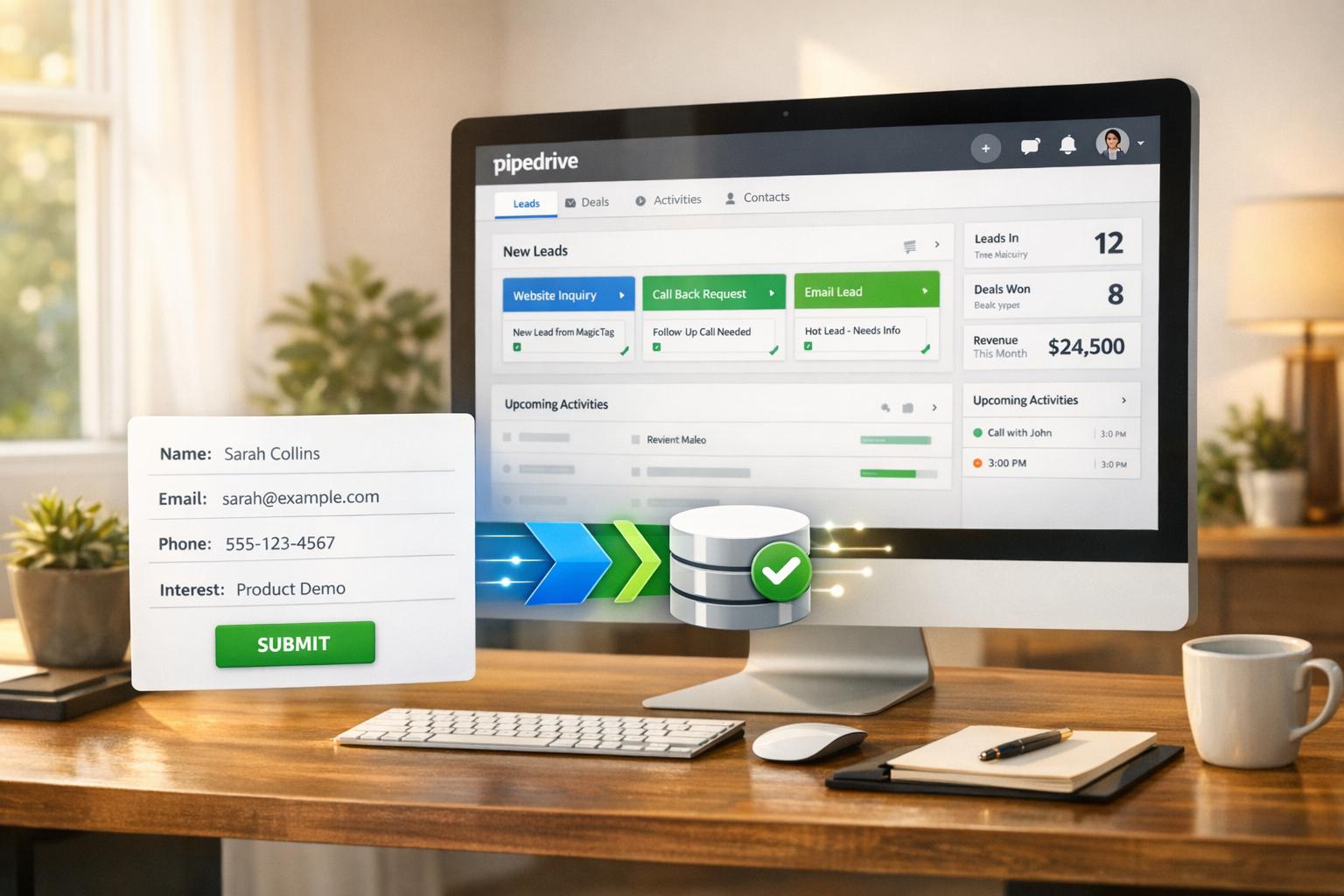
MagicTag helps businesses identify website visitors who leave without completing actions, turning missed opportunities into actionable leads. It captures details like names, emails, and phone numbers in real time, even if forms are abandoned. By integrating with CRMs and adhering to privacy regulations, it streamlines lead recovery and enhances follow-up efficiency.
Key Highlights:
- Real-time data collection: Captures user input as they type, even without form submission.
- CRM integration: Syncs visitor data with tools like HubSpot, Salesforce, and Mailchimp.
- Privacy compliance: Adheres to GDPR, CCPA, and offers user consent controls.
- Lead recovery: Converts incomplete data into usable leads with high accuracy.
- Flexible pricing: Free plan available for up to 1,000 users/month; paid plans start at $19/month.
MagicTag offers a simple setup via a JavaScript snippet or Google Tag Manager, making it accessible for businesses of all sizes. It’s a practical solution to recover leads, track visitor behavior, and boost sales conversions.
How MagicTag Captures and Processes Visitor Data
Real-Time Data Capture from Form Fields
MagicTag operates behind the scenes using a lightweight JavaScript snippet that runs silently on your website. As visitors type into form fields - whether it’s their name, email address, or phone number - the tool captures this information instantly, even if they don’t hit "submit." It works seamlessly without affecting site performance. Beyond form fields, MagicTag identifies anonymous visitors by analyzing their digital footprint, such as referral URLs, page views, and browsing patterns. This data is then matched against an identity graph of over 850 million opt-in contacts to uncover insights.
Installation and Setup Process
Getting started with MagicTag is quick and straightforward - it only takes about five minutes. All you need to do is embed a small JavaScript snippet into your website’s code. For those using a package manager, you can install the magic-sdk dependency via npm by running npm install magic-sdk. After installation, initialize the tool with a publishable API key from your MagicTag dashboard.
During the setup, you’ll map your form fields to custom fields in your CRM or marketing platform. For example, if someone enters "john@example.com" into your contact form, MagicTag ensures that email address is routed directly to the correct field in your system. Additionally, you can configure lead source tracking using UTM codes or custom parameters like ?leadsource=custom to pinpoint where your traffic is originating from. Once installed, you can fine-tune privacy settings to ensure compliance with data protection regulations.
Privacy and Compliance Features
MagicTag prioritizes privacy and adheres to GDPR and CCPA regulations. It uses first-party data collection, meaning all information is gathered directly from users with their knowledge. This approach ensures transparency and aligns with legal requirements.
The platform allows you to control tracking based on user consent. For instance, if a visitor declines cookies through your consent banner, MagicTag respects that choice. Moreover, it employs server-side tagging to safeguard personally identifiable information (PII) and prevent unauthorized sharing with third-party vendors. If your business needs to exclude specific regions from data collection, MagicTag offers geofiltering options to block tracking in certain states or countries.
To maintain compliance, ensure your website includes clear privacy notices where data is collected and provides "Do Not Sell or Share My Personal Information" links to meet CCPA standards. For GDPR, include opt-in checkboxes that are unchecked by default to secure proper consent.
Integrating MagicTag with CRM and Marketing Tools
Connecting MagicTag to Your CRM
MagicTag acts as a bridge between your website and popular CRM systems like HubSpot, Salesforce, ActiveCampaign, Mailchimp, Pipedrive, and Zoho CRM. By leveraging webhooks and APIs, it syncs visitor data - such as names, emails, and company details - directly to your marketing tools in real time. For instance, integrating with HubSpot involves generating a private app to obtain an API key, which you then input into MagicTag. This enables CRM contact registration without the need for developer assistance. Once connected, MagicTag transforms raw data into actionable leads, setting the stage for automated workflows.
How Data Flows and Enables Automation
MagicTag seamlessly transfers visitor data - including company details, acquisition sources, and behavioral insights - straight into your CRM. This real-time integration powers automated tasks like segmentation, follow-ups, and even instant notifications (e.g., Slack alerts) when high-value prospects revisit your site, accelerating the sales process.
"Responding within five minutes can boost qualification rates more than twentyfold, making fast, automated follow-up the difference between a lead and a lost sale." – LeadsBridge
For more advanced setups, MagicTag supports two-way synchronization. This means CRM statuses like "Open Deal" or "Existing Customer" are updated within MagicTag, helping you avoid redundant follow-ups and uncover upsell opportunities when existing clients engage with key pages on your site.
Integration Methods Comparison
MagicTag offers flexible integration options tailored to different business needs, supporting both webhook and direct API methods for real-time data transfer. Here’s a quick comparison:
| Feature | Webhook Integration | Direct API Integration |
|---|---|---|
| Data Transfer | Real-time push (instant) | Real-time or near real-time |
| Setup Complexity | Simple HTTP callback; minimal setup | Typically native plug-and-play |
| Data Direction | Primarily one-way | Often supports two-way synchronization |
| Best Use Case | Instant notifications and real-time alerts | Major CRMs like Salesforce, HubSpot, and Pipedrive |
| Scalability | High – fires only on events | High – handles large data volumes efficiently |
For businesses using custom or niche CRM platforms, tools like Zapier or Make can provide additional flexibility with field mapping, typically in a one-way configuration. To ensure secure data transfer, always use HTTPS for webhook endpoints and include unique identifiers (like a message_id) to prevent duplicate lead records in case a webhook is sent multiple times.
Lead Recovery and Real-Time Tracking with MagicTag
Recovering Leads from Abandoned Forms
MagicTag has a clever way of addressing one of the biggest challenges in online conversions: abandoned forms. It captures data as users type, meaning even if someone doesn’t hit "submit", their information - like a partially entered email or name - is saved. This feature ensures fewer missed opportunities since most website visitors leave without completing forms.
But it doesn’t stop there. MagicTag uses identity resolution to enrich incomplete data. For instance, if a visitor only provides an email address, the system validates and fills in the gaps with an impressive 99% accuracy rate. This turns what would be incomplete and unusable data into actionable leads. Between April and June 2023, Phil Todd, Marketing Director at MotorBiz, saw a 6x increase in SMS subscribers by leveraging MagicTag's Webchat. This tool simplified data collection and automated customer profiles, making it easier to reconnect with past visitors and recover repeat customers. Beyond recovering abandoned leads, MagicTag also offers robust visitor tracking to enhance your lead database.
Real-Time Visitor Tracking Features
MagicTag doesn’t just recover leads - it keeps an eye on visitor activity across your site in real time. It connects page visits and interactions directly to captured lead details, even identifying anonymous visitors. Without requiring a completed form, MagicTag can gather key information like names, email addresses, and phone numbers. This creates a more complete understanding of visitor behavior - whether someone spends time on your pricing page or just skims a blog post, their intent becomes clearer, helping you prioritize follow-ups.
For B2B users, MagicTag takes it further by tracking profile updates, job changes, and social media activity. Custom notifications can alert your team instantly - via Slack or email - when high-value prospects engage with critical pages. Tak Shinta, Manager at Choji Yakiniku, shared how MagicTag helped his restaurant achieve a 15x increase in online booking inquiries in the first half of 2023. By integrating MagicTag’s Webchat, they were able to engage with visitors in real time, converting casual web traffic into confirmed reservations.
"Since integrating with Magic, we were able to grow online bookings through Webchat and saw over 15x increase in web enquiries." – Tak Shinta, Manager, Choji Yakiniku
Lead Recovery and Tracking Benefits
The combination of lead recovery and real-time tracking delivers results you can measure. Rapid response times are crucial - companies that respond to leads within five minutes are 100 times more likely to close the sale compared to those that wait 30 minutes. MagicTag enables lightning-fast follow-ups by instantly pushing captured data to your CRM, ensuring you stay within that critical response window.
Dave Chen, owner of Signature Smile Dental, experienced a 180% increase in online patient leads over just two months in early 2023. By using MagicTag to manage reviews and unify customer communication, his practice improved its Google ranking and converted more website visitors into leads. MagicTag also claims to convert 5 times more cart abandoners compared to traditional methods by identifying users who never even entered their contact details. This approach changes the game - outbound leads can cost 39% more than inbound ones, so recovering traffic that’s already on your site becomes a highly cost-effective strategy.
sbb-itb-77d5bc3
MagicTag Pricing, Plans, and Implementation
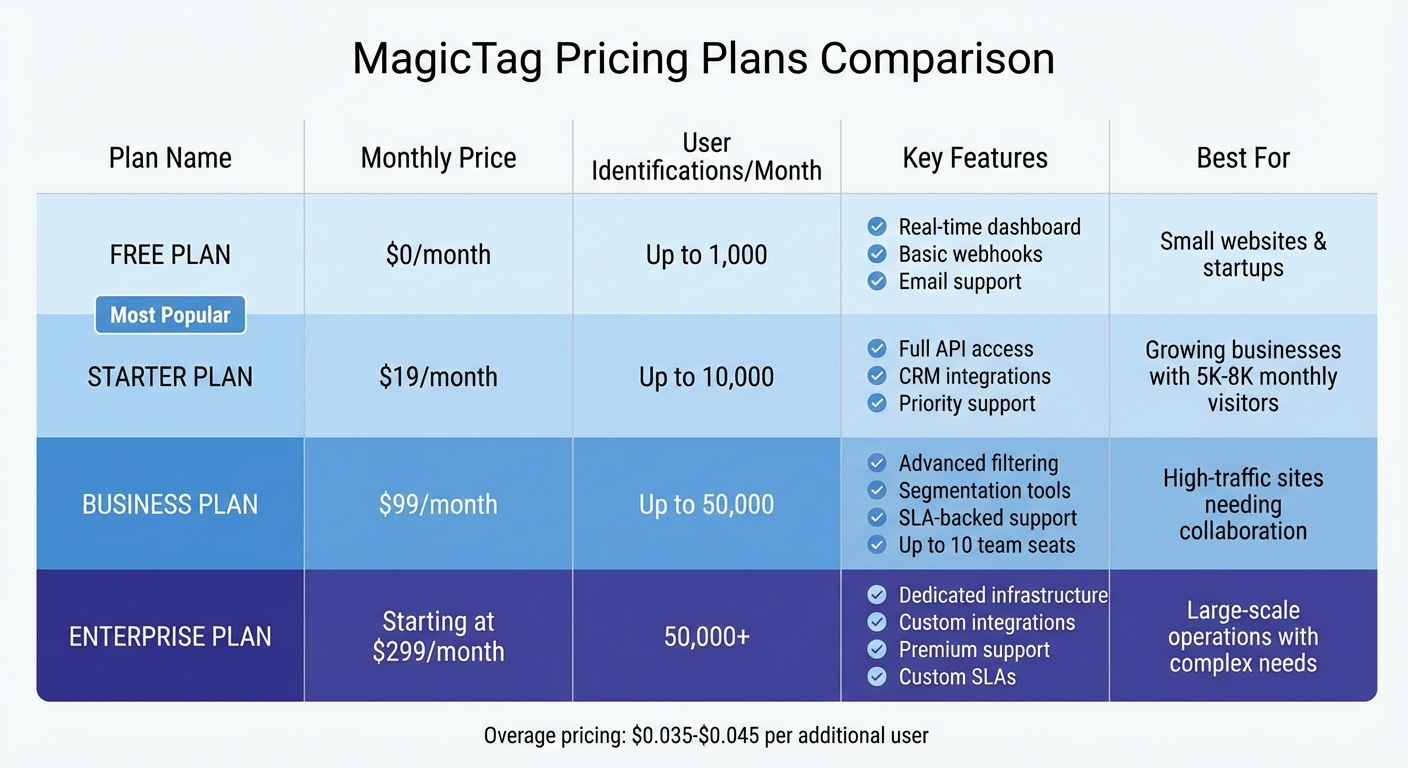
MagicTag Pricing Plans Comparison: Features and Limits by Tier
Pricing Plans and Features
MagicTag offers four pricing tiers designed to meet different visitor identification needs. The Free plan is perfect for small websites or businesses just starting out, allowing up to 1,000 user identifications per month. It includes essential features like a real-time dashboard, basic webhook functionality, and email support - all at no cost.
For growing businesses, the Starter plan is priced at $19 per month and supports up to 10,000 identified users. It adds full API access, CRM integrations, and priority support, making it a great choice for automating lead routing. If your site handles higher traffic, the Business plan, at $99 per month, supports up to 50,000 users and offers advanced filtering, segmentation tools, and SLA-backed support. For large-scale operations, the Enterprise plan begins at $299 per month, catering to organizations managing over 50,000 users. This plan includes dedicated infrastructure, custom integrations, and premium support.
If you exceed your plan's monthly limit, additional identifications cost between $0.035 and $0.045 per user. However, frequent overages might indicate it's time to upgrade to a higher plan, which could be more cost-effective in the long run.
Selecting the Right Plan for Your Business
To choose the best plan, start by estimating your monthly visitor count and how many interact with your forms. If you're running a small e-commerce site or just starting with lead recovery, the Free plan is an excellent entry point, accommodating up to 1,000 identifications. For businesses with steady growth and traffic between 5,000 and 8,000 visitors per month, the Starter plan offers enhanced CRM automation and priority support.
Companies with higher traffic or advanced needs, such as white-labeled widgets and custom email templates, might find the Business plan ideal. It also includes up to 10 team seats, enabling seamless collaboration between sales and marketing teams. For organizations with complex requirements, such as custom service-level agreements or ultra-low transaction-based pricing (as low as $0.001 per transaction), the Enterprise plan provides the flexibility and resources needed.
Steps to Implement MagicTag
After selecting the right plan, setting up MagicTag is straightforward. Install the MagicTag script using Google Tag Manager (GTM), then connect it to your CRM via webhooks or API to start capturing data immediately. The system automatically identifies key fields like name, email, and phone number, capturing data the moment a visitor moves to the next field - even if they abandon the form.
"Installed through Google Tag Manager in seconds, and it immediately started tracking names, emails, and phone numbers in real time." – Emily Davis, Entrepreneur
Assign team access based on your chosen plan, ensuring both sales and marketing teams can act quickly on recovered leads. This efficient setup allows you to start recovering lost leads right away. Track your success by monitoring the cost of recovered leads and improvements in conversion rates. On average, MagicTag users report a 39% increase in conversions and up to 12 times more identified users compared to standard tracking methods.
Conclusion
Why MagicTag Stands Out
MagicTag redefines how businesses identify and engage with website visitors by uncovering the 98% of anonymous traffic that often goes unnoticed. It captures critical details - like names, emails, and phone numbers - in real time as visitors type, helping businesses recover potential customers who abandon forms or browse without taking action. This approach tackles the 70% cart abandonment rate faced by many e-commerce platforms, enabling businesses to launch highly targeted remarketing campaigns that lower cost-per-click.
With integrations across more than 80 CRM platforms - including HubSpot, Salesforce, and Mailchimp - MagicTag ensures sales teams receive instant updates when high-value leads visit key pages, such as pricing or product details. Quick follow-ups matter: companies that respond to leads within five minutes are 100 times more likely to secure a sale than those that wait 30 minutes. MagicTag automates this process, eliminating manual tasks so your team can focus on closing deals.
Case studies highlight the tool's impact, with users reporting up to 12 times more identified visitors, translating into better lead recovery and stronger marketing ROI. These results underscore the immediate value MagicTag can bring to your business.
How to Get Started
MagicTag offers a Free plan that supports up to 1,000 user identifications per month - perfect for businesses looking to test the waters without any upfront cost. Installation is quick and easy through Google Tag Manager, requiring no developer assistance. For businesses with higher traffic, the $19/month Starter plan expands capabilities with API access and CRM integrations, supporting up to 10,000 users.
Whether you're managing a small online store or handling enterprise-level traffic, MagicTag provides flexible pricing options to fit your needs. Visit magictag.ai to explore plans or contact the team for customized enterprise solutions, including dedicated infrastructure and premium support.
FAQs
How does MagicTag comply with privacy laws like GDPR and CCPA?
MagicTag is built with privacy-first principles, ensuring it aligns with regulations like GDPR and CCPA. From the moment data is collected, it’s safeguarded through encryption - both during transfer and at rest - processed in secure environments, and stored in systems that meet compliance standards.
The platform includes clear, jurisdiction-specific cookie consent notices, making it easy for visitors to opt out. Personal data is only retained when users provide explicit consent, adhering to GDPR’s lawful basis and CCPA’s opt-out requirements. MagicTag also provides tools for businesses to efficiently handle data requests, such as locating, exporting, or deleting user information to meet legal obligations.
With robust encryption, secure storage, transparent consent processes, and efficient data management tools, MagicTag enables businesses to gain insights while maintaining full compliance with privacy laws.
How does integrating MagicTag with my CRM benefit my business?
Integrating MagicTag with your CRM takes the hassle out of managing leads by automatically syncing detailed visitor data straight into your system. When someone visits your website, MagicTag identifies them and enriches their profile with essential details - like their name, company, and contact information. It then updates or creates a record in your CRM instantly.
This means no more manual data entry, fewer mistakes, and quicker access to qualified leads for your sales team. Plus, with pre-scored and segmented data, you can focus on high-value prospects, kick off automated workflows, and speed up follow-ups. The result? Faster outreach, better conversion rates, and a smoother sales process.
How does MagicTag help recover leads from abandoned website forms?
MagicTag makes sure you don’t lose potential leads, even when visitors abandon forms on your website. Powered by advanced AI, it identifies visitors the moment they arrive on your page and pulls key details - like name, email, and phone number - from its opt-in database. And here’s the best part: it does this even if they never click “Submit.” These details are instantly sent to your CRM, so you can respond quickly and stay ahead.
By adding the MagicTag script to your form pages, you activate abandoned-form tracking. It matches the captured data fields with your CRM, ensuring seamless integration. If a visitor leaves without completing their form, MagicTag marks the interaction as high-priority. From there, it can kick off actions like sending automated emails, running retargeting ads, or notifying your sales team. This smart system helps you recover the 70% of potential customers who typically leave forms unfinished, transforming lost chances into real opportunities.