Over 67% of visitors abandon online forms, and most never return. That’s a massive missed opportunity for businesses. MagicTag offers a simple solution: it saves user input in real-time - even if the form isn’t submitted. This data is sent directly to your CRM, allowing you to follow up with leads before they go cold.
Here’s what you need to know:
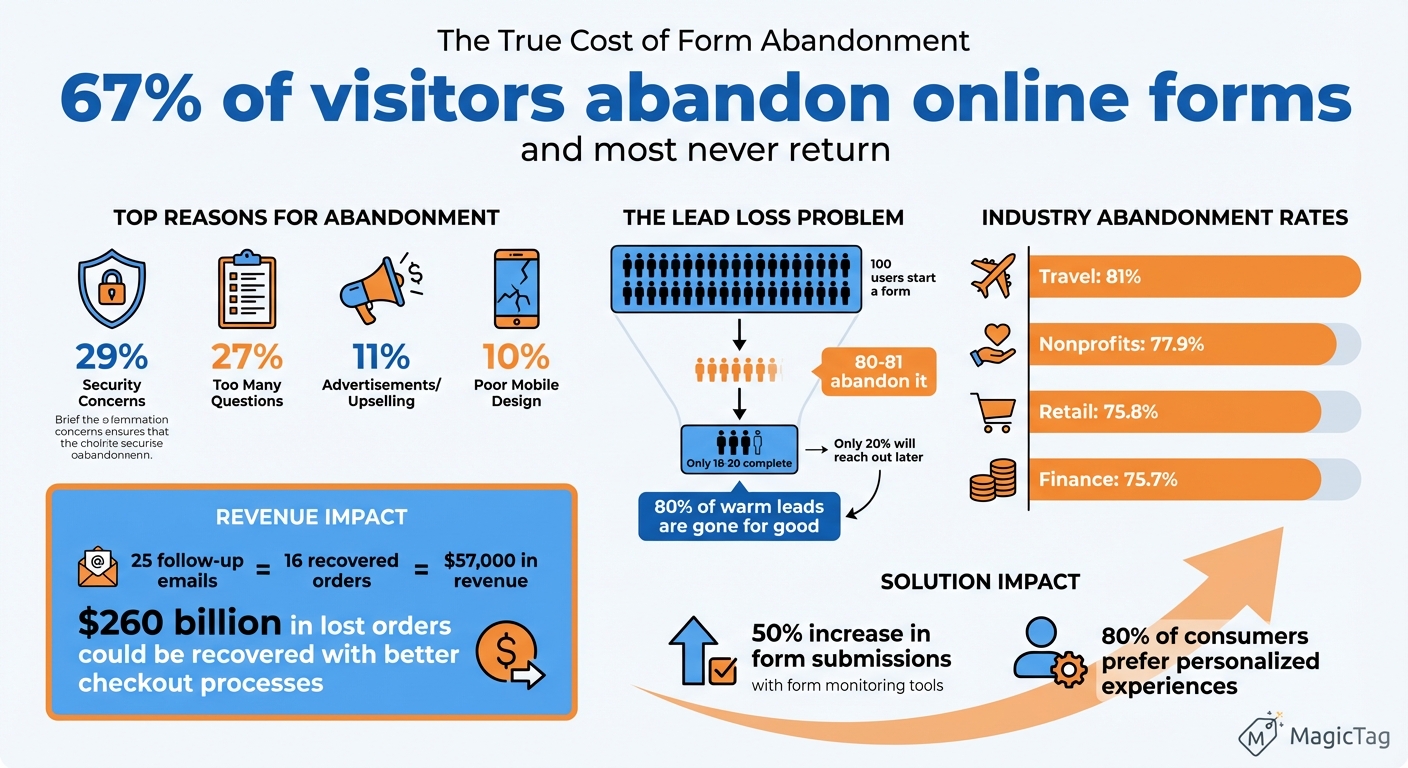
- Why forms get abandoned: Security concerns (29%), too many questions (27%), and poor mobile design (10%) are top reasons.
- The cost of abandonment: For every 100 users, 80 leave without completing the form. This can mean thousands in lost revenue.
- How MagicTag helps: It tracks partial form entries, identifies where users drop off, and automates follow-ups to recover leads.
- Who benefits: Marketers, small businesses, SaaS, and B2B companies can all recapture lost leads with minimal setup.
MagicTag integrates with tools like HubSpot and Mailchimp, offering plans from free to enterprise-level. By recovering abandoned forms, you can boost conversions without increasing ad spend.
Form Abandonment Statistics and Impact on Business Revenue
The Impact of Form Abandonment
Why Users Abandon Forms
One of the biggest reasons people abandon forms is security concerns - 29% of users walk away because they don't feel safe sharing their information. If your form doesn’t show HTTPS or lacks clear privacy statements, trust goes out the window. Next up is form length: 27% of users leave because of too many questions. When a form feels like a never-ending chore, people simply quit.
Another issue is mobile usability, which accounts for 10% of form abandonment. Forms that aren’t mobile-friendly - like those with tiny buttons or unresponsive designs - can frustrate users, especially since mobile traffic now dominates the web. On top of that, technical hiccups such as slow loading times, glitches with ReCAPTCHA, or clunky field validation can push abandonment rates as high as 87%.
Certain fields are also dealbreakers. For instance, 37% of users abandon a form if a phone number is required. Making that field optional can nearly double the number of completions. Other issues, like unnecessary questions or intrusive ads and upsell offers, create friction and drive users away.
| Reason for Abandonment | Percentage of Users |
|---|---|
| Security Concerns | 29% |
| Form Length/Too Many Questions | 27% |
| Advertisements or Upselling | 11% |
| Lack of Mobile Responsiveness | 10% |
Calculating Lead and Revenue Loss
Form abandonment can drain your leads and revenue. 81% of users have abandoned an online form after starting to fill it out. For every 100 people who begin a form, only 18-20 complete it, leaving over 80 potential leads lost. Abandonment rates differ by industry: travel leads at 81%, nonprofits at 77.9%, finance at 75.7%, and retail at 75.8%.
The financial impact can be staggering. To calculate your losses, multiply the number of abandoned entries by the average value of a lead. Here’s an example: In July 2021, Norwegian cruise line Hurtigruten launched a manual email remarketing campaign targeting customers who had started booking trips but hadn’t completed payment. By sending just 25 follow-up emails, they recovered 16 orders, bringing in $57,000 in revenue.
But here’s the catch - only 20% of users who abandon a form will reach out to the company later. That means 80% of warm leads are gone for good unless you have a way to capture their data before they leave. Implementing proven methods to recover abandoned form leads can help bridge this gap. This highlights a major flaw in traditional tracking methods: they often fail to collect the data you need to close the gap.
Why Standard Methods Don't Work
Recovering abandoned leads requires a broader perspective - something traditional methods just don’t deliver. To understand the revenue you’re losing, you need to examine why conventional tracking tools fall short.
Most traditional tools, like Google Analytics, don’t track form abandonment. They only monitor successful "Thank You" page visits, which means you lose visibility as soon as a user quits mid-form.
"Traditional analytics such as Google Analytics are completely blind to form abandonment: you have no way of knowing when a potential lead abandons your forms if you're just using standard in-page analytics." - Insiteful
On top of that, standard forms only save data when the "Submit" button is clicked. If a user exits before submitting, all the information they’ve entered is gone. Without best practices for tracking abandoned forms to identify which specific fields cause drop-offs, you’re left guessing.
While it’s possible to implement partial entry tracking with tools like Google Tag Manager (GTM) and GA4, it’s not easy. This process involves complex coding, custom event tags, and detailed configurations - making it inaccessible for many businesses. And even if you set it up, many of these methods rely on cookies, which are becoming less reliable with modern browsers. Without real-time data capture, businesses miss their chance to follow up while the lead is still fresh.
How MagicTag Recovers Abandoned Leads
Real-Time Data Capture
MagicTag is designed to track user interactions with your forms in real time. By deploying JavaScript listeners, it monitors every keystroke and selection users make in standard form elements like input fields, text areas, and dropdown menus. This allows the script to capture crucial details - such as names, emails, and phone numbers - before the form is even submitted. It also maps the sequence of entries to pinpoint where users abandon the form. If a visitor leaves the page, a beforeunload event sends the collected data directly to your CRM system.
"Post-form abandonment tracking is the process of monitoring when a user starts filling out a web form but does not complete or submit it... this technique focuses on partial engagement, capturing user input, behavior, and intent before abandonment occurs." - Margub Alam, Digital Marketer
This real-time data capture enables businesses to act quickly, reaching out to leads before they go cold.
Installation and Setup
Getting started with MagicTag is simple; follow our form analytics checklist to add a lightweight JavaScript snippet to your site. To ensure accurate tracking, forms must use standard <form> tags with unique "name" attributes. For the best results, place key fields like email or phone number at the top of your form - this increases the likelihood of capturing contact information even if users don’t complete the entire form. MagicTag works seamlessly across major browsers, including Chrome, Firefox, Edge, and Opera.
Data Privacy and Compliance
Because MagicTag collects sensitive contact information, it prioritizes privacy and security. The platform adheres to major data protection laws, including GDPR and CCPA, and uses "Legitimate Interest" as its legal basis for processing business contact details in B2B scenarios. All data is encrypted during transmission and storage, with additional safeguards like strict access controls and regular security audits.
"For business contact information, we often rely on legitimate interest as our legal basis for processing, as such processing is a standard and expected practice in the B2B context and necessary for the functioning of the business ecosystem." - LeadMagic, Inc.
Users can request access to their data, make corrections, or ask for deletion. For California residents, MagicTag provides a "Do Not Sell or Share My Personal Information" option and respects the "Right to Know" about the data it collects. When transferring information from the EEA or UK to the U.S., the platform ensures compliance by using standard contractual clauses (SCCs) to maintain high levels of data protection.
Setting Up MagicTag for Lead Recovery
Integration Steps
To get started, install the magic-sdk package via your terminal:
npm install magic-sdk
Once the installation is complete, initialize Magic using your publishable API key, which you can find in the MagicTag dashboard:
const magic = new Magic('PUBLISHABLE_API_KEY');
For smoother page performance, enable the deferPreload flag by setting it to true in the constructor. This ensures assets only load when needed. To maximize data collection, place essential fields at the top of your forms.
Make sure to test your setup on all major browsers to confirm consistent functionality. Afterward, integrate the captured data with your CRM and marketing tools for streamlined lead management.
Connecting to CRM and Marketing Tools
MagicTag works seamlessly with U.S.-based platforms like HubSpot, Salesforce, Mailchimp, and Klaviyo. You can connect these tools using direct API integrations or automation platforms. Use Magic's Auth Module methods, such as loginWithEmailOTP or loginWithSMS, to verify contacts in real time. Once verified, the data is automatically sent to your CRM via webhook or API.
For teams without engineering resources, MagicTag offers a no-code Chrome extension to simplify the process. Open your lead form and the corresponding CRM record in separate tabs, then type "//" in an empty CRM field to transfer labeled data directly from the form. This approach eliminates the need for API setups and works across platforms like Google Analytics, Hotjar, and Marketo. To ensure accurate data mapping, create custom labels for key points such as "Lead Interest" or "Ad Campaign".
Automating Lead Recovery
Once your data integration is in place, automate follow-ups to re-engage leads who didn’t complete the process. With the Messaging Automations feature, you can set up email or SMS templates that pull information from partially completed forms. For example, if a visitor provides their email but exits before requesting a demo, you can trigger a personalized message within 24 hours offering help or an incentive.
Save commonly used text snippets as shortcuts to help your sales team respond quickly without typing everything manually. Additionally, combine the data from your forms with retargeting campaigns on platforms like Facebook and Google Ads. This allows you to display personalized ads to visitors who didn’t convert. Research shows that 80% of consumers are more likely to make a purchase when brands deliver tailored experiences, making these automations a powerful tool for recovering leads effectively.
sbb-itb-77d5bc3
Improving Conversions with MagicTag Data
Identifying and Fixing Form Problems
MagicTag tracks every keystroke and interaction in real time, helping you spot where users run into trouble. It highlights the fields that cause hesitation, validation errors, or even lead to users abandoning the form altogether. For instance, if users seem stuck on a particular field - clicking or typing repeatedly without moving forward - that’s a clear sign of friction.
Complicated forms can drive visitors away for good. If you notice a large number of users dropping off midway, it might mean your form is too long. Breaking it into smaller, multi-step sections with progress indicators can make it feel less overwhelming. On the other hand, if users abandon the form at sensitive fields like phone numbers or payment details, adding security badges and clear privacy policies can help build trust.
MagicTag can also reveal if text-heavy fields are discouraging users. Swapping open-ended text boxes for dropdown menus, radio buttons, or checkboxes can make the process easier and faster. Research shows that $260 billion in lost orders could be recovered simply by improving checkout processes.
| Common Form Issue | Data Signal from MagicTag | Recommended Fix |
|---|---|---|
| Form is too long | High drop-off at mid-point fields | Use a multi-step layout or remove extra fields |
| Confusing labels | Hesitation or excessive time on fields | Rephrase labels or add placeholder examples |
| Validation errors | Repeated interactions without progress | Add real-time inline validation |
| Lack of trust | Abandonment at sensitive fields | Include security badges and privacy links |
| Poor mobile experience | High mobile abandonment rates | Use responsive design and larger tap targets |
Once problem areas are identified, the next step is reaching out to these users with targeted follow-ups.
Creating Targeted Follow-Ups
Even if users don’t complete the form, MagicTag captures partial data that can fuel personalized recovery efforts. Segment abandoned leads based on how far they got and the details they provided. For example, tailor your follow-up differently for someone who abandoned at the pricing stage versus someone who stopped at payment.
Most abandoned leads won’t re-engage on their own, so timely outreach is key. Use the captured data - like their name or expressed interests - in your email subject lines to grab their attention. For users who dropped off at high-intent fields like payment, offering a discount code or free trial can encourage them to come back. Recovery emails sent within 24 hours are particularly effective at keeping your brand fresh in their minds.
Expanding beyond email can also boost results. Automated push notifications or direct callbacks for users who nearly completed the form can increase conversion chances. In fact, research shows that 80% of consumers are more likely to purchase when they feel the experience is personalized.
After setting up follow-ups, the next step is measuring their impact on your bottom line.
Measuring ROI
To calculate ROI, compare the value of recovered leads to the cost of using MagicTag. Here’s a simple formula:
Number of recovered leads × Lead-to-Customer Conversion Rate × Average Contract Value = Recovered Lead Value
For example, if you recover 50 leads per month, convert 10% of them into paying customers, and your average contract value is $2,000, you’re looking at $10,000 in recovered revenue monthly.
Businesses using form monitoring tools often see a 50% increase in form submissions. For SaaS companies, where form conversion rates can be as low as 2.4%, reducing friction could boost revenue by 10% to 15% - all without spending extra on ads.
Track key metrics like form completion rates, cost per lead, and total revenue from form submissions before and after implementing MagicTag. Even small businesses can get started with MagicTag’s Free plan, which supports up to 1,000 users per month at no cost. It’s a simple way to start seeing results right away.
MagicTag Pricing and Plans
Plan Comparison
MagicTag offers four pricing tiers designed to accommodate different business sizes and user volumes. The Free plan is perfect for small businesses or those testing the platform, supporting up to 1,000 identified users per month. It includes access to a real-time dashboard, basic webhook functionality, and email support - everything you need to start recovering abandoned form leads right away.
The Starter plan, priced at $19 per month, supports up to 10,000 users monthly. This plan provides full API and webhook access, seamless CRM integrations, and priority support. It’s an excellent choice for early-stage teams that require more advanced automation capabilities.
For businesses managing higher traffic, the Business plan at $99 per month handles up to 50,000 users. It introduces high-volume data pipelines, advanced filtering and segmentation tools, and SLA-backed support. This plan is ideal for scaling companies that need to manage thousands of form interactions efficiently.
Finally, the Enterprise plan is tailored for organizations processing over 50,000 users monthly. Starting at $299 per month, it offers dedicated infrastructure, custom integrations tailored to your unique tech stack, and premium support to ensure smooth operations.
| Plan | Monthly Price | User Limit | Key Features |
|---|---|---|---|
| Free | $0 | 1,000 users | Real-time dashboard, basic webhook, email support |
| Starter | $19 | 10,000 users | Full API + webhook, CRM integrations, priority support |
| Business | $99 | 50,000 users | High-volume pipelines, advanced filtering, SLA support |
| Enterprise | $299 | 50,000+ users | Dedicated infrastructure, custom integrations, premium support |
These tiers ensure flexibility and scalability, aligning with MagicTag's robust lead recovery features.
Calculating Expected Returns
With form abandonment vs. lead loss rates reaching up to 75%, even small improvements in lead recovery can have a big impact on revenue. MagicTag’s real-time data capture and automated follow-ups are designed to re-engage users and turn abandoned interactions into meaningful opportunities. By improving recovery rates, businesses can see noticeable returns over time, turning potential losses into valuable customer conversions.
Scaling with Business Growth
As your business grows, it’s crucial to choose a plan that matches your increasing traffic and lead volume. MagicTag’s higher-tier plans ensure you can handle more users without missing opportunities. For instance, the Business plan’s advanced filtering and segmentation tools allow you to focus on high-intent leads - such as users who almost completed a checkout - while deprioritizing less promising interactions. This targeted approach helps your team concentrate on leads most likely to convert.
For larger enterprises, the Enterprise plan provides custom integrations that seamlessly connect with proprietary systems, along with dedicated infrastructure to handle peak traffic. Premium support and SLA guarantees ensure that your lead recovery system remains reliable, even during high-demand periods. This ensures you maximize revenue from every form interaction, no matter how large your user base grows.
Conclusion: Converting Form Abandonment Into Revenue
Form abandonment doesn’t have to mean lost revenue. With abandonment rates soaring up to 75%, each recovered lead presents a real chance to grow your revenue without increasing your ad spend. MagicTag’s real-time data capture ensures you maintain contact with potential customers - even if they don’t hit "Submit." Pairing this with automated follow-ups allows MagicTag to transform missed opportunities into tangible revenue.
The numbers speak for themselves: re-engaging an abandoned lead costs significantly less than acquiring brand-new traffic. By pinpointing where users drop off - whether it’s a confusing field, a security hesitation, or an overly long form - you can fine-tune your forms and recapture leads from your existing audience. Businesses using form monitoring tools have reported up to a 50% jump in form submissions, proving that the right tools can make a direct impact on your conversions.
MagicTag grows alongside your business, helping you make the most of every lead, no matter your traffic volume. Recovered prospects enter your sales funnel with the context your team needs to close deals effectively. Turning abandoned forms into opportunities is essential, and MagicTag ensures no chance is wasted. By optimizing your form strategy with MagicTag, every interaction becomes a step toward increasing your profitability.
FAQs
How does MagicTag securely collect user data while protecting privacy?
MagicTag gathers user data using first-party, consent-based methods that put privacy front and center. When someone begins filling out a form, MagicTag only records partial information after they’ve given clear consent. This approach avoids the use of third-party cookies or hidden client-side scripts, ensuring a more secure and transparent process.
To protect sensitive details, MagicTag employs automatic data-scrubbing and masking techniques. This means personal information like Social Security numbers or credit card details is either redacted or removed, leaving only the essential lead information securely stored.
All collected data is classified as first-party information and undergoes encryption both during transmission and while stored. With a server-side setup, MagicTag keeps raw inputs in a controlled, secure environment. This design not only complies with U.S. privacy laws but also supports effective lead recovery without compromising security.
How can I reduce form abandonment on my website?
To reduce form abandonment and recapture potential leads, focus on creating a seamless and user-friendly experience. Here’s how:
- Keep it simple: Ask only for the most essential details, like a name and email address. The less effort required, the more likely users are to complete the form.
- Optimize for mobile: Design forms that are easy to fill out on any device. Use large input fields, responsive layouts, and ensure quick loading times.
- Build confidence: Include privacy statements, security badges, and SSL padlocks to assure users their data is protected.
- Highlight your CTA: Use action-driven phrases like “Get My Quote” and make the button visually distinct to draw attention and encourage interaction.
- Guide users in real-time: Implement inline validation and provide clear instructions to help users avoid errors and move through the form smoothly.
You can also track incomplete submissions and follow up with a reminder email or notification within 24 hours. This proactive approach can boost completion rates and help turn missed opportunities into conversions.
How do I connect MagicTag to my CRM system?
MagicTag simplifies connecting with your existing CRM system through its no-code Integration Hub. With ready-to-use connectors for platforms like Salesforce and HubSpot, setting up is a breeze. All you need to do is select your CRM from the app directory, log in with your credentials, and map key fields - such as name, email, and phone - so they align with your CRM’s structure. After setup, MagicTag takes over, syncing recovered leads to your CRM in real-time and eliminating the hassle of manual data entry.
If you have more complex requirements, MagicTag also offers custom data automation. You can set up triggers (like a form submission) and actions (like sending data to your CRM) without needing to write a single line of code. Additionally, the Auto Form Filler feature enriches incomplete data directly in your CRM, saving you time while improving accuracy. These features make it easy to integrate MagicTag into your workflows and efficiently recover abandoned leads.