MagicTag integrates with Klaviyo to help e-commerce businesses recover lost leads and boost sales. It works by collecting customer data in real time as users interact with forms or abandon carts, then syncing this data with Klaviyo for automated email and SMS campaigns. This setup eliminates manual data entry and simplifies workflows, saving teams time and effort.
Key Features:
- Automatically collects form data (e.g., name, email, product preferences) before submission.
- Syncs data with Klaviyo to trigger personalized marketing campaigns.
- No coding required - use MagicTag's Chrome extension or webhooks for seamless integration.
- GDPR-compliant when configured with explicit opt-in consent.
Steps to Get Started:
- Create accounts with MagicTag and Klaviyo.
- Add MagicTag's script to your website to start collecting data.
- Set up a webhook to transfer data to Klaviyo.
- Build Klaviyo lists and automate recovery flows for abandoned carts or browse events.
Results You Can Expect:
- Save time by automating data collection and campaign setup.
- Recover up to 12x more abandoned carts with personalized, timely follow-ups.
- Increase revenue with targeted email and SMS campaigns.
This guide explains how to install MagicTag, connect it to Klaviyo, and optimize your campaigns using segmentation, A/B testing, and analytics.
What You Need Before Starting
Required Accounts and Tools
To get started, you'll need three key things: a MagicTag account, a Klaviyo account (with an API key), and a website with lead capture forms.
MagicTag offers a free plan that supports up to 1,000 users per month, while their paid plans start at $19/month for up to 10,000 users. Klaviyo's pricing, on the other hand, depends on the size of your contact list and the volume of emails or SMS messages you send.
To make things easier, you can use MagicTag's Chrome extension to transfer data directly to Klaviyo without needing any coding or API setup. All you have to do is label your data fields (like Customer Name or Email Address) and use the "//" command to send the information to Klaviyo.
GDPR Compliance Considerations
Before you begin collecting visitor data, it's critical to ensure compliance with privacy regulations like GDPR. Under GDPR, your business is classified as the "Data Controller", while Klaviyo acts as the "Data Processor". This means you’re responsible for having a valid reason to collect personal data and should limit your collection to only what’s necessary for your marketing efforts.
Switch from using opt-out consent to explicit opt-in consent. For example, your lead capture forms should include clear, unticked checkboxes that require users to actively agree to receive marketing communications. Additionally, update your website's privacy policy to inform visitors that MagicTag and Klaviyo are used for data collection and automation. You should also provide an option for users to delete their data upon request.
Klaviyo stores customer data in the United States, specifically in AWS-East-1, and uses the EU-U.S. Data Privacy Framework or Standard Contractual Clauses for international data transfers. To stay compliant, ensure you have a signed Data Processing Agreement (DPA) with Klaviyo, which is usually included in their Terms of Service. Keep in mind, non-compliance with GDPR can result in hefty penalties - up to €20 million or 4% of your annual global turnover, whichever is higher.
How to Connect MagicTag with Klaviyo
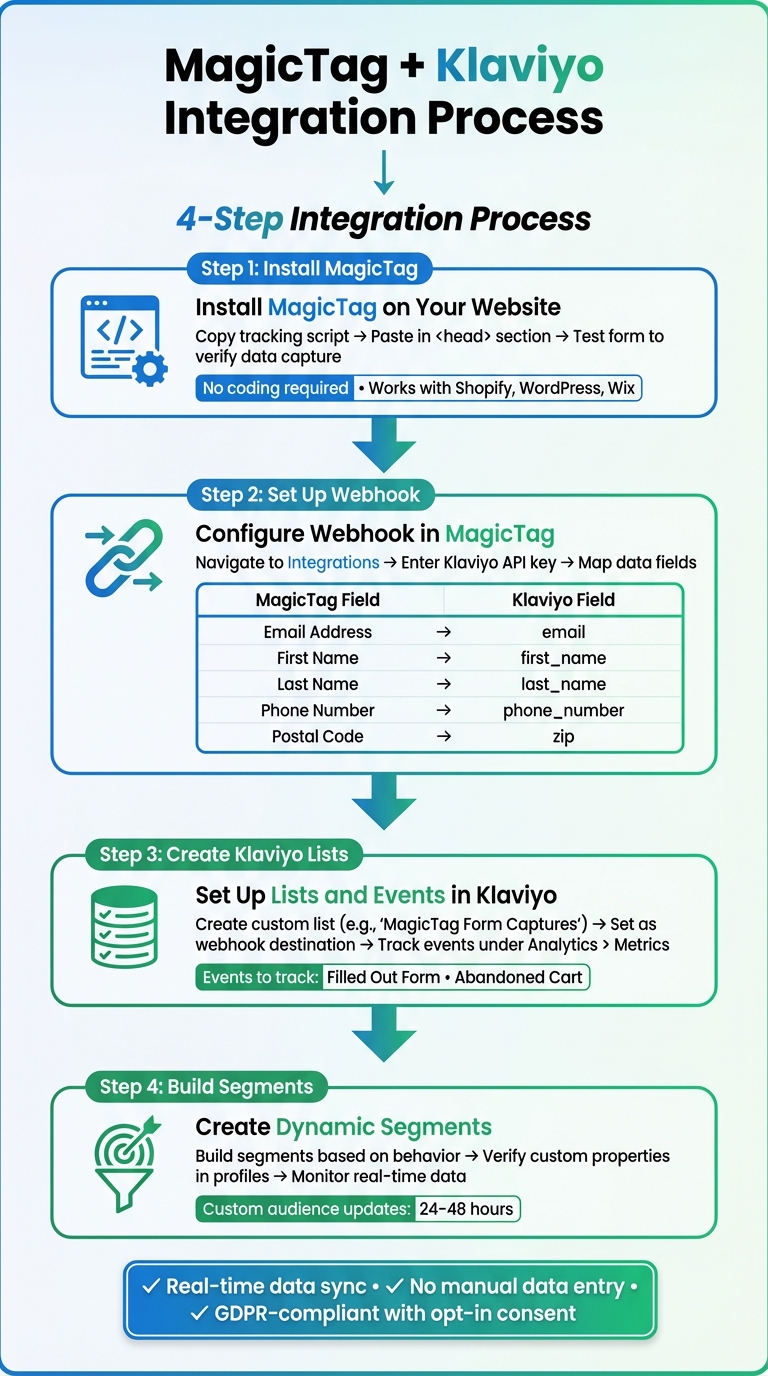
How to Connect MagicTag with Klaviyo in 4 Steps
Installing MagicTag on Your Website
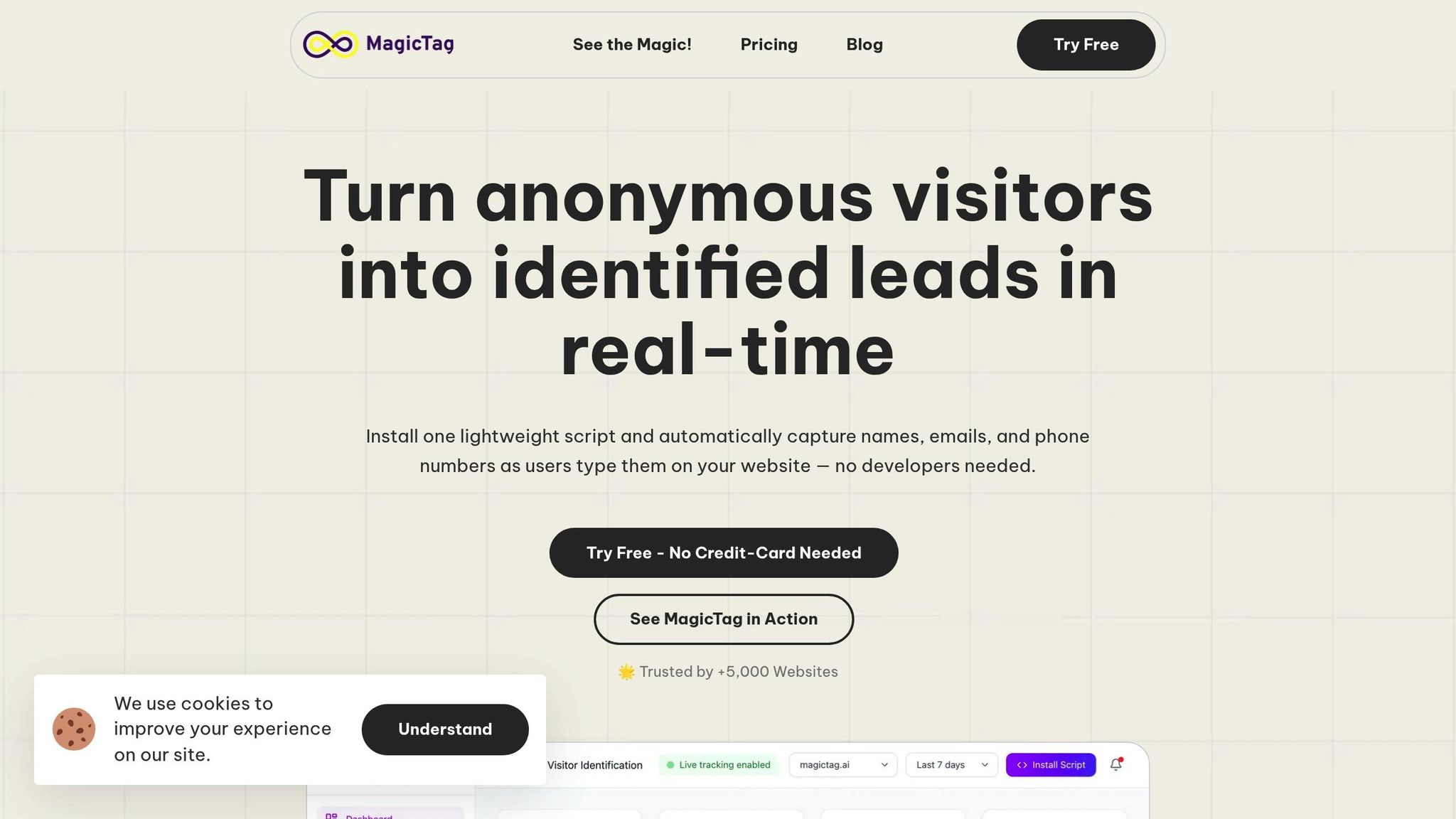
Getting MagicTag up and running on your website is quick and doesn’t require a developer. This lightweight script collects visitor data in real time, capturing details as users type into form fields.
Start by logging into your MagicTag dashboard. Head to the installation section to find your unique tracking script. Copy the script and paste it into your website's <head> section, just before the closing </head> tag. If you’re using platforms like Shopify, WordPress, or Wix, you can use their custom code sections to add the script.
Once installed, the script begins capturing form interactions immediately. To confirm everything’s working, test a form on your site. If the setup is correct, the data should appear in your MagicTag dashboard right away.
After verifying the installation, the next step is to set up a webhook to enable data transfer.
Setting Up a Webhook in MagicTag
Once MagicTag is successfully capturing data, you’ll need to create a webhook to send that data to Klaviyo. In your MagicTag dashboard, navigate to the Integrations or Webhooks section and create a new webhook. Enter your Klaviyo API key, which you can find under Account > Settings > API Keys in Klaviyo.
When mapping fields, use standardized, lowercase labels to ensure seamless integration. For example:
| Field Type | Klaviyo Label |
|---|---|
| Email Address | email |
| First Name | first_name |
| Last Name | last_name |
| Phone Number | phone_number |
| Postal Code | zip |
After mapping the fields, save your webhook configuration. From then on, MagicTag will automatically send lead data to Klaviyo whenever someone interacts with a form on your site.
Creating Klaviyo Lists and Events
With your webhook active, it’s time to organize the incoming data in Klaviyo. Start by setting up custom lists and events. MagicTag will appear as a custom event source in Klaviyo, and you can track events like "Filled Out Form" or "Abandoned Cart" under Analytics > Metrics. Use MagicTag as the source filter to monitor these events in real time.
To manage your leads effectively, create a dedicated list in Klaviyo for MagicTag data. Navigate to Lists & Segments, click Create List, and choose a clear name like "MagicTag Form Captures" or "Abandoned Cart Leads." When configuring your webhook in MagicTag, set this list as the destination for new profiles. If double opt-in is enabled, remember that profiles will only be added once users confirm their subscription via email.
For even better targeting, build dynamic segments based on custom properties or user behavior. For instance, you could create a segment for visitors who’ve viewed a specific product page multiple times without adding it to their cart. To ensure accuracy, check individual profiles in Klaviyo to verify that form responses are recorded as custom properties. While lead-capture events are typically tracked instantly, custom audience updates may take 24–48 hours to process. Keep this in mind when analyzing your data.
Setting Up Abandoned Cart Recovery Flows
Once you've integrated your tools, it's time to focus on strategies to bring back those shoppers who leave items behind in their carts.
Triggering Flows with MagicTag Events
MagicTag uses server-side tracking to trigger Klaviyo flows, capturing data that traditional client-side scripts might miss. This means you can catch more abandoned carts, even from shoppers who leave before standard tracking kicks in.
To set up these flows, use three key server-side events: "Viewed Product – MagicTag SS" for browse abandonment, "Added to Cart – MagicTag SS" for cart abandonment, and "Begin Checkout – MagicTag SS" for checkout abandonment.
Here’s how to get started:
- Clone your existing client-side flows.
- Update the triggers to the corresponding MagicTag server-side events.
- Add profile filters to avoid sending duplicate emails.
For browse abandonment flows, include filters like "Placed Order zero times since starting this flow" and "Started Checkout zero times since starting this flow" to ensure your emails remain relevant.
Timing is key. Set delays to avoid coming across as too pushy - send the first browse abandonment email after at least an hour, and wait 1 to 4 hours for cart and checkout abandonment emails.
Personalizing Recovery Emails
MagicTag gives you the tools to go beyond basic personalization. With dynamic variables like {{ event.Name }}, {{ event.Price }}, and {{ event.URL }}, you can tailor your email templates to reflect the exact products customers viewed or added to their cart.
For browse abandonment emails, use a static image block in Klaviyo and insert event.ImageURL into the dynamic variable field. This will display the specific product the shopper looked at. For abandoned cart emails featuring multiple items, opt for a dynamic table block that lists each cart item.
Make the recovery process seamless by including a "Return to Cart" button. For Shopify users, you can use {{ event.extra.checkout_url }} to link directly to the customer’s pre-filled checkout page. This one-click option removes barriers, making it easier for shoppers to complete their purchase.
Subject lines matter, too. Personalize them with the customer’s first name or the specific item they left behind to increase open rates. Adding social proof, like star ratings or customer reviews of the abandoned products, can also help build trust and reduce hesitation.
"Including personalized product recommendations in an abandoned cart email can turn heads and drive much higher click rates as shoppers investigate new finds that align with what they've already shown an interest in." - Sharon Goldstein, former CEO, LimeSpot
Setting Timing and Conditions
When it comes to recovery emails, timing can make or break your success. Send the first reminder 1 to 4 hours after the cart is abandoned. Follow up with a second email 20 to 48 hours later, and if you choose to send a third, aim for 48 to 72 hours post-abandonment.
Adjust the timing based on the type of product. For expensive, high-consideration items, longer delays might work better, while shorter delays are ideal for impulse buys. Use Klaviyo’s conditional splits to experiment with timing and find what resonates with your audience.
To keep things professional, include filters like "Placed Order zero times since starting this flow" and set frequency caps, such as "Has not been in this flow in the last 30 days", to avoid bombarding repeat shoppers with the same messages.
Enable Smart Sending in Klaviyo to prevent sending abandoned cart emails to customers who recently received another marketing message. This ensures your communication stays balanced. For non-Shopify integrations, consider a minimum delay of 1 hour and 15 minutes to account for slower data syncing.
Finally, avoid including discounts in your first email. Save incentives for the second or third message. This discourages customers from intentionally abandoning carts to get a coupon. When offering discounts, use conditional splits to target high-value carts where the profit margin can handle the cost.
sbb-itb-77d5bc3
Advanced Tips and Optimization Strategies
Once your recovery flows are up and running, it’s time to fine-tune them. By leveraging MagicTag's real-time data, you can segment your leads, experiment with variables, and closely monitor key performance metrics. These advanced strategies take your recovery efforts to the next level.
Segmenting Leads for Better Targeting
MagicTag collects detailed customer information as they interact with your site - like names, emails, browsing habits, and cart values - and integrates it into Klaviyo. This allows you to use custom properties (not tags, which are meant for internal organization) to group customers based on their behavior. Tailor your follow-ups depending on the type of interaction. For instance, someone who downloaded a "Free eBook" will need different messaging compared to someone who redeemed a "10% Discount".
You can also create behavioral tiers to classify leads by their engagement levels. For example, Huda Beauty focused on subscribers active within the past 120 days and achieved 2x year-over-year growth in revenue attributed to Klaviyo. Similarly, Andie Swim used a fit-finder quiz to gather style preferences as custom properties, which helped them generate over $70,000 in additional revenue within eight months through personalized segmentation.
Segmenting by cart value is another effective approach. Consider offering free shipping or discounts only to high-value carts where your profit margins can accommodate it. For even more precise targeting, combine these segments with Klaviyo's predictive analytics, which can identify leads by Customer Lifetime Value, churn risk, or predicted next order date. Following the 70-20-10 rule can help maintain deliverability: send 70% of campaigns to your most engaged profiles, 20% to a broader audience, and only 10% to your full list.
A/B Testing Recovery Emails
Once you’ve segmented your audience, fine-tune your email campaigns through A/B testing. Focus on one variable at a time to pinpoint what drives conversions. For example, Grind created separate email flows for one-time purchases versus subscriptions, resulting in a 12.3% conversion rate. Manly Bands went a step further by adding a survey to their abandoned cart emails, asking customers why they didn’t complete their purchase. They then sent personalized follow-up coupons, which led to a placed order rate 4.8x higher than the median for their peer group.
You can also test different incentive types - like percentage discounts versus fixed dollar amounts, or discounts versus free shipping. To avoid training customers to expect discounts, consider delaying these offers until the second or third email in your sequence.
Tracking Performance Metrics
Keep a close eye on key metrics like Revenue Per Recipient (RPR), which averages $3.07, and a 2.68% placed order rate. Analyze open and click-through rates to evaluate the effectiveness of your subject lines and calls-to-action. Use MagicTag’s instant data updates alongside Klaviyo’s detailed reports to adjust your strategy on the fly. MagicTag’s dashboard shows you captured leads in real time, while Klaviyo’s reports provide insights into which emails are driving conversions.
Pay attention to checkout drop-off rates to uncover potential friction points. For instance, 90% of shoppers abandon their carts when shipping costs seem too high, and 18% leave due to a complicated checkout process. Adjust Klaviyo’s default attribution settings (set to 5 days) to get an accurate picture of revenue performance. A creative example comes from Happy Wax, which deployed an AI customer agent that resolved over 50% of customer conversations within 90 days, reducing support tickets and building trust before checkout.
Conclusion
Pairing MagicTag with Klaviyo transforms how you recover leads and streamline your marketing efforts. By capturing data instantly - even before a form is submitted - this integration delivers actionable insights for precise segmentation, automated workflows, and increased conversions. Together, they create a complete customer view, enabling smarter and more effective marketing strategies.
The results? They’re hard to ignore. Businesses using optimized marketing flows report an average revenue increase of 70%, a 37% boost in Average Order Value, and a 21% rise in returning customer rates. With MagicTag feeding real-time behavioral data into Klaviyo’s automation engine, you can effortlessly trigger abandoned cart emails, browse abandonment sequences, and post-purchase follow-ups - all perfectly timed to engage customers when it matters most. These figures highlight the impact of combining real-time data with automated lead recovery.
"Automated flows can recover lost sales, up-sell customers, and generate repeat purchases, all while you sleep." - Klaviyo
Getting started is straightforward. You don’t need advanced coding skills or complicated APIs to sync customer data between these platforms. MagicTag’s webhook setup integrates seamlessly with Klaviyo, allowing you to launch high-performing automations in as little as a week.
To begin, install MagicTag, configure your webhook, and set up your first abandoned cart flow. From there, refine your approach with advanced segmentation, A/B testing, and performance tracking. With real-time data capture and automated workflows working together, you’ll recover more leads, boost conversions, and see your marketing ROI grow - all day, every day.
FAQs
How does MagicTag stay GDPR-compliant when integrated with Klaviyo?
MagicTag helps ensure compliance with GDPR by working seamlessly with Klaviyo’s Data Processing Agreement (DPA). This agreement enforces strict guidelines for handling personal data in line with EU regulations. When a lead submits their information through a MagicTag-enabled form, their data is only shared with Klaviyo after they’ve given explicit consent. Klaviyo then processes the data following the DPA’s rules, which include principles like data minimization, security, and limiting use to specific purposes.
In addition, MagicTag empowers marketers with complete control over how data is managed. You can edit or delete records, define retention periods, and even review access logs. All data is securely stored in Klaviyo’s AWS-East-1 data center, located in Northern Virginia, which adheres to GDPR’s technical requirements. This integration creates a smooth and compliant workflow, safeguarding user privacy without needing extra agreements or complicated processes.
How does integrating MagicTag with Klaviyo improve abandoned cart recovery?
By combining MagicTag's real-time lead capture with Klaviyo, you can seamlessly send shopper data into Klaviyo’s abandoned cart flows the moment a cart is left behind. This enables automated reminders to kick in immediately, giving you a better chance to recover those lost sales quickly.
Once the data is in Klaviyo, you can design highly tailored email and SMS sequences for each shopper. Add multiple follow-ups, adjust content based on the cart’s total value, and use branching logic to align messages with the shopper’s behavior and intent. This kind of customization can make a big difference in boosting recovery rates and increasing revenue.
MagicTag’s instant tracking paired with Klaviyo’s automation tools simplifies your workflows, improves conversion rates, and creates a smoother experience for both your team and your customers.
Can I integrate MagicTag with Klaviyo without any coding skills?
If you're wondering whether you can integrate MagicTag with Klaviyo without any coding skills, the answer is a resounding yes. MagicTag offers a visual, no-code workflow that lets you handle the entire setup without writing a single line of code.
Thanks to its straightforward point-and-click interface, MagicTag simplifies connecting with Klaviyo for tasks like lead capture, abandoned cart recovery, and automating workflows. This hassle-free integration means you can start improving your marketing operations right away - no technical background needed.