67% of users abandon forms before completing them, and 80% of leads never convert into sales. But re-engaging these leads is 5-10 times cheaper than acquiring new ones, and nurtured leads often result in 47% higher order values. Instead of relying on costly retargeting ads, you can use your existing CRM and tools like MagicTag to recover these leads efficiently. Here's how:
- Use MagicTag to collect partial form data: Capture user info (like email or name) as they type, even if they don’t submit the form.
- Send personalized email campaigns: Create targeted follow-ups addressing where they dropped off.
- Automate CRM workflows: Set up systems for timely, tailored outreach.
- Leverage multi-channel strategies: Use exit-intent pop-ups, SMS reminders, and push notifications to re-engage users.
- Track results and refine efforts: Monitor metrics like open rates, click-through rates, and conversions to improve your approach.
These steps help you turn abandoned leads into conversions without spending extra on ads. By focusing on timely, personalized communication, you can maximize ROI and boost sales from your existing database.
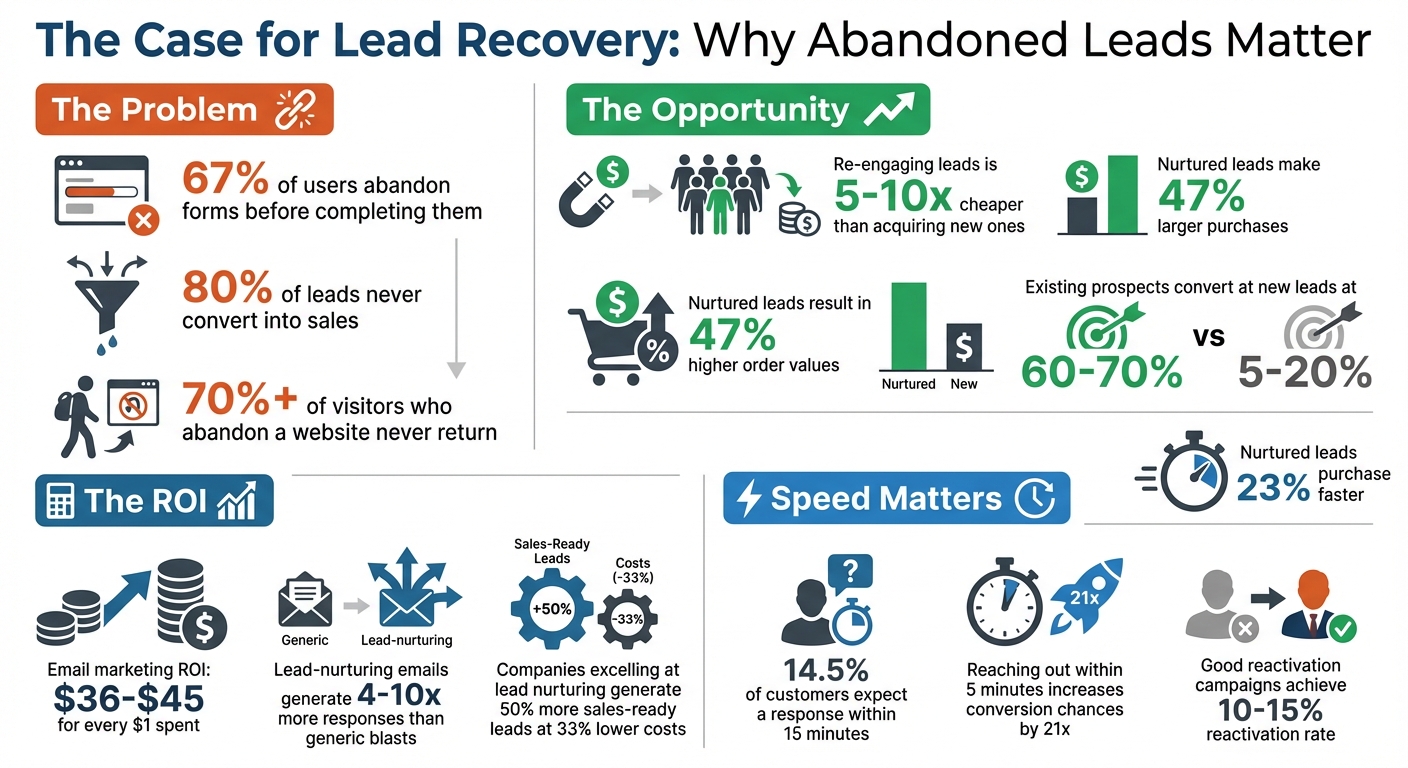
Lead Recovery Statistics: Cost Savings and Conversion Rates
How To Recover "Lost Sales" Using Abandoned Cart Email
Capture Partial Form Data with MagicTag
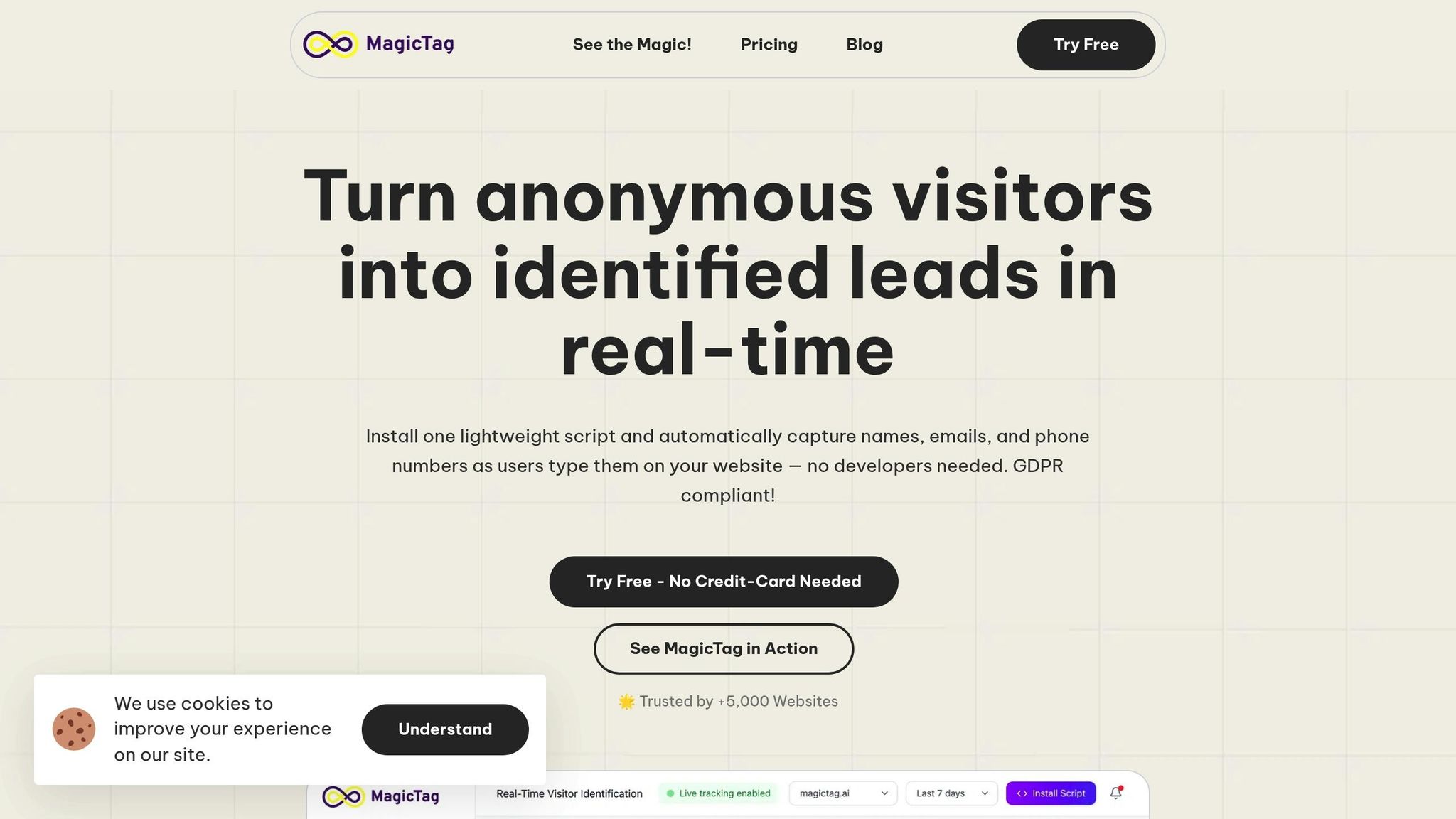
What if you could gather potential lead information as users type - even if they never hit "submit"? That’s exactly what MagicTag does. Most businesses only collect data when a form is completed, leaving countless leads slipping through the cracks. MagicTag changes the game by capturing details in real time.
How MagicTag Works
MagicTag monitors form inputs as they’re being typed, collecting key details like names, emails, and phone numbers - even if the form is abandoned. This means you can identify up to 12x more leads compared to relying solely on completed submissions.
The tool is lightweight and works seamlessly on any website, ensuring your pages load quickly while it quietly records partial entries the moment users start typing. No disruptions, just smarter lead tracking.
Connect MagicTag to Your CRM
MagicTag integrates effortlessly with popular CRMs like HubSpot, ActiveCampaign, and Salesforce through webhooks or APIs. Once connected, it automatically updates or creates contact records in real time whenever partial form data is captured.
To make the most of this integration, carefully map MagicTag’s fields - such as Name, Email, and Phone - to your CRM’s corresponding contact properties. This ensures your data stays clean and organized, eliminating the chaos of disconnected tools.
In the summer of 2023, filmmaker Adam Gorham realized he’d lost $86,000 in revenue because engagement data from 19 interested couples was stuck in his email tool while his CRM marked them as cold leads. After switching to CRM-native automation that synced data instantly, his booking rate jumped from 18% to 31%, and his response time dropped from 18 hours to under three hours.
By integrating MagicTag, you’re setting up your team for faster and more targeted follow-ups, all based on the data you’ve already captured.
Why Partial Form Data Matters
Capturing partial data is a game-changer for lead recovery. Instead of waiting for a user to fully submit a form - which might never happen - you can act while their interest is still fresh.
When IronPDF implemented real-time CRM automation under CEO Cameron Rimington, their qualified lead conversion grew by 34% in just three months. This was thanks to instant visibility into engagement signals, giving their sales team a head start.
Partial data also enables personalized follow-ups. Imagine sending a "Where did you stop?" email that directly addresses the point where a user abandoned the form. Whether they hesitated over pricing, had questions about features, or simply got distracted, you’ll have the insights to re-engage them effectively. This kind of tailored outreach isn’t just smart - it’s impactful.
Build Personalized Email Campaigns
Tap into MagicTag's partial form data to create quick, targeted email campaigns that help recover lost leads. Personalized emails, when paired with automated CRM workflows, can be a game-changer for boosting conversions. Here's a compelling stat: for every $1 spent on email marketing, brands see an ROI of $36–$45. Plus, lead-nurturing emails generate 4–10x more responses compared to generic blasts.
With the data you've gathered - like names, emails, and specific form details - you can craft outreach that feels helpful rather than intrusive. Address the exact point where the lead dropped off and tackle their specific concerns to win them back.
Design a 3-Step Email Sequence
A three-email sequence works well for re-engaging leads. Here’s a simple framework:
| Email Step | Timing | Primary Goal | Content Example |
|---|---|---|---|
| Reminder | Within 1 hour | Re-establish contact | "Did we lose you?" or "Just checking in." |
| Incentive | 24 hours later | Provide value and remove barriers | Offer a 15–20% discount or share a case study |
| Final Nudge | 4–7 days later | Create urgency and clean the list | "Should I close your file?" or include an opt-out option |
- Email 1: Send this within the first hour to reconnect. Keep it simple - acknowledge they started the process and offer help.
- Email 2: Follow up 24 hours later with added value. Share a case study, testimonial, or a time-sensitive offer. For instance, 57% of US customers who used an abandoned cart coupon code said it influenced their purchase. Make sure any urgency feels genuine.
- Email 3: Wrap it up with a "break-up" email, asking if you should close their file or follow up later. This creates urgency and offers a clear opt-out, which often prompts a response.
"Attention spans are short, and it's easy for potential leads to forget why they initially showed interest in your company."
– Paul Stainton, Director of Content and SEO, AgencyAnalytics
Segment Leads for Better Targeting
Not all abandoned leads are alike. For example, someone who dropped off after viewing your pricing page might have budget concerns, while another who left after entering partial contact details may have been distracted or worried about privacy. Start by grouping leads based on where they exited the process. Then, refine your approach:
- High-value leads: These might warrant a personal touch, like a direct call from a senior rep.
- Lower-value leads: Automated email sequences can nurture these prospects.
- Industry or interest: Use MagicTag's custom fields to tailor your outreach further.
Personalize Your Emails
Leverage MagicTag's real-time data to make every email feel personal. Mention the product they were interested in, highlight where they got stuck, or address a specific pain point.
Use conversational subject lines like, "Did we lose you, [First Name]?" instead of something generic. This not only grabs attention but also sets a friendly, approachable tone.
In the body of the email, focus on their specific challenge rather than delivering a one-size-fits-all sales pitch. For instance, if they abandoned a pricing form, acknowledge that pricing decisions can be tough and offer a brief call to discuss options. Include a clear call-to-action, like a one-click calendar link or a simple "yes/no" reply, to make it easy for them to re-engage. And don’t underestimate the power of a subtle link, such as a "Book a Demo" button, for those ready to take the next step.
"When you articulate their pain better than they can, they'll trust you to solve it."
– Jeanne Jennings, Email Marketing Consultant
Nurtured leads tend to purchase 23% faster, and automated emails are projected to drive 37% of sales in 2024. By tailoring your campaigns with MagicTag insights, you’re not just reviving abandoned leads - you’re building meaningful relationships that lead to conversions. Use these insights to fuel your CRM workflows and keep the momentum going.
Set Up CRM Lead Nurturing Workflows
After capturing partial form data with MagicTag and crafting your email sequences, the next step is automating the process using CRM workflows. This ensures no lead slips through the cracks, allowing your team to focus on closing deals.
Here’s why this matters: companies that excel at lead nurturing generate 50% more sales-ready leads at 33% lower costs. Plus, nurtured leads tend to make purchases that are 47% larger than those from non-nurtured leads. And according to 80% of marketers using automation, it's a game-changer for generating more leads.
Automate Your Follow-Ups
Reaching out to a lead within five minutes can make a huge difference - it increases the chances of conversion by 21 times. With MagicTag’s real-time data sync, delays of 4–6 hours (common with standalone email tools) are a thing of the past.
For example, if a visitor abandons a form after entering their email, your CRM can automatically send a follow-up email within the first hour, like a "Did we lose you?" message. Similarly, if someone repeatedly visits your pricing page, it signals high interest, prompting an instant alert to your sales team.
Real-world examples show how effective this can be. In 2025, Siera Rejcek from SocialStrategy1 implemented an automated workflow that updated data every five minutes. This ensured that anyone requesting information received a welcome email and timely follow-ups. Rachel Campbell from the National University of Health Sciences shared a similar experience, noting how automation saved her hours of work each week and ensured prospective students were contacted within 24 hours.
Using branching logic takes automation to the next level. If a lead engages with multiple emails, they can be directed to high-priority content like case studies or demo links. On the flip side, leads showing little interest can be moved into a re-engagement sequence with fresh messaging.
Once your follow-ups are automated, you can fine-tune your process by scoring leads to prioritize actions.
Score and Prioritize Your Leads
Lead scoring helps you separate casual browsers from serious buyers by assigning points to specific actions. For instance, partial form submissions, visits to your pricing page, or clicks on demo links can all carry different weights. When a lead’s score hits a certain threshold, your CRM can alert your sales team immediately. Meanwhile, lower-scoring leads remain in automated nurture workflows.
Take it from Cameron Rimington, CEO of IronPDF. In 2025, his team used CRM-native automation to track leads downloading API documentation. The result? A 34% increase in qualified lead conversion within three months. Similarly, Baris Zeren, CEO of Bookyourdata, slashed his company’s sales cycle by 28 days by eliminating data sync delays and leveraging real-time triggers to engage prospects at their peak interest.
Negative scoring is equally important. Deduct points for non-business emails, unsubscribes, or prolonged inactivity to ensure your sales team focuses on leads that matter most. MagicTag’s accurate data capture feeds directly into these workflows, helping you refine your scoring criteria over time.
"Lead scores on their own are not actionable. A successful approach to lead scoring will involve automation to make sure that contacts are getting routed to the right people."
– Ryan Durling, Inbound Consultant, HubSpot
Once your leads are scored, you can take personalization even further with targeted drip campaigns.
Create Effective Drip Campaigns
Drip campaigns are a powerful way to guide leads toward conversion through a series of timed messages. The key is segmentation - tailor your messaging based on where a lead is in the funnel. Someone just discovering your brand needs different content than someone who abandoned a checkout or pricing form.
For example, if a lead dropped off during pricing, you could send content emphasizing ROI or cost savings. If they entered their contact details but didn’t complete the process, highlight trust-building elements like testimonials, privacy assurances, or security certifications.
Make sure to set clear exit conditions. Once a lead converts - whether by booking a demo or making a purchase - they should be automatically removed from the drip sequence. You can also optimize engagement by using smart send times based on each contact’s activity patterns.
"Lead nurturing automation is not about replacing humans. It's about letting software handle the repetitive work, so your team can actually sell."
– Elena Mazaheri, Content Marketer, LeadsBridge
Before launching any workflow, test everything from start to finish with a mock contact. This ensures your automation logic, timing, and branching work as intended. Also, keep your CRM clean by auditing key properties like lifecycle stage, persona, product interest, and last activity date. Use clear naming conventions for workflows (e.g., "DRIP_Onboarding_V1_2025Q1") to keep your team organized and ready to scale.
With MagicTag feeding real-time data into your CRM and workflows managing follow-ups, you’re not just salvaging abandoned leads - you’re building a system that turns missed opportunities into measurable revenue.
sbb-itb-77d5bc3
Re-Engage Users Who Abandoned Forms
Sometimes, leads just need a little push to come back. Real-time strategies like exit-intent pop-ups, SMS reminders, and push notifications can help turn abandoned interactions into conversions.
Here’s a hard truth: over 70% of visitors who abandon a website never return. But don’t worry - there are practical ways to re-engage these users right after they leave your forms.
Add Exit-Intent Pop-Ups
Exit-intent technology works by detecting when a user’s cursor moves toward the browser’s close button or address bar. At that moment, it triggers a targeted message to catch their attention.
"Exit-intent popups have doubled my email opt-in rate. When done right, you can see an instant 12% lift on driving sales."
– Neil Patel, founder of QuickSprout
This approach has proven results. Michael Stelzner of Social Media Examiner grew his email list by over 95,654 names in just seven months using exit-intent pop-ups. Similarly, the American Bird Conservancy reported a lead increase of more than 1,000% after implementing automated lead generation tools to capture visitors before they left.
To make your exit-intent pop-ups effective, offer something enticing. It could be a time-limited incentive, like a 15–20% discount valid for 10 days, or even a waived setup fee. Alternatively, ask for feedback on why they’re leaving or provide a link back to the abandoned form with a reassuring message like, “We saved your progress - click here to pick up where you left off.” You can also include extra qualifying fields like dropdowns or radio buttons to gather more information.
Send SMS Reminders
If you’ve captured a phone number through tools like MagicTag, SMS reminders can be a game-changer. With their high open rates, SMS messages are perfect for quick, time-sensitive follow-ups. Platforms like Brevo can automate these messages based on user behavior. For example, if someone enters their phone number but doesn’t complete the form, an SMS can be sent immediately.
Keep your messages short and actionable. For instance:
"Hi [Name], we noticed you started signing up but didn’t finish. Need help? Reply YES for a quick call from our team."
You can also use SMS to create urgency:
"Your 20% discount expires in 24 hours - finish your signup here: [link]".
Just make sure your messages comply with SMS marketing regulations, and always include an opt-out option.
Use Push Notifications
Push notifications are another effective way to bring users back. You can create an "Incomplete Form Fillups" segment and send automated notifications to users who leave without clicking "Submit".
For multi-step forms, tailor notifications based on the last step the user completed. This is especially effective since multi-step forms can convert up to 87% better than single-step forms. Use an API to remove users from the "Incomplete" segment once they finish submitting the form to avoid unnecessary reminders.
Your push notifications should be clear and helpful. For example:
"Stuck? We saved your info - finish in 30 seconds: [link]."
"A disappearing act is often the perfect candidate for revival. They may be busy and overwhelmed at work, but remain interested in your product."
– Cara Hogan, Content Marketer at InsideSquared
Measure and Improve Your Results
To refine your lead recovery efforts, it’s crucial to track the right metrics. Keep an eye on engagement metrics like open rates, click-through rates, and direct replies alongside conversion metrics such as meeting bookings, trial starts, and pipeline progress. These indicators provide a clear picture of how well your recovery strategies are working. Ultimately, the most telling measure of success is how these efforts impact revenue.
Here’s a compelling stat: nurtured leads tend to make 47% larger purchases than those that aren’t nurtured. This highlights why tracking and adjusting your approach is so important.
Track the Right Metrics
Not all metrics are created equal. Focus on those that provide actionable insights:
- Open rates reveal how effective your subject lines are.
- Click-through rates show whether your content and calls-to-action resonate.
- Unsubscribe rates and spam reports are red flags indicating potential issues with your messaging tone or frequency.
Low open rates might point to poorly timed emails or weak subject lines, while high unsubscribe or spam rates suggest it’s time to clean your contact lists. A quarterly cleanup, removing unengaged contacts, can help protect your sender reputation.
For a more direct measure of success, track leads that book meetings, start trials, or make progress in your sales pipeline. A good reactivation campaign should aim for a 10-15% reactivation rate among inactive leads. Additionally, monitor changes in your sales cycle - effective recovery efforts should shorten the time it takes to close stalled deals.
| Metric Category | Key Indicator | Purpose |
|---|---|---|
| Engagement | Open & Click Rates | Shows relevance of subject lines and content. |
| Deliverability | Unsubscribe & Spam Rates | Highlights audience irritation or disinterest. |
| Conversion | Meetings/Demos Booked | Tracks creation of sales opportunities. |
| Pipeline | Sales Cycle Time | Measures acceleration of stalled deals. |
| Bottom Line | Revenue Impact | Evaluates ROI of recovery campaigns. |
These metrics not only guide your recovery efforts but also lay the groundwork for ongoing testing and segmentation.
Test Your Email Campaigns
Once you’ve gathered engagement and conversion data, use it to fine-tune your email campaigns. A/B testing can be a game-changer here. Experiment with subject lines, email timing, and the format - plain text versus HTML - to see what resonates most. Personalized emails, for instance, deliver 2.5x higher click-through rates than generic ones.
You can also test different call-to-action styles. For example, compare simple "yes/no" questions with direct "book a demo" links to determine which drives more responses. Try varying subject line elements like personalization, emojis, or length to see what grabs attention. To ensure reliable results, only A/B test high-volume campaigns; smaller ones may not provide accurate insights. If leads click but fail to respond, it might be time to rethink your offer or make your CTA more tailored.
Refine Your Lead Segments
Your CRM holds a wealth of data that can help you refine your lead segments. Use it to pinpoint where leads typically drop off - whether it’s after pricing discussions, demos, or another stage. Segmenting leads by their reasons for inactivity, such as "budget constraints" or "timing issues", allows you to craft highly specific recovery offers.
For high-value deals, consider creating a priority segment that justifies more personalized outreach. Set up CRM alerts for leads that have been inactive for a set period (e.g., 90 days) to trigger recovery workflows automatically.
Regular data cleansing is also essential. Remove invalid or outdated email addresses before launching recovery campaigns. Focus your efforts on prospects that show genuine potential, pruning those that don’t align with your goals. This not only improves results but also protects your sender reputation over time.
Conclusion
Recovering abandoned leads can save you from pouring money into expensive retargeting ads. The strategies shared here - capturing partial form data with MagicTag, creating personalized email sequences, automating CRM workflows, and using multi-channel re-engagement methods - provide an efficient, cost-effective way to bring those leads back into your pipeline.
MagicTag, for instance, tackles the issue of form abandonment, which occurs 67% of the time, by capturing contact details as users type. Combined with instant CRM routing, it ensures timely follow-ups - essential, as 14.5% of customers expect a response within just 15 minutes.
Reactivating lost leads is also far more budget-friendly than acquiring new ones, costing 5-10 times less. Plus, the conversion rate for existing prospects (60-70%) vastly outperforms that of new leads (5-20%). By integrating personalized email campaigns, CRM automation, and re-engagement tools like exit-intent pop-ups or SMS reminders, you can create a seamless system that drives higher conversion rates compared to uncoordinated efforts.
Your existing database holds a goldmine of prospects already familiar with your brand. By closely monitoring performance metrics, testing different approaches, and refining audience segments, you can steadily improve your recovery rates and see stronger returns on investment.
The key is to stay consistent and relevant. Use behavioral data to customize your follow-ups based on where users dropped off, ensuring you maintain engagement without overwhelming them. With these strategies in place, every abandoned lead becomes an opportunity to boost your bottom line.
FAQs
How does MagicTag capture form data even if a user doesn’t submit it?
MagicTag captures form data the moment a visitor starts typing - even if they never click the Submit button. As soon as a form loads, lightweight JavaScript kicks in, tracking changes in real time. Each keystroke or selection is temporarily stored in the browser and securely synced with MagicTag’s backend. This means the platform can instantly create a partial lead record, even if the user abandons the page.
It’s designed to work seamlessly with standard HTML forms and prioritizes user privacy by only saving data that’s actively entered. With just a single email address or phone number, you can reconnect with prospects through personalized emails or CRM workflows - no need to rely on retargeting ads.
How can personalized email campaigns help recover abandoned leads?
Personalized email campaigns are a powerful way to reconnect with leads who’ve already expressed interest in your business. By crafting messages that align with their specific needs and behaviors, you make your communication feel directly relevant to them. This can result in higher open rates and more clicks, ultimately boosting your chances of turning those leads into loyal customers.
But it’s not just about better engagement - personalized emails also make the most of your existing database. These leads already know your brand, which gives you an edge when reaching out. By referencing their past interactions, a thoughtfully written email can reignite their interest, spark fresh conversations, and transform dormant prospects into new sales - all without the extra cost of running retargeting ads.
How does CRM automation help recover abandoned leads?
CRM automation takes the hassle out of lead recovery by using the data already in your system to trigger personalized and timely outreach - all without manual intervention. By integrating tools like lead-capture forms, enrichment software, and your CRM, automation can instantly handle tasks like scoring, segmenting, and assigning leads to the right follow-up process. This eliminates delays that often cause potential customers to lose interest.
For instance, you can create workflows that automatically send follow-up emails when a prospect skips filling out a form, misses a scheduled demo, or hasn’t engaged after a set period. These workflows can deliver tailored messages at just the right intervals, keeping potential customers engaged and nudging them closer to conversion - all without lifting a finger.
With automation, every lead gets consistent and efficient attention, boosting response rates and improving your odds of turning abandoned leads into real sales opportunities. It's a smart, scalable way to keep leads warm and tap into your revenue potential.