ActiveCampaign excels at engaging known users with advanced automation and analytics. However, it has a critical limitation: it cannot track anonymous visitors. This means any potential lead who doesn't submit a form, click a tracked link, or get identified manually remains invisible.
Why does this matter?
- Most website visitors never fill out a form.
- Anonymous visitors browsing high-value pages (e.g., pricing or demo pages) are missed opportunities.
- ActiveCampaign retroactively links data only after a form submission, leaving gaps for visitors who never convert.
Solution:
MagicTag solves this by logging user data as they type into forms - even if they abandon the page. This real-time data syncs with ActiveCampaign, enabling automated follow-ups and recovering leads previously lost.
Key benefits of MagicTag:
- Tracks form inputs instantly, even without submission.
- Integrates with ActiveCampaign via webhooks or APIs.
- Simple setup with a lightweight script (works with platforms like WordPress, Shopify, etc.).
- Pricing starts at $0/month for up to 1,000 users.
MagicTag makes it easy to recover leads, improve conversion rates, and fill the gaps left by ActiveCampaign's limitations.
ActiveCampaign's Anonymous Visitor Problem
ActiveCampaign Only Works After Form Submission
ActiveCampaign has a significant limitation: it only tracks page views for visitors who are already in your contact database. According to their documentation:
That contact must be identified to associate page view data with them. This allows us to link page visits with their email address.
In simpler terms, a visitor is only identified when they interact in specific ways - like clicking a link in an ActiveCampaign email, submitting a form created within ActiveCampaign, or being manually identified through JavaScript. Any other visits remain completely untracked.
For example, if a potential lead browses your pricing page or explores your product documentation but doesn’t fill out a form, ActiveCampaign logs the visit as an anonymous cookie. Since this cookie isn’t tied to an email address, the data becomes useless for follow-ups. Additionally, visits from third-party forms or those waiting for a double opt-in confirmation aren’t tracked either. This creates a blind spot in your data, making it harder to monitor visitor behavior and recover lost leads effectively.
What You Lose When Visitors Don't Submit Forms
This tracking gap means you miss out on valuable insights about high-intent visitors who don’t fill out a form. ActiveCampaign doesn’t log any activity unless there’s an existing contact record. As their documentation explains:
Every event must include a previously created Contact record. If your system sends an event for a Contact that does not exist in your account, the event log will not be written.
This is especially problematic for visitors who engage with important resources, like demo pages or documentation, but don’t take that extra step to submit a form. While ActiveCampaign can retroactively link up to 30 days of anonymous visits after someone submits a form, it’s of no help for visitors who never convert. The issue is compounded when people clear their cookies, switch browsers, or browse in incognito mode - leaving no data behind.
These gaps in tracking make it harder to engage potential leads proactively and recover missed opportunities. Later sections will explore how MagicTag addresses these challenges.
ActiveCampaign Site Tracking
How MagicTag Solves This Problem
MagicTag addresses a key limitation in ActiveCampaign: its inability to track anonymous visitors. By capturing data as soon as it's entered, MagicTag ensures no potential lead slips through the cracks. The tool logs visitor information the moment a user fills out a field - like their name, email, or phone number - and moves to the next. This happens even if they abandon the form or leave the page without hitting "submit." This real-time data capture integrates effortlessly with ActiveCampaign, allowing you to identify and engage with leads who might otherwise remain invisible.
Capture Data as Visitors Type (Before They Submit)
MagicTag captures visitor data instantly - right when they type their email and move on. Even if they close the tab just seconds later, the information is sent to your CRM through webhooks or APIs. This "blur event" technology has been shown to identify up to 12x more users compared to traditional methods that rely solely on form submissions.
"I was shocked by how many users type their details and abandon the site. MagicTag helps us recover those leads and turn them into paying customers." - Emily Davis, Entrepreneur
MagicTag focuses on three key fields - name, email, and phone number. As soon as a visitor enters data and shifts focus, the information is logged in your MagicTag dashboard. This enables automated follow-ups in ActiveCampaign, unlocking remarketing and CRM automation for leads who might have otherwise been lost. Users have reported a 39% increase in conversion rates by leveraging this feature.
GDPR and LGPD Compliance
MagicTag operates in full compliance with privacy regulations like GDPR and LGPD. It respects user intent by capturing only the data that visitors actively type into fields, avoiding any passive data collection. Working seamlessly in the background, MagicTag ensures visitors experience no interruptions while their data is logged securely. The tool syncs this information directly to your CRM through secure webhooks or APIs, giving you complete control over how it's stored and used. To remain transparent, make sure your website's privacy policy clearly explains the use of real-time data capture tools.
Simple Installation on Any Website
Installing MagicTag is quick and hassle-free. A lightweight HTML/JS snippet can be added to your website's footer or implemented via Google Tag Manager in just two minutes. This setup works across all platforms - whether you're using WordPress, Shopify, Webflow, or custom landing pages - and doesn’t require a developer. Over 5,000 websites already rely on MagicTag for seamless tracking.
"Installed through Google Tag Manager in seconds, and it immediately started tracking names, emails, and phone numbers in real time." - Emily Davis, Entrepreneur
Once installed, the script automatically runs on every form across your site. Leads are captured in real time and appear instantly in your MagicTag dashboard. From there, you can push the data to ActiveCampaign to trigger automations for abandoned forms or personalized follow-ups.
sbb-itb-77d5bc3
How to Connect MagicTag with ActiveCampaign
Integrating MagicTag with ActiveCampaign is straightforward and involves three key steps: adding the MagicTag script to your website, setting up webhooks to sync data, and creating automations to act on partial lead information. Here’s a step-by-step guide to help you get started.
Installing MagicTag on Your Website
Start by grabbing the lightweight HTML/JS snippet from your MagicTag dashboard. Paste this code into your website’s footer, or, if you prefer, use Google Tag Manager to install it. Once it’s live, the script begins capturing visitor data in real time - tracking inputs as users type and move between fields. The best part? It works seamlessly across all major platforms and doesn’t require any coding skills. You can have it up and running in just a couple of minutes.
Setting Up Webhooks and Field Mapping
Next, head back to your MagicTag dashboard to configure a webhook. Enter your ActiveCampaign API endpoint, or, for a no-code option, use middleware like Zapier. Once the connection is established, map key fields - such as Name, Email, and Phone - to their corresponding fields in ActiveCampaign. This ensures that any information MagicTag collects is automatically added or updated in your CRM.
Keep in mind that full API access and CRM integrations require the Starter plan, priced at $19 per month. If you’re on the Free plan, you’ll still have basic webhook functionality but are limited to managing up to 1,000 identified users per month.
Using Partial Data to Trigger Automations
Once the data starts flowing into ActiveCampaign, you can set up automations to engage leads - even if they’ve only provided partial information. For instance, let’s say a visitor enters their email but doesn’t complete the form. You can send a recovery email 30 to 60 minutes later, offering assistance or encouraging them to finish. To streamline follow-ups, tag these contacts with labels like "MagicTag-Lead", making it easier to segment and target them with tailored sequences.
"MagicTag showed us how many hidden leads we were losing. One quick install and we started capturing emails and phones from visitors who never submit forms." - James Carter, Marketing Director
MagicTag Pricing and Plans
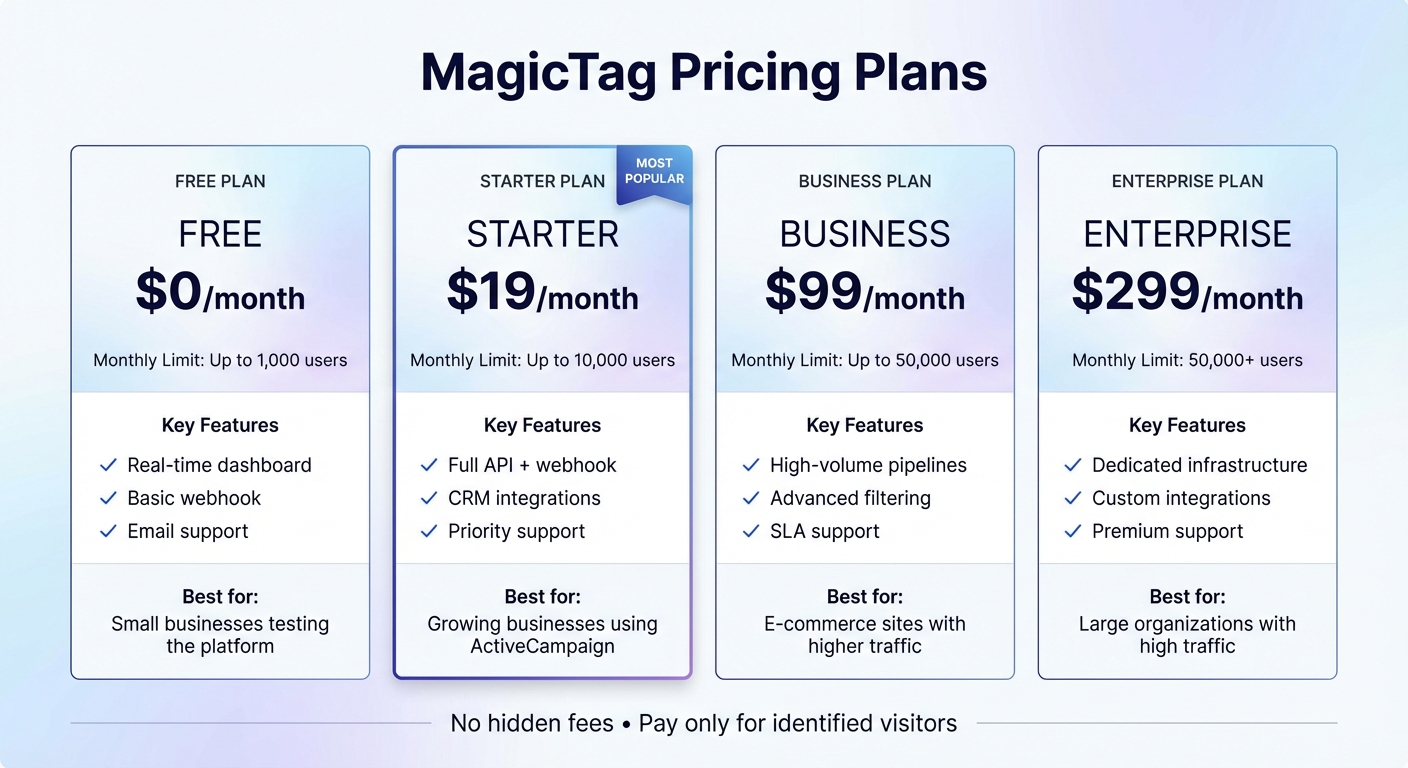
MagicTag Pricing Plans Comparison: Features and Limits
Plan Comparison and Features
MagicTag provides four pricing tiers tailored to fit different levels of lead recovery needs. Whether you're just testing the waters or managing a high-traffic website, their pricing is simple: you pay based on the number of visitors identified each month - no hidden fees.
| Plan | Monthly Limit | Price | Key Features |
|---|---|---|---|
| Free | 1,000 users | $0 | Real-time dashboard, basic webhook, email support |
| Starter | 10,000 users | $19 | Full API + webhook, CRM integrations, priority support |
| Business | 50,000 users | $99 | High-volume pipelines, advanced filtering, SLA support |
| Enterprise | 50,000+ users | $299 | Dedicated infrastructure, custom integrations, premium support |
The Free plan is perfect for small businesses or websites looking to test MagicTag's impact without any financial commitment. It includes real-time tracking for up to 1,000 visitors, basic webhook functionality, and email support - no credit card required.
For those using tools like ActiveCampaign, the Starter plan ($19/month) unlocks full API access, CRM integrations, and automated data syncing, making it a great fit for growing businesses.
If you're running an e-commerce site or need to handle more traffic, the Business plan ($99/month) supports up to 50,000 identified users. It also comes with advanced filtering and segmentation tools, plus SLA support for added reliability. For organizations managing over 50,000 visitors monthly, the Enterprise plan ($299/month) offers dedicated infrastructure, custom integrations, and premium support.
These options make it easy for MagicTag to grow alongside your business, adapting to your increasing traffic and lead recovery needs.
Plans That Grow with Your Business
MagicTag’s pricing is designed to scale effortlessly as your traffic expands. Start with the Free plan for up to 1,000 visitors, then upgrade as needed to maintain smooth automation and data retention.
"MagicTag has become one of our highest-ROI tools. We now convert visitors who would've vanished forever." - Chris Caveiras, Founder
With its transparent pricing and no setup fees, MagicTag ensures you only pay for what you need, keeping costs aligned with your traffic volume.
Conclusion
What You Should Remember
ActiveCampaign identifies visitors only after they take action, but MagicTag takes it a step further by capturing data as visitors type it, even if they abandon the form. This real-time data capture can dramatically improve your chances of converting leads by using webhooks to integrate with ActiveCampaign. This integration enables instant automated follow-ups, turning potential losses into opportunities.
The best part? Setting it up is incredibly simple. It takes just 2 minutes using Google Tag Manager, requires zero coding skills, and works seamlessly with any website platform. Plus, with pricing starting at $0/month for up to 1,000 visitors, you can test it risk-free and discover how many of those "invisible" leads could turn into paying customers.
How to Get Started
Ready to take action? Here’s how you can start capturing those hidden leads today.
- Sign up for MagicTag’s Free plan to capture up to 1,000 visitors at no cost.
- Use Google Tag Manager to install the MagicTag script on your website.
- Set up a webhook to send the captured data directly to ActiveCampaign.
- Create an automation in ActiveCampaign to follow up with visitors who abandoned your forms.
Don’t let valuable leads slip away. Head over to MagicTag.ai today, set it up in minutes, and see how many opportunities your website has been missing!
FAQs
How does MagicTag collect information from anonymous website visitors?
MagicTag turns your website into a lead-capturing powerhouse with the help of a simple JavaScript snippet. You can easily add it to your site, often using tools like Google Tag Manager. Once it's up and running, MagicTag starts tracking what visitors type into form fields - like names, email addresses, or phone numbers - even if they leave without clicking the “Submit” button.
The captured data is instantly and securely sent to MagicTag’s cloud platform. From there, it can sync effortlessly with tools like ActiveCampaign or other CRMs. This real-time data capture ensures you don’t lose out on potential leads, giving you the chance to follow up and improve your conversion rates.
How does integrating MagicTag with ActiveCampaign benefit my business?
Integrating MagicTag with ActiveCampaign changes the game for capturing and re-engaging potential customers. Here’s how it works: MagicTag collects partial form entries - like names, email addresses, and phone numbers - even if someone doesn’t hit "Submit." This information is then automatically synced with ActiveCampaign, where it can be tagged, segmented, and used to send personalized follow-ups, such as emails or SMS messages.
This seamless automation cuts out the need for manual data entry, saves valuable time, and recovers leads that might have otherwise slipped through the cracks. Businesses using this integration have reported impressive results, including boosts in conversion rates and revenue - some even achieving up to a 300% increase in online sales. By pairing real-time lead capture with ActiveCampaign’s robust CRM features, you can create highly targeted audience segments and roll out campaigns at just the right moment to maximize impact.
Does MagicTag comply with privacy regulations like GDPR?
MagicTag’s documentation doesn’t specifically confirm whether it complies with privacy regulations like the EU General Data Protection Regulation (GDPR). While the documentation outlines how the tool collects visitor data in real time, it doesn’t mention any official certifications or assurances related to GDPR or similar standards.
If privacy compliance is a priority for your business, it’s a good idea to review MagicTag’s privacy policy or reach out to their customer support team for more detailed information.