98% of your website visitors leave without taking action. That’s the harsh reality. But what if you could turn those lost visitors into leads before they vanish? Real-time visitor identification tools like MagicTag make this possible by collecting data as users interact with your site - no need to wait for them to hit "Submit."
Here’s what you need to know:
- Recover abandoned leads: Capture partial form data even if visitors don’t complete forms.
- Act fast: Respond to high-intent visitors within seconds, increasing conversion rates by up to 25%.
- Personalize experiences: Tailor content, offers, and outreach in real time based on user behavior.
- Reduce cart abandonment: Businesses report 15% fewer abandoned carts using real-time tools.
MagicTag tracks visitor behavior instantly, giving you actionable insights to engage leads while they’re still active. It integrates with your CRM, automates follow-ups, and helps you prioritize high-value prospects. Start with a free plan and scale as your traffic grows. Don’t lose another lead - real-time identification can help turn interest into action.
Real-Time Leads Explained
What Is Real-Time Visitor Identification?
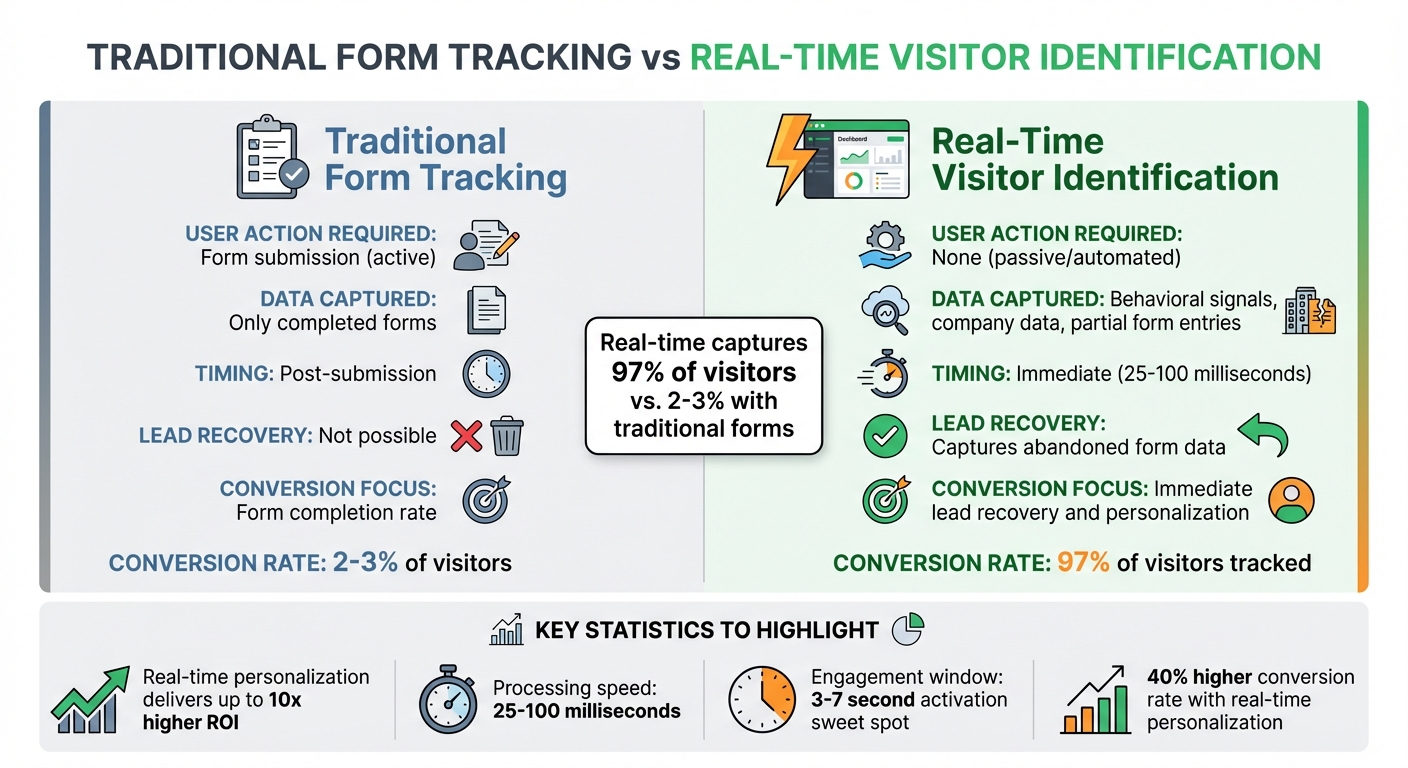
Real-Time vs Traditional Form Tracking: Key Differences and Performance Metrics
Real-time visitor identification tracks user activity on your website as it happens. It captures details like page views, clicks, and navigation paths instantly, without waiting for visitors to fill out forms. This technology offers immediate insights into who your visitors are and what they’re interested in, all in real time.
The process relies on JavaScript snippets embedded in your website. These snippets collect data on user actions, session lengths, and conversion paths. Cookies play a key role, tracking both new and returning visitors. For B2B companies, IP tracking and reverse DNS (rDNS) technology are particularly useful, as they can link IP addresses to specific company domains. This means you can identify which businesses are browsing your site.
The magic happens fast - processing takes just 25–100 milliseconds. This speed allows you to act on visitor behavior within a crucial 3–7 second window, often referred to as the "activation sweet spot". Ben Wightman, Strategic Business Value Engineering Lead at Tealium, sums it up perfectly:
"Engagement has moved from 'Carpe Diem' (seize the day) to 'Carpe Secundus' (seize the second). Engagement must happen in the moment to be most effective".
Unlike traditional web analytics tools like Google Analytics, which provide data hours or even days later, real-time identification works while visitors are still on your site. This real-time capability leads to an average 40% higher conversion rate for brands using personalization.
How Real-Time Data Capture Works
MagicTag captures behavioral data - like pages visited, time spent, and clicks - from every visitor the moment they interact with your site. Even if someone starts filling out a form but doesn’t finish, MagicTag records the partial data.
For B2B companies, reverse DNS technology matches visitor IP addresses to company databases. This reveals which organization is visiting your site and provides details like company name, industry, and size - all before the visitor leaves the homepage.
The system also tracks where visitors come from using UTM parameters and referral data. Whether they arrived via a LinkedIn ad, a Google search, or an email campaign, this information helps you tailor your response in the moment.
All of this data flows into MagicTag's dashboard in real time, giving you a complete view of each visitor’s journey. This allows you to engage them while they’re still active on your site.
Real-Time vs. Traditional Form Tracking
Traditional form tracking depends on visitors completing and submitting forms. If they get distracted or decide not to share their information, you’re left with nothing. And since only 2–3% of visitors typically complete forms, this approach misses out on a huge chunk of potential leads.
Real-time visitor identification, on the other hand, captures data from the majority of visitors - around 97% - who browse without converting. It automatically collects company details, behavioral data, and even partial form entries, eliminating the need for active user input.
| Feature | Traditional Form Tracking | Real-Time Visitor Identification |
|---|---|---|
| User Action Required | Form submission (active) | None (passive/automated) |
| Data Captured | Only completed forms | Behavioral signals, company data, partial form entries |
| Timing | Post-submission | Immediate (25–100 milliseconds) |
| Lead Recovery | Not possible | Captures abandoned form data |
| Conversion Focus | Form completion rate | Immediate lead recovery and personalization |
Real-time personalization outperforms traditional batch campaigns, delivering up to 10x higher ROI. By engaging visitors when their interest is at its peak, you can collect the data you need to drive conversions.
Types of Data That Improve Conversions
Real-time identification gathers four main types of data that help boost conversion rates:
- Firmographic data: Details like company name, industry, and employee count are invaluable for account-based marketing. For example, if a visitor is checking out your pricing page, your sales team can prioritize that lead right away. Combining firmographic and behavioral data enables highly targeted follow-ups.
- Behavioral signals: These include clicks, scrolls, time spent on pages, and entry/exit points. A visitor who spends time exploring key sections and related content shows more intent than someone who leaves quickly.
- Contextual data: Information like traffic source, device type, and location allows for personalized offers and messaging. For instance, real-time product recommendations tailored to these details can boost click-through rates by up to 60%.
- Interaction data: This includes form inputs, cart contents, and past purchases. Capturing partial form entries or cart details lets you follow up with visitors who didn’t complete their actions. Businesses have used this approach to grow their email lists significantly. Michael Stelzner, Founder of Social Media Examiner, shared:
"In only 7 months, we added more than 95,654 names to our email list using Exit Intent™ technology".
How Real-Time Identification Increases Conversions
When you track visitor behavior as it happens, you can recover lost leads and turn high-intent traffic into actual sales. Real-time visitor identification transforms anonymous visits into actionable insights. Instead of waiting for the small percentage of visitors who fill out forms (typically 2–3%), you can instantly capture behavioral signals. This approach enables dynamic personalization, which can increase revenue by 40%, a feature that 70% of buyers now expect. Real-time insights allow you to tailor the user experience in ways that directly drive conversions.
Personalizing Content Based on Visitor Behavior
Dynamic content adjusts based on what visitors do on your site in real time. For instance, if someone from a specific industry lands on your homepage, you can immediately customize hero images, CTAs, or product recommendations to align with their needs. Factors like browsing history, device type, location, and past interactions all play a role in this personalization.
Big names like Walmart and Orbitz have successfully used behavioral personalization. Walmart tailored product recommendations based on past shopping and cart activity, while Orbitz did the same for travel bookings. The results? A 55% boost in unique site traffic for Walmart and up to 130% more bookings for Orbitz. Personalized CTAs also outperform generic ones by a staggering 202%. Plus, 75% of customers prefer buying from companies that recognize them by name and remember their past purchases.
Tools like MagicTag make this level of personalization possible by tracking visitor behavior and feeding it directly into your CRM or marketing automation platform. Here’s how it works:
| Personalization Trigger | Data Source | Practical Application |
|---|---|---|
| Exit Intent | Mouse movement/velocity | Display a discount popup when a user moves to close the tab. |
| Pageview History | Browsing patterns | Show a "CMS Software" hero image if the user previously visited CMS-related pages. |
| Referral Source | UTM parameters/Referrer | Tailor landing page content based on whether the visitor arrived via a PPC ad or social media. |
| Inactivity | Time on page without clicks | Trigger a live chat or help bot if the user remains idle for 30 seconds. |
| Cart Contents | Real-time cart data | Suggest "Frequently bought together" items during checkout. |
Location-based personalization is another powerful tactic. For example, you can promote winter gear to visitors in colder areas or swimwear to those in warmer climates. Similarly, message matching ensures that popup headlines and CTAs align with the content the visitor is currently viewing.
Snowflake took things a step further by developing a "meeting propensity" AI model to predict which accounts were most likely to respond positively to outreach. This approach led to 2.3x more meetings with high-potential accounts and a 38% reduction in spend.
Recovering Leads from Abandoned Forms
Around 70% of visitors abandon their carts after adding items. Traditional tracking methods often lose these leads entirely, but real-time identification offers a way to recover them.
MagicTag records partial form entries - such as names, emails, and phone numbers - even if visitors don’t hit submit. This data is sent to your CRM via webhook or API, enabling immediate, personalized follow-ups. Since 60% of shoppers return to complete their purchase within 24 hours of receiving a personalized follow-up email, acting quickly is crucial.
DealDoktor used onsite retargeting combined with exit-intent campaigns to capture visitors before they left. By fine-tuning their campaigns based on real-time behavior, they achieved a 2,100% improvement in conversion rates. Similarly, IncStores leveraged behavioral retargeting and product-specific messaging to grow their email list by 750 new subscribers per week, tripling their overall list growth.
Most businesses typically convert only 2–3% of their visitors, but with focused abandoned recovery strategies, conversion rates can exceed 10%. Real-time alerts - sent via Slack or email - can notify sales reps the moment a high-intent visitor from your Ideal Customer Profile views a key page, bridging the gap between automated processes and human engagement.
Engaging High-Intent Visitors Immediately
High-intent visitors often display clear buying signals, such as exploring pricing pages, viewing product demos, or spending significant time on solution pages. Research shows that B2B buyers complete 57% of their purchase journey before ever contacting a sales representative. By the time they reach out, they’ve likely narrowed down their options. Real-time identification allows you to engage these visitors earlier, while you still have the opportunity to influence their decision.
For example, if MagicTag identifies a visitor from a target account browsing your pricing page, it can trigger automated workflows. These might include sending a personalized email, notifying your sales team via Slack, or launching a live chat to offer assistance. This immediate response prioritizes warm leads, making conversions far more likely compared to cold outreach.
Real-time engagement tools like exit-intent popups and live chat also help address common friction points - such as unexpected costs, technical issues, or security concerns - that often lead to abandonment. Adding trust signals like Norton or McAfee seals can further reduce abandonment caused by security worries, which affect 29% of users.
sbb-itb-77d5bc3
How to Set Up MagicTag on Your Website
Setting up MagicTag is simple, even if you're new to it. The process involves three key steps: choosing which pages and forms to track, installing the tracking code, and connecting it to your CRM. Once it's set up, MagicTag starts collecting visitor data right away, including partial form submissions.
Identifying Forms and Pages to Track
The first step is to pinpoint the pages that show strong buyer intent. Pricing pages should be your top priority since visitors here are actively comparing costs and options. Next, focus on demo request or contact pages, as these indicate direct interest. Pages featuring case studies or testimonials are also important because they provide social proof and ROI evidence, helping visitors finalize their decisions.
Don't forget to include checkout and cart pages - these are crucial for recovering lost revenue from abandoned purchases. Comparison pages are another high-value area, as they show visitors are evaluating your solution alongside competitors, making them prime candidates for follow-up. Also, track pages with high drop-off rates, like multi-step forms, to identify points where potential leads might be slipping through.
You can also set up real-time triggers to monitor specific behaviors. For instance, you could create alerts for visitors who spend more than five minutes on your pricing page or for those who visit your services page multiple times in a week. Track which marketing channels - like ads, social media, or email - are driving traffic to these key pages, so you can tailor your follow-up strategy accordingly.
| Page Type | Intent Level | Recommended Action |
|---|---|---|
| Pricing Page | High | Trigger sales outreach or send a personalized discount email. |
| Case Studies | Medium-High | Share industry-specific ROI reports or success stories. |
| Abandoned Cart | Very High | Show an on-site popup with a limited-time incentive. |
| Comparison Page | High | Follow up with a guide highlighting your solution's strengths. |
| FAQ/Support | Low-Medium | Use for retargeting campaigns or educational email sequences. |
Once you've identified the pages to track, you're ready to install and configure MagicTag.
Installing and Configuring MagicTag
After selecting the pages you want to monitor, the next step is to install MagicTag. When you sign up, you'll receive a JavaScript snippet to embed into your website's HTML. If you're using WordPress, you can install MagicTag with a dedicated plugin. Shopify users can take advantage of an app that handles the installation automatically. Once the code is added, MagicTag will start tracking visitor interactions.
Next, configure the tracking parameters to specify what you want to capture - such as page views, form submissions, or specific conversion events like purchases. To improve conversion rates, keep your lead capture forms short - ideally three fields or fewer, as this can boost submissions by up to 40%. Use clear, straightforward language in your forms to build trust with visitors.
After installation, verify that MagicTag is working correctly by checking the real-time dashboard. Visitor activity, including partial form submissions and page views, should appear almost instantly. Test the setup by submitting an incomplete form to ensure MagicTag captures the data accurately.
Connecting MagicTag to Your CRM
To make the most of the data MagicTag collects, it's crucial to integrate it with your CRM. MagicTag can sync visitor details - such as company name, industry, size, and location - directly into your CRM using either a webhook or API. This eliminates the need for manual data entry and streamlines lead management. Simply enter your CRM's API credentials and map the fields in the MagicTag dashboard to ensure the data flows correctly.
Once connected, you can set up automated workflows. For example, you can create Slack or email alerts for high-value leads visiting key pages. You can also trigger automated email sequences to deliver helpful content immediately after a lead is captured, followed by additional educational materials.
This integration helps with lead qualification and timely engagement. For instance, if MagicTag detects that a visitor from a target account has viewed your pricing page several times, it can automatically notify your sales team to follow up. By connecting marketing, sales, and support data, MagicTag creates a seamless workflow that turns anonymous website traffic into actionable opportunities.
Measuring Results and Scaling Your Implementation
To truly understand the impact of MagicTag, keeping an eye on key metrics is essential. Start by tracking the percentage of visitors who begin versus those who complete a form. Also, monitor the total number of leads captured monthly, breaking them down into Marketing Qualified Leads (MQLs) and Sales Qualified Leads (SQLs). This helps you gauge both the quantity and quality of your leads.
Dig deeper into your conversion rate by traffic source to identify which channels - whether paid ads, social media, or email - are bringing in the most identified leads. Keep an eye on your Average Order Value (AOV) to see if identified visitors are spending more than anonymous ones. Also, review bounce rates on high-intent pages, like pricing or comparison pages, to spot any friction points that might be driving visitors away.
Key Metrics to Track
Your tracking efforts should focus on four main areas: lead capture, sales impact, retention, and traffic quality. For lead capture, compare form start and completion rates to uncover inefficiencies. Pay attention to your abandonment rate, which averages 69% across industries, to measure how many users leave forms or carts unfinished. On the sales front, monitor metrics like total revenue and AOV to understand how MagicTag directly affects your bottom line.
To better understand visitor behavior, use heatmaps and session recordings. These tools let you see exactly how identified users interact with your site - where they click, how far they scroll, and which sections grab their attention [18, 39]. Additionally, track unique website visitors and page views to measure overall engagement levels. Even small improvements in these metrics can lead to noticeable revenue gains.
Once you’ve gathered this data, calculate your ROI to determine if MagicTag is delivering the value you expect.
Calculating Your ROI
Figuring out the return on investment (ROI) is straightforward with this formula:
(Leads Captured × Lead-to-Close Rate × Average Order Value) [23, 41].
For example, if MagicTag generates 100 extra leads per month, with a 20% close rate and an AOV of $500, you’re looking at an additional $10,000 in monthly revenue (100 × 0.20 × $500 = $10,000).
Small changes can lead to big results. In 2010, Expedia boosted its annual profit by $12 million just by removing one confusing form field that caused abandonment. Similarly, Imagescape increased its conversion rate by 120% by cutting their form fields from 11 to 4. These examples highlight how even minor optimizations, like capturing partial form data, can have a significant impact. Before implementing MagicTag, calculate your baseline conversion rate using this formula:
(Conversions ÷ Total Visits × 100).
Then, measure the improvement after implementation to see exactly how much lift MagicTag provides.
Once you’ve calculated your ROI, it’s time to choose the MagicTag plan that best fits your needs.
Selecting the Right MagicTag Plan
Selecting the right MagicTag plan depends on your website’s traffic volume and your budget. Here’s a breakdown of the options:
- Free Plan: Perfect for low-traffic sites or first-time users, this plan supports up to 1,000 identified users per month at no cost.
- Starter Plan ($19/month): Handles up to 10,000 users monthly and includes full API access, CRM integrations, and priority support. It’s a great choice for growing businesses.
- Business Plan ($99/month): Designed for high-traffic websites, this plan supports up to 50,000 users per month and offers advanced filtering, segmentation, and SLA support.
- Enterprise Plan ($299/month): For websites with over 50,000 monthly visitors or those needing custom integrations and dedicated infrastructure, this plan offers unlimited capacity and premium support.
If you’re just starting out, begin with a lower-tier plan and upgrade as your traffic increases. Scaling up is easy, and you’ll have the data to back your decision once you’ve proven the ROI.
Conclusion
Did you know that most websites lose about 97% to 98% of their visitors without collecting any information? That’s where MagicTag steps in, turning anonymous visitors into actionable leads in real time. With MagicTag, you’ll know exactly who’s browsing your site, what pages they’re exploring, and how long they’re staying - giving you the tools to engage immediately.
But it doesn’t stop at just identifying visitors. Businesses that use real-time identification to personalize their websites see an average 19% boost in conversion rates. Even better, personalized content encourages customers to spend 10% more when they convert. By recognizing returning visitors who frequently interact with key pages, you’re no longer making educated guesses - you’re connecting with purpose and intent.
MagicTag also integrates seamlessly with your CRM, sending instant alerts to your sales team when high-value prospects visit your site. This allows you to follow up within 30 minutes of their visit, turning cold outreach into warm, tailored conversations. Whether it’s recovering abandoned carts, prioritizing leads with the highest intent, or gaining deeper insights into your audience, MagicTag delivers the data you need to act swiftly and effectively.
The best part? You can start with the Free Plan, which captures up to 1,000 users per month, and expand as your ROI grows and traffic increases. Don’t let those anonymous visitors slip away - they could be your next big opportunity. Start capturing those leads today and turn missed chances into measurable revenue.
FAQs
How can real-time visitor identification help increase conversion rates?
Real-time visitor identification empowers businesses to boost conversion rates by recognizing website visitors instantly and customizing their experience on the spot. Leveraging tools like IP tracking, CRM integration, and behavior analysis, you can present tailored content, offers, and recommendations that align with each visitor's preferences.
By engaging users immediately with relevant experiences, you increase the chances of high-intent visitors taking action - whether that’s making a purchase, signing up for a service, or requesting additional details. It’s a highly effective approach to building connections with your audience and turning potential leads into tangible outcomes.
What kind of data does MagicTag use to create personalized experiences?
MagicTag gathers a range of data to create deeply personalized user experiences. This includes details like how visitors interact with your website, their IP addresses, and CRM data. By processing this information in real time, MagicTag enables businesses to customize interactions, enhance engagement, and drive higher conversion rates.
The platform emphasizes delivering actionable insights to uncover visitor preferences and needs, ensuring every interaction is both timely and meaningful.
How fast does MagicTag identify and process website visitor data?
MagicTag works by collecting and analyzing visitor data in real time, enabling businesses to interact with their website visitors almost instantly. While the exact speed of data processing can vary based on factors like site traffic and integration configurations, the platform is fine-tuned to provide actionable insights quickly, helping you make the most of every conversion opportunity.
Need help with setup or have questions about performance? Our support team is ready to assist!