Want to track your website visitors more effectively in 2025? Modern tools go beyond basic metrics, helping businesses identify leads, recover lost opportunities, and optimize user experiences - all while staying privacy-compliant. Here's a quick breakdown of the top tools:
- MagicTag: Recovers incomplete form data, identifying up to 12x more leads. Learn how to recover abandoned form leads using these advanced methods. Starts at $0/month.
- Google Analytics (GA4): Tracks user behavior across platforms with event-based analytics. Free for most users.
- Hotjar: Offers heatmaps, session recordings, and surveys for user behavior insights. Plans start at $32/month.
- Leadfeeder: Identifies B2B visitors using reverse DNS, boosting lead generation. Starts at $99/month.
- FullStory: Automatically records user interactions to detect friction points. Free plan available; enterprise pricing varies.
Quick Comparison:
| Tool | Best For | Starting Price | Key Features |
|---|---|---|---|
| MagicTag | Form-based lead recovery | $0/month | Real-time form tracking, CRM integrations |
| Google Analytics | Traffic analysis | Free | Event-based tracking, Google ecosystem sync |
| Hotjar | UX insights | $32/month | Heatmaps, session recordings, surveys |
| Leadfeeder | B2B lead identification | $99/month | Reverse DNS, CRM integrations |
| FullStory | Behavioral analytics | Free | Autocapture, session replays, AI insights |
Each tool offers unique advantages depending on your business needs - whether you're focused on recovering leads, analyzing why visitors abandon forms, or improving conversions. Let's dive into the details of how these tools work.
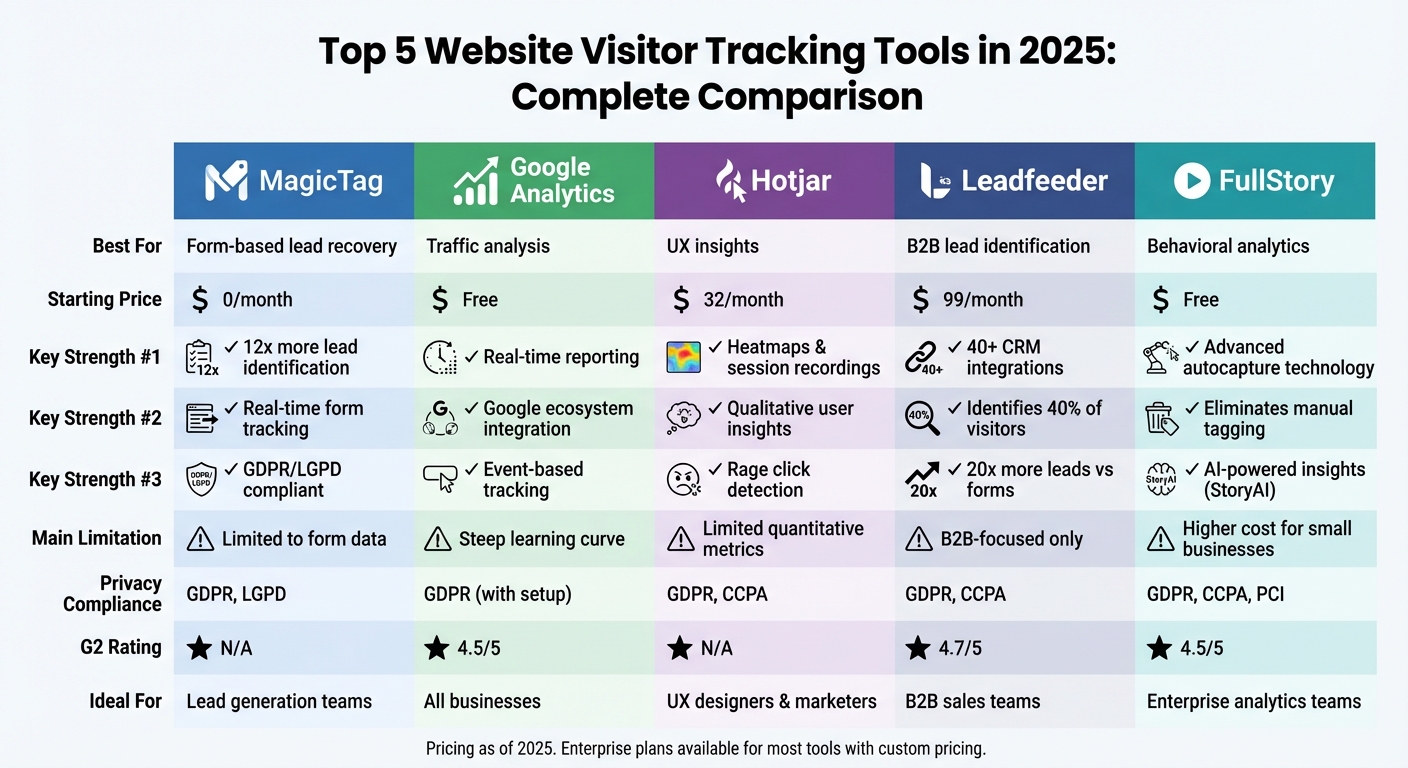
Website Visitor Tracking Tools Comparison 2025: Features, Pricing & Best Use Cases
1. MagicTag
Tracking Methodology
MagicTag keeps track of keystrokes from incomplete form entries in real time. By monitoring activity as users type into your website's forms, it ensures that partially entered data doesn’t disappear into the void. The tool is lightweight and can be set up on any website quickly - no developer needed.
Lead Recovery
MagicTag shines when it comes to tracking abandoned forms. By capturing data from forms that users didn’t finish filling out, it allows businesses to follow up promptly. This approach can uncover up to 12x more leads compared to relying solely on fully completed form submissions.
Integrations
MagicTag connects seamlessly with popular tools via webhooks and APIs. It works with platforms like HubSpot, ActiveCampaign, Mailchimp, Google Analytics, Hotjar, and FullStory, making it easy to pass data and automate follow-ups without breaking a sweat.
Privacy Compliance
MagicTag takes privacy seriously. It complies with GDPR and LGPD regulations by using first-party data collection instead of third-party cookies. This means data is captured directly from your website’s forms, offering a more privacy-conscious approach. Plus, it includes consent management features, giving businesses control over how long data is retained and ensuring transparency with users. For a complete setup, follow this form analytics checklist to track every visitor.
Pricing
MagicTag offers four pricing options to suit businesses of all sizes:
- Free Plan: Covers up to 1,000 identified users per month.
- Starter Plan: $19/month for up to 10,000 users.
- Business Plan: $99/month for up to 50,000 users.
- Enterprise Plan: Starts at $299/month, designed for higher volumes and includes dedicated infrastructure.
All plans include full API access, CRM integrations, and priority support, making it easy to scale as your business grows.
Up next, we’ll explore another top tool for tracking website visitors.
2. Google Analytics
Tracking Methodology
Google Analytics uses a JavaScript tracking tag embedded on every webpage to gather data. This tag collects information like user interactions, browser settings, device types, operating systems, and traffic sources. The latest version, GA4, features an event-based tracking model that consolidates data from websites and mobile apps into a single stream. This unified approach not only simplifies tracking but also enables the creation of detailed reports and predictive insights using machine learning.
Lead Recovery
The detailed data collected by Google Analytics plays a key role in recovering lost leads. By monitoring user journeys and tracking events (like conversions), it pinpoints where potential customers drop off. For instance, Gymshark used Google Analytics to identify friction points in their customer journey, successfully reducing drop-offs by 9%. It also supports Offline Conversion Tracking through Google Click IDs (GCLIDs), linking online ad clicks to offline sales recorded in CRM systems. Additionally, Enhanced Conversions improve tracking accuracy by capturing hashed first-party data, such as email addresses submitted through lead forms, ensuring better attribution across devices and sessions.
Integrations
Google Analytics integrates seamlessly with various platforms, enhancing its functionality. It works natively within the Google ecosystem, connecting to tools like Google Ads, Search Console, Google Play, and BigQuery. Beyond Google, it supports popular CRM platforms like Salesforce, HubSpot, Zoho, Pipedrive, and Freshsales, often using the Google Ads Data Manager or third-party middleware for smooth data flow. For example, 412 Food Rescue managed to cut their reporting time in half by leveraging these integrations. Additionally, Google Analytics pairs with Looker Studio, offering a comprehensive view of lead journeys and performance metrics.
Privacy Compliance
In January 2025, Google Analytics introduced a Consent Settings Hub to simplify consent management and tracking. This feature supports Google Consent Mode v2, which adjusts tag behavior based on user consent - a crucial tool for personalized advertising in regions like the EU and UK. The platform uses cookies such as "_ga" to differentiate visitors without collecting personally identifiable information; this cookie typically has a two-year lifespan. While designed with privacy considerations, full compliance with regulations like GDPR requires proper setup, including enabling Google Consent Mode.
Pricing
For most users, Google Analytics is completely free and has earned a 4.5/5 rating on G2. For businesses with advanced needs, Google Analytics 360 offers a premium solution with custom pricing. Features exclusive to GA 360 include access to unsampled data, higher data processing limits, and raw data export via SQL and API. While the free version may rely on data sampling for large datasets, GA 360 ensures more precise data handling and enhanced integration options for enterprise-level operations.
3. Hotjar
Tracking Methodology
Hotjar takes a deep dive into the qualitative side of user behavior. By using a JavaScript tracking code, it gathers data from user interactions on your site. Unlike traditional analytics tools that focus on raw numbers, Hotjar combines its "Observe" tools - like Heatmaps and Session Recordings - with its "Ask" tools, such as Surveys and Feedback. Heatmaps reveal where users click, move their mouse, and scroll on a page, while session recordings provide anonymized replays of individual user sessions, including mobile activity. It also tracks custom events and attributes, giving you a clear picture of user behavior. Heatmap data is stored for up to 365 days.
"The problem is that Google Analytics on its own isn't enough. It tells me that 100 people have visited a page, whereas Hotjar lets you go granular and really understand the individuals using the page. In other words, it turns data into life."
– Gavin Bell, Founder, Yatter
Lead Recovery
Hotjar is particularly useful for recovering lost leads by identifying user pain points. Its rage click detection and frustration score filters highlight UX issues that may cause users to abandon your site. By combining Funnel Analysis with session recordings, you can pinpoint where potential customers drop off during the conversion process. For instance, HubSpot Academy used Hotjar Surveys to gather direct user feedback, which led to a 10% increase in signups. Growth Marketer Eric Peters explained, "If you can't figure out why users are bouncing, Hotjar Surveys is a really direct way to ask them". Similarly, Taskworld leveraged heatmap insights to make a quick five-minute adjustment that boosted conversion rates by 40%.
Integrations
Hotjar works seamlessly with major platforms like Google Analytics, HubSpot, Slack, Microsoft Teams, Mixpanel, Unbounce, and Optimizely. Its integration with HubSpot is especially valuable, streamlining marketing automation and CRM workflows. Pairing Hotjar with GA4 provides a well-rounded view of user behavior. These integrations help uncover user frustration points - like rage clicks - and ensure design changes are validated before investing development resources.
Privacy Compliance
Hotjar prioritizes user privacy and complies with GDPR and CCPA regulations. According to its privacy policy: "We will NEVER sell Your Personal Data to Third Parties". The platform anonymizes visitor data by default and automatically suppresses sensitive details, such as keystrokes and credit card information. Session recordings capture user interactions without including personal identifiers, and IP addresses used for performance metrics are deleted within 30 days. Most personal data is stored within the European Union, with Standard Contractual Clauses in place for transfers outside the EU. Hotjar also supports user rights for data access, rectification, and erasure, and includes a "Do Not Track" feature.
Pricing
Hotjar offers a free plan that provides basic access to its core tools - Heatmaps, Recordings, Feedback, Surveys, and Interviews - making it a great option for small businesses and startups. Paid plans start at $32 per month, offering higher data limits and advanced features like Trends and Funnels. Pricing is tailored to specific needs, with product bundles for Observe (Heatmaps/Recordings), Ask (Surveys/Feedback), and Engage (User Interviews). Hotjar is trusted by over 1.3 million websites in more than 180 countries, with 56,549 new users joining monthly. For those looking to conduct deeper user research, the platform also provides access to a pool of more than 200,000 participants for automated user interviews.
Next, we examine Leadfeeder's capabilities.
4. Leadfeeder
Tracking Methodology
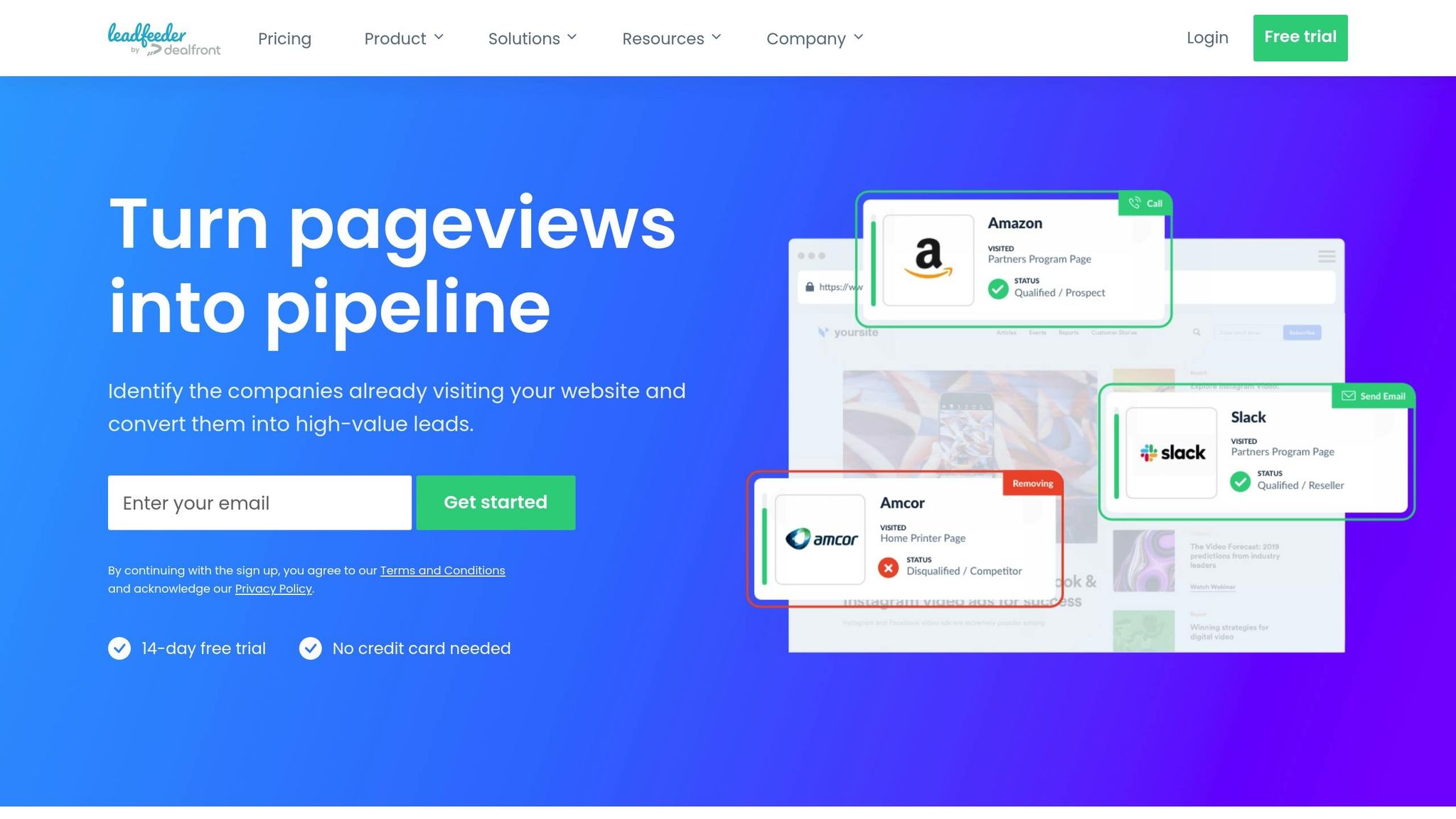
Leadfeeder employs a combination of a JavaScript tracker and reverse DNS (rDNS) to link visitor IP addresses to company names, making it possible to identify businesses even in remote work setups. Each company profile is enriched with details like employee count, social media links, and key contacts. The platform also monitors visitor behavior, such as pages viewed, time spent on the site, and traffic sources - whether from Google Ads, LinkedIn, or organic search. With updates to its dashboard occurring 24 times a day and daily database refreshes, Leadfeeder ensures users receive up-to-date insights. These tracking methods play a key role in recovering otherwise lost leads.
Lead Recovery
Leadfeeder excels at lead recovery, identifying around 40% of website visitors and generating up to 20 times more leads compared to traditional web forms. For example, Steve Jackson, CEO of Quru, used Leadfeeder's integration with Pipedrive to send website leads directly to their CRM, achieving a 34% increase in qualified sales leads.
The platform’s Custom Feeds feature enables users to set up filters for high-priority pages - like pricing or demo pages - and receive instant alerts via Slack or email when target companies exhibit buying intent. Triuvare, an IT agency, leveraged this feature to track companies viewing their "ICT Tendering Guide", boosting their content ROI and conversion rates. Similarly, Casper Rouchmann, Traffic Manager at Templafy, used the Zapier integration to automate account-based marketing (ABM) campaigns, cutting their sales process by 20%.
Integrations
To enhance lead recovery, Leadfeeder integrates with a variety of CRM and marketing platforms. It syncs seamlessly with tools like Salesforce, HubSpot, Pipedrive, Zoho, and Microsoft Dynamics, as well as marketing platforms such as Mailchimp, Outreach, and SalesLoft. These integrations are further supported by Zapier, enabling real-time notifications via Slack or email.
Privacy Compliance
Leadfeeder adheres to GDPR and CCPA regulations by using first-party cookies. It holds ISO 27001 and ISO 27701 certifications, ensuring high standards for data security and privacy management. Data is stored on secure servers within the European Union, offering compliance assurance for businesses in regulated industries. The platform uses rDNS to match IP addresses with business networks without identifying private individuals, and its B2B data is sourced from official trade registers, public web crawling, and AI-driven classification.
Pricing
Leadfeeder provides a free Lite plan at no cost, offering access to data from the last 7 days and identifying up to 100 companies. The Premium plan starts at $99 per month when billed annually (or $139 per month on a monthly basis). Pricing adjusts based on the number of unique companies identified monthly: 51–100 companies cost $119 per month, 101–200 companies are $143 per month, and 201–400 companies cost $215 per month. A 14-day free trial of Premium features is also available. With a G2 rating of 4.7 out of 5, users often commend its precise location tracking and ease of use, though some mention that access to contact email addresses is only available on paid plans.
sbb-itb-77d5bc3
5. FullStory
Tracking Methodology
FullStory brings a powerful approach to visitor tracking with its patented Fullcapture™ technology. This tool automatically records every user interaction - clicks, scrolls, hovers, and page changes - so there’s no need for manual tagging or guesswork.
Adding to its capabilities, the StoryAI feature acts as a virtual analyst, delivering real-time answers to natural language queries. The platform also identifies user pain points by detecting behaviors like rage clicks, dead clicks, and thrashed cursors, helping teams zero in on trouble spots that could be affecting conversion rates.
Lead Recovery
FullStory plays a crucial role in recovering revenue lost to digital friction. For instance, Chipotle recovered over 71% of lost revenue, while VividSeats saved approximately 10,000 conversions per error.
The session replay feature provides detailed recordings of user journeys, giving teams the context they need to understand and resolve issues. Companies have seen impressive results: Finicity reported a 15% increase in funnel conversions, and TBC achieved a 145% boost in conversion rates after using FullStory insights. These examples highlight how behavioral data can refine lead recovery strategies and integrate seamlessly with broader marketing and sales efforts.
Integrations
FullStory connects effortlessly with platforms like Google Analytics, Salesforce, HubSpot, and Slack. It supports integrations through APIs, native connectors, webhooks, and Zapier, making it easy to sync with existing tools. With its FullStory Anywhere: Activation feature, technical teams can act on real-time user behavior to deliver personalized experiences and automate workflows.
Privacy Compliance
When it comes to privacy, FullStory ensures compliance with GDPR, CCPA, and PCI standards by excluding sensitive information from its recordings. This privacy-first approach allows businesses to gather detailed behavioral data while respecting user privacy and adhering to regulations across different regions.
Pricing
For basic tracking needs, FullStory offers a free plan at no cost. Enterprise plans are tailored based on session volume and specific features, with pricing details available through their sales team. The platform is well-regarded, holding a 4.5 out of 5 rating on G2 from 767 reviews. Users appreciate the autocapture feature for eliminating the hassle of manual event tagging. However, some note that the platform can be pricey for smaller businesses and may require time to master its advanced analytics tools. As of 2025, FullStory’s annual revenue reached $84 million.
5 Best Visitor Identification Software (B2B Website Visitor Tracking)
Pros and Cons
Every tracking tool has its own strengths and limitations. Here's a breakdown of the key advantages and drawbacks for some popular options.
MagicTag is designed to capture real-time form inputs, allowing businesses to identify up to 12x more leads - even if users don’t submit the form. It’s lightweight, compliant with GDPR and LGPD regulations, and includes a free plan that covers up to 1,000 identified users each month. On the downside, its functionality is limited to form-based data capture, leaving out broader behavioral analytics.
Google Analytics (GA4) integrates seamlessly with Google services like Google Ads and Search Console, offering real-time reporting and synchronization. However, it has a steep learning curve, and data sampling can occur when dealing with high traffic volumes.
Hotjar excels in providing qualitative insights through tools like heatmaps and session recordings, making it great for pinpointing usability issues. It’s often used alongside Google Analytics to complement quantitative data. That said, its focus on qualitative insights means it lacks the depth of quantitative analytics some businesses may need.
Leadfeeder is particularly strong in B2B scenarios, offering integrations with over 40 CRMs, including HubSpot, Salesforce, and Pipedrive. While it’s excellent for identifying anonymous website visitors, its B2B-specific design may not suit all industries.
FullStory offers advanced autocapture technology, eliminating the need for manual event tagging and saving significant time. Its automation capabilities are impressive, but the tool can be expensive for smaller businesses, and its advanced features require time to master.
Here’s a quick comparison of the tools:
| Tool | Key Strengths | Main Weaknesses |
|---|---|---|
| MagicTag | Real-time form capture, 12x more lead identification, affordable pricing ($0–$299/month), easy to set up, strong CRM integration | Limited to form data capture, lacks full behavioral analytics |
| Google Analytics | Free, real-time reporting, integrates deeply with Google tools, comprehensive traffic analysis | Steep learning curve, data sampling issues |
| Hotjar | Heatmaps, session recordings, great for qualitative insights | Limited quantitative metrics |
| Leadfeeder | 40+ CRM integrations, ideal for identifying B2B visitors | Focused primarily on B2B applications |
| FullStory | Advanced autocapture technology, reduces manual tracking | Higher cost for small businesses, requires time to learn advanced features |
This comparison provides a handy reference to help you choose the tracking tool that best fits your needs.
Conclusion
Selecting the right visitor tracking tool in 2025 comes down to aligning with your business goals. For companies prioritizing form-based lead capture and recovery, MagicTag is a standout choice. It captures real-time form inputs, identifying up to 12x more leads. With pricing options ranging from $0 to $299 per month and seamless CRM integrations, MagicTag is particularly well-suited for U.S. businesses aiming to enhance lead generation without diving into complex behavioral analytics.
For B2B companies, tools that uncover hidden opportunities can make a big difference. For instance, Templafy saw a 20% reduction in its sales cycle after integrating Leadfeeder into its ABM campaigns on LinkedIn. These tools help solve the challenge of anonymous traffic by identifying which companies are visiting your site.
To fully understand user behavior, combining quantitative tools like Google Analytics with qualitative platforms such as Hotjar offers a well-rounded view. While Google Analytics shows what’s happening on your site, Hotjar’s heatmaps and session recordings reveal the underlying reasons behind user actions.
Finally, privacy and data collaboration remain critical. With regulations like the CCPA shaping the landscape, U.S. businesses must prioritize tools that support granular consent management, such as those implementing Google Consent Mode v2. Additionally, effective use of visitor data not only ensures compliance but also drives results - boosting customer retention by 36% and increasing sales win rates by 38%.
FAQs
How does MagicTag improve lead recovery compared to traditional tracking methods?
MagicTag changes the game for lead recovery with its standout features like real-time visitor tracking, automatic lead identification, and CRM integration that works effortlessly. Instead of relying on outdated, manual processes, MagicTag gives businesses instant access to visitor behavior data. This means they can take action fast, capturing leads before they slip away.
With automated lead tracking and smooth integration into your current marketing tools, MagicTag simplifies workflows, minimizes errors, and ensures every opportunity is captured. It’s a powerful way to boost conversions and make your marketing efforts more efficient.
How does MagicTag ensure compliance with data privacy regulations?
MagicTag focuses on supporting businesses in meeting key data privacy regulations, including GDPR, CCPA, and LGPD. Its tools are built to manage user data responsibly, prioritizing transparency and security to align with these legal requirements.
For a deeper dive into MagicTag's privacy compliance features, it's best to contact their support team or check their official documentation for the latest and most accurate details.
What types of businesses benefit most from using MagicTag?
Businesses aiming to generate leads and boost online conversions stand to gain a lot from using MagicTag. For e-commerce retailers and SaaS companies, its real-time data tracking can help uncover anonymous visitors, recover potential leads, and drive more sales.
For B2B marketing and sales teams, MagicTag offers tools to map out customer journeys, pinpoint high-intent prospects, and initiate timely follow-ups. This not only improves lead generation but also helps close deals faster. Meanwhile, digital agencies and brands running frequent campaigns can analyze which pages and user actions lead to the highest conversions. This insight allows them to fine-tune their strategies and create better user experiences.