Want to turn website visitors into leads? Here are five effective ways to track and understand your audience:
- Google Analytics (GA4): Analyze visitor behavior, traffic sources, and conversion rates. Use integrations like BigQuery for deeper insights and real-time tracking for instant campaign feedback.
- Heatmaps & Session Recordings: Visualize user actions like clicks and scrolls. Tools like Microsoft Clarity help identify roadblocks, improving user experience and conversions.
- MagicTag: Recover form data in real time, even if users abandon forms. Sync with CRMs like HubSpot or Salesforce for seamless lead management.
- Real-Time Alerts & CRM Integration: Get instant notifications for high-intent actions and sync data with your CRM to streamline sales follow-ups.
- Server-Side Tracking: Ensure privacy compliance and bypass ad blockers by shifting data collection to your server.
These strategies combine data insights and real-time tools to help you identify high-intent visitors and boost conversions.
How to Track Visitors to Your Website: A Step-by-Step Guide
1. Use Google Analytics to Monitor Visitor Metrics
Google Analytics dominates the market with an impressive 84.1% share, making it the go-to tool for tracking user behavior. With GA4, you can capture every interaction - whether it’s a page view, a scroll, a click, or a form submission - giving you a full picture of how visitors engage with your site.
Visitor Data Insights
GA4 categorizes traffic into key sources like organic, direct, referrals, social, and paid. It also provides engagement metrics such as session duration and engagement rates, along with demographic data. Interestingly, only 2.35% of visitors actually convert. By analyzing this data, you can pinpoint where potential leads drop off, offering a roadmap to improve user experience and boost conversions.
Integration Capabilities
GA4’s integration options make it even more powerful. Pair it with Google Search Console to uncover top-performing keywords or use Google Tag Manager to easily manage tracking tags - no developer needed. For more advanced analysis, export raw data to BigQuery for deeper insights without sampling limitations. A great example? Thinkific leveraged visitor activity data through Breadcrumbs to refine their lead scoring model, slashing their Service Level Agreement (SLA) response time by an incredible 99.9%.
Real-Time Tracking Features
The Realtime report is a game-changer for monitoring immediate campaign performance. It provides data from the last 30 minutes, including user counts, locations, and the pages they’re viewing. Enabling Enhanced Measurement takes things further, automatically tracking actions like scrolls, outbound clicks, and site searches.
Privacy Compliance
GA4 is designed with privacy in mind, incorporating features to comply with GDPR and CCPA. Tools like Consent Mode and customizable data retention settings help you stay on the right side of regulations. You can also enhance privacy by implementing server-side tagging and filtering out internal traffic, such as your team’s IP addresses.
2. Apply Heatmaps and Session Recordings to See User Behavior
Google Analytics does a great job showing what visitors do on your site, but heatmaps and session recordings go a step further by revealing why they do it. These tools transform raw data into visual insights, like color-coded maps and playback recordings, that highlight exactly where users click, how far they scroll, and where they hit roadblocks. By layering these insights on top of visitor metrics, you gain a much clearer picture of user behavior.
Visitor Data Insights
Heatmaps provide a visual breakdown of user interactions, showing clicks, scroll depth, and cursor movements. This helps identify which elements on your site grab attention. Session recordings take it further by replaying real user visits, capturing every mouse movement, click, scroll, and form interaction. They also expose potential issues, like users repeatedly clicking on non-functional elements or struggling with confusing navigation. For example, you can pinpoint the exact form field where users hesitate or abandon a signup process.
The results speak for themselves. In 2024, Cooking Guild used revenue-based heatmaps to identify their top-performing products on collection pages, boosting Revenue Per Session by 48% and achieving a 40x return on investment in just 30 days. Similarly, AstroPay combined funnel analysis with session recordings to uncover confusion around pending transaction statuses, which led to a 56% increase in cryptocurrency purchase conversions. These insights can directly shape strategies to capture and retain valuable leads.
Integration Capabilities
Heatmap tools work seamlessly with your existing analytics setup, complementing GA4 insights. Platforms like Microsoft Clarity and Smartlook integrate directly with Google Analytics, and many offer one-click setups for popular platforms like WordPress, Shopify, Wix, and Webflow. For more advanced needs, you can sync these tools with A/B testing platforms like Intelligems or Convert to validate design changes with visual evidence.
Real-Time Tracking Features
Many heatmap tools provide near-instant data after installation, helping you quickly spot issues like JavaScript errors or sudden drops in conversions. Some even allow you to overlay live heatmaps directly on your site for immediate insights.
"With the Optimizely integration with Contentsquare, we're able to be more effective as a CRO program because we can take a losing test and see why it lost - maybe there's points of friction or a minor tweak that could be made to change the outcome of the test."
- Sheena Green, Director, eCommerce / Optimizations, Ultra Mobile
Privacy Compliance
These tools are built with privacy in mind. They comply with GDPR and CCPA through features like automatic data masking for sensitive fields (e.g., passwords, credit card numbers) and IP anonymization, ensuring user data stays protected.
3. Install MagicTag to Capture Form Data in Real-Time

Heatmaps are great for visualizing how users interact with your site, but they fall short when it comes to identifying who those users are - especially if they abandon forms without hitting "submit." This is where MagicTag steps in. It captures key user data - like names, emails, and phone numbers - in real time as visitors type into your forms, even if they don’t finish. For businesses losing leads to form abandonment, MagicTag can help recover up to 12 times more leads compared to traditional tracking methods.
Real-Time Tracking Features
Installing MagicTag is simple. Add its lightweight HTML script to your website’s <head> or <footer> section, and it starts tracking user interactions instantly. It captures actions like form completions, email sign-ups, and newsletter registrations in real time - no need to wait for a form submission. This makes it especially useful for reducing cart abandonment and improving conversions by giving you a clearer picture of user engagement.
Integration Capabilities
MagicTag doesn’t just stop at tracking - it works seamlessly with your existing tools. It integrates with major CRM platforms like HubSpot, Salesforce, and Pipedrive through webhooks and APIs, updating lead profiles as users interact with your forms. It also connects with marketing platforms like MailChimp and ActiveCampaign, allowing you to enroll leads into nurture campaigns based on their activity. Plus, sales teams can receive instant notifications via Slack or email when high-value prospects submit their details, ensuring no opportunity slips through the cracks.
Privacy Compliance
MagicTag is designed with privacy in mind. It follows GDPR and LGPD standards, collecting only the information you actually need and avoiding the use of persistent cookies. The platform includes built-in consent management tools, giving users control over their data with options to access or delete it. By using cookie-free tracking, MagicTag helps you understand user behavior without relying on intrusive consent banners that might hurt your conversion rates.
sbb-itb-77d5bc3
4. Set Up Real-Time Alerts and CRM Integration
Real-time alerts give your sales team the edge they need to act fast when prospects engage with your site. By reaching out within minutes, you can tap into peak interest and improve the chances of closing a deal. Pair this with CRM integration to create a seamless, real-time view of your leads, giving your team the context they need to make informed decisions.
Integration Capabilities
Connecting your tracking data to your CRM ensures you have a complete picture of each lead's journey. With automatic syncing of visitor behavior - like page views, time spent on site, and content engagement - manual data entry becomes a thing of the past. This means your sales reps always have the right information at their fingertips.
For example, Quru, under the leadership of CEO Steve Jackson, saw a 34% increase in qualified sales leads by integrating their tracking system with Pipedrive CRM. Leads from the website were routed directly to sales reps, enabling quick follow-ups. Similarly, Templafy's Traffic Manager Casper Rouchmann used automated workflows to streamline account-based marketing campaigns, cutting their sales process time by 20%.
Activate Real-Time Alerts
Custom alerts can be a game-changer for identifying high-intent actions. Whether it’s multiple visits to your pricing page or downloading technical resources, you can set up notifications to be sent via Slack or Microsoft Teams. By implementing lead scoring, you can assign points to key behaviors, and once a lead reaches your "sales-ready" threshold, your CRM will notify the right sales rep instantly.
The results of aligning sales and marketing teams through integrated data are hard to ignore: companies enjoy 36% higher customer retention rates and 38% higher sales win rates. Thinkific, for instance, slashed their response time by 99.9% after introducing a lead scoring model that prioritized hot leads based on website activity.
5. Use Server-Side Tracking for Better Privacy Compliance
Privacy Compliance
Server-side tracking shifts data collection from a visitor's browser to a secure server under your control. This approach lets you intercept data before it leaves your server, allowing you to remove personally identifiable information (PII) like email addresses, user IDs, or sensitive URL parameters. By doing so, you align with GDPR and CCPA data minimization standards while also implementing consent frameworks that block tracking until users provide explicit permission.
Real-Time Tracking Features
Once your data is secured, server-side tracking enhances accuracy and helps you sidestep browser restrictions.
Ad blockers and browser privacy tools, such as Safari's Intelligent Tracking Prevention, often disrupt traditional client-side tracking. Server-side tracking routes data through your own domain instead of third-party endpoints, effectively bypassing most ad blockers. This ensures a fuller understanding of visitor behavior and helps you identify high-intent leads more effectively.
"Server-side tracking captures user events directly from your backend rather than relying solely on front-end JavaScript. This prevents data loss due to ad blockers or ITP restrictions." - Nilangan Ray, Salespanel
Using platforms like Google Cloud Run or AWS to host a server-side container allows you to enrich visitor data with secure CRM details. You can also send a single tracking request to multiple destinations, streamlining your data processes.
MagicTag Pricing Comparison
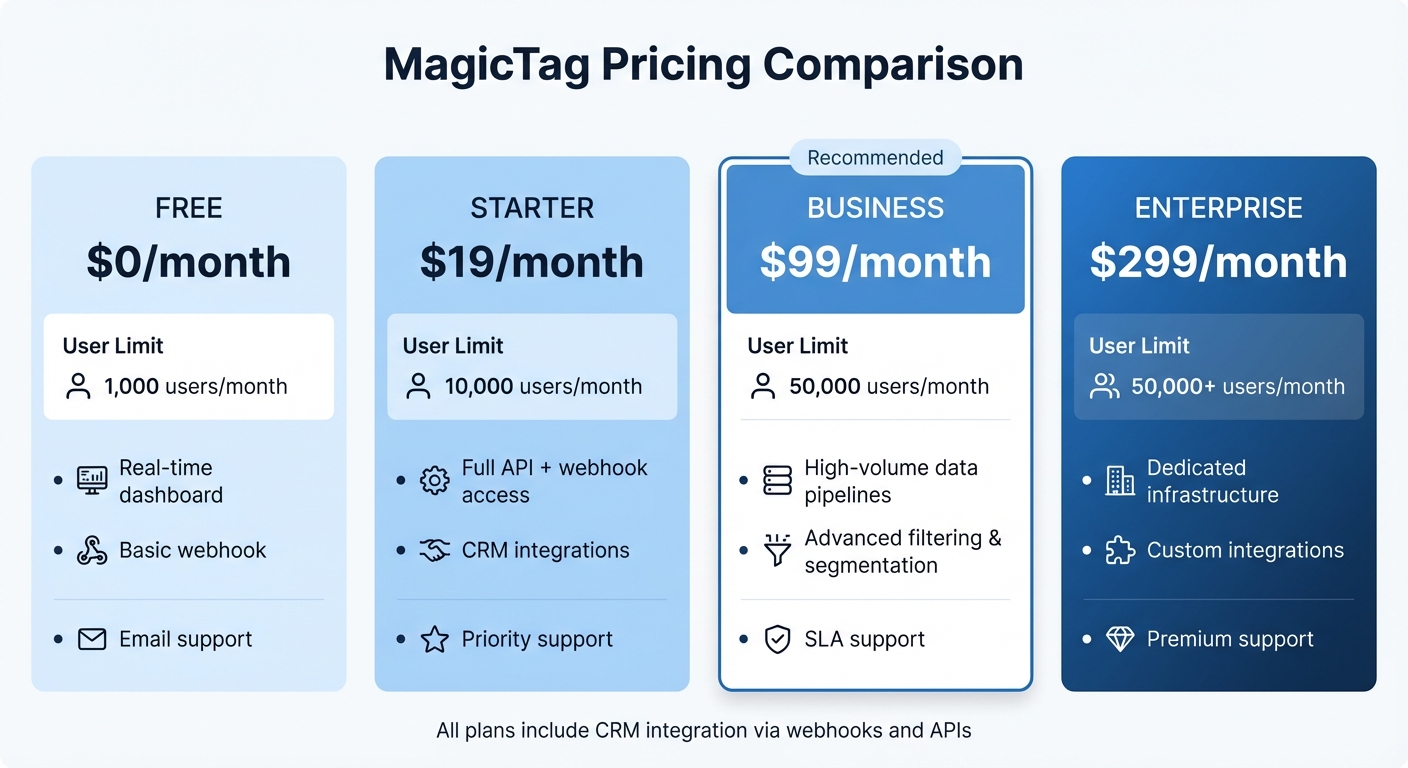
MagicTag Pricing Plans Comparison: Features and Limits
MagicTag provides four pricing tiers designed to help you capture real-time visitor data directly from form entries.
The Free plan is ideal for small websites or testing the platform, offering up to 1,000 identified users per month at no cost. It includes access to a real-time dashboard, basic webhook functionality, and email support. For $19/month, the Starter plan increases the limit to 10,000 users and unlocks full API and webhook access, CRM integrations, and priority support.
If your business deals with higher traffic, the Business plan is available for $99/month, identifying up to 50,000 users. This plan introduces high-volume data pipelines, advanced filtering and segmentation tools, and SLA-backed support. For organizations with more complex needs, the Enterprise plan starts at $299/month for over 50,000 users. It offers dedicated infrastructure, custom integrations, and premium support.
Here’s a quick breakdown of the plans:
| Plan | Monthly Price | Monthly User Limit | Key Features | Support Level |
|---|---|---|---|---|
| Free | $0 | 1,000 users | Real-time dashboard, basic webhook | Email support |
| Starter | $19 | 10,000 users | Full API + webhook, CRM integrations | Priority support |
| Business | $99 | 50,000 users | High-volume pipelines, advanced filtering | SLA support |
| Enterprise | $299 | 50,000+ users | Dedicated infrastructure, custom integrations | Premium support |
All plans integrate seamlessly with major CRM platforms through webhooks and APIs, ensuring lead information flows directly into your existing sales and marketing systems. Plus, you can implement MagicTag on any website without needing a developer.
These pricing options are designed to grow with your business, giving you the tools you need to optimize your lead recovery strategy.
Conclusion
Understanding your website visitors goes beyond just knowing the numbers - it's about grasping who they are, what they care about, and when they're ready to take action. The five methods outlined here work together to give you that clarity. Google Analytics provides the hard data, heatmaps uncover the "why" behind user behavior, and real-time tools like MagicTag ensure you capture leads before they slip away. Combine these with CRM integration and server-side tracking, and you’ve built a system designed to turn anonymous visitors into real sales opportunities.
Conversion rates tend to be low, which highlights just how many potential leads go unnoticed. But when you mix quantitative data with insights into user behavior, you stop relying on guesswork and start making informed decisions based on actual user intent.
This is where real-time solutions shine. For instance, MagicTag captures form data instantly - even if users abandon the form - and syncs it with your CRM, giving your sales team a chance to act immediately. Their Free plan, which identifies up to 1,000 users per month, is a great way to see its impact before scaling up.
As one industry expert puts it:
"Website visitor tracking isn't about tracking data for the sake of tracking... When you know who is visiting your site, what they care about, and when they are ready to buy, you stop trying to convert cold leads and start reaching out to potential customers".
This shift - from passively collecting data to actively engaging with potential customers - can make all the difference in lead generation.
The best part? These tools are straightforward to set up and deliver results you can measure. Start with one method today, and watch as your understanding of your audience deepens. With these strategies in place, you’ll be turning passive visitors into actionable leads in no time.
FAQs
How does MagicTag help recover leads from incomplete forms?
MagicTag equips you with tools to spot and reconnect with potential leads who leave forms incomplete on your website. By monitoring user behavior and capturing partially filled-out forms, it ensures no opportunity slips through the cracks.
Armed with this data, you can reach out to users with tailored follow-ups, re-engaging them and guiding them further along your sales process.
What are the privacy advantages of using server-side tracking?
Server-side tracking moves the process of data collection from a visitor's browser to your backend systems. This means personal identifiers and interaction details aren't exposed through client-side scripts or third-party cookies. By storing raw event data on your own server, you can better safeguard it from unauthorized access, align with privacy regulations like GDPR and CCPA, and reduce the impact of ad blockers on your tracking efforts.
This method also enables tighter access controls, encryption for sensitive data, and secure deletion practices that follow your privacy policy. These steps not only help protect user information but also demonstrate a strong commitment to responsible data management, fostering trust with your audience.
How can heatmaps and session recordings help improve website user experience?
Heatmaps provide a visual snapshot of where visitors focus their attention on a page. They use color-coded zones to indicate the most and least engaging areas. For instance, "hot" zones - marked in red or orange - highlight the parts of a page that draw the most interaction, like headlines, buttons, or images. Conversely, cooler zones show areas that users tend to overlook. This insight allows you to make informed adjustments, such as moving calls-to-action or simplifying forms, to boost engagement and increase conversions.
Session recordings, on the other hand, offer a detailed look at individual user journeys. They show exactly how visitors interact with your site - whether they’re scrolling, clicking, or leaving a page altogether. These recordings can reveal hidden issues, like broken links, confusing navigation, or repeated failed clicks. Fixing these pain points can help create a smoother, more user-friendly experience that keeps visitors engaged and encourages them to take action.
By combining heatmaps and session recordings, you get both a bird’s-eye view and a close-up understanding of user behavior. This combination makes it easier to focus on meaningful changes and deliver a website experience that’s intuitive and enjoyable for your audience.