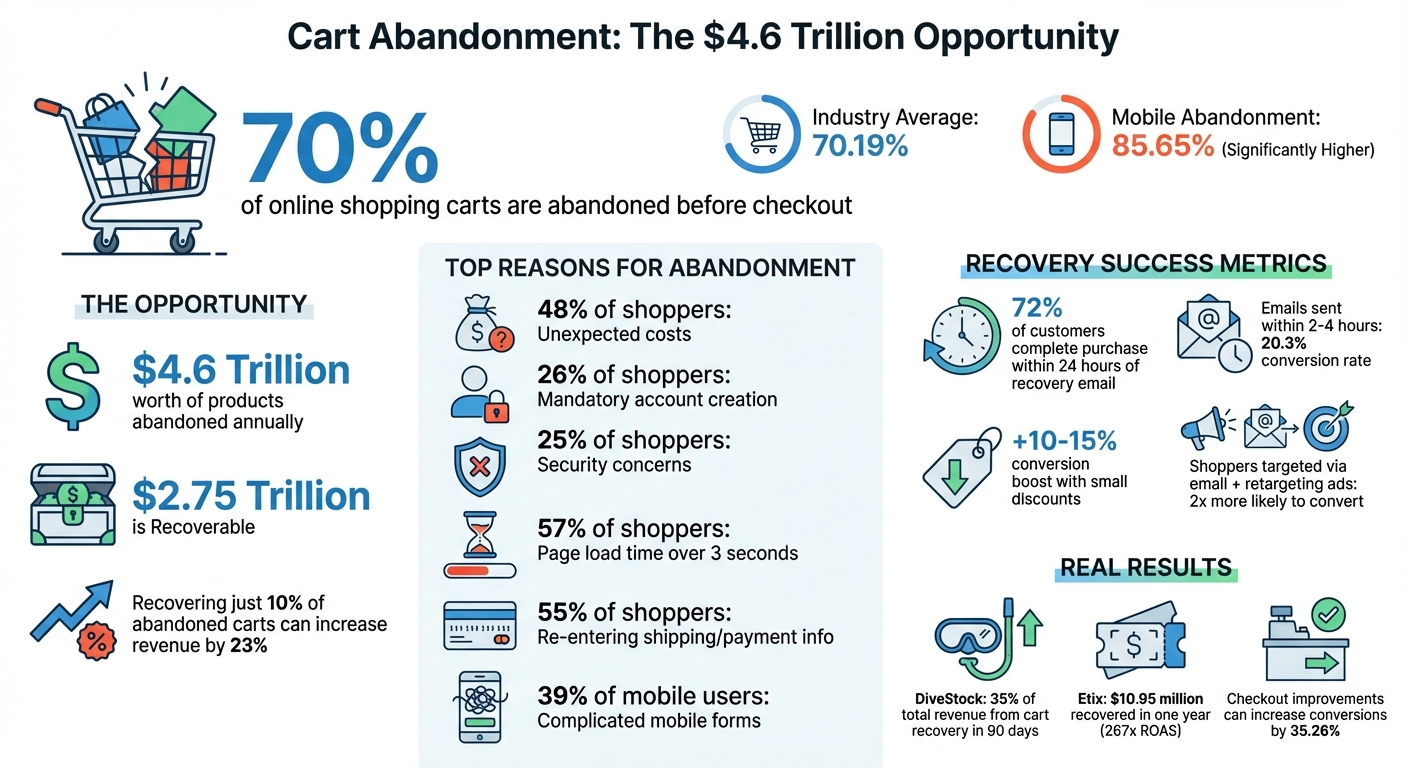
Did you know that 70% of online shopping carts are abandoned before checkout? This means e-commerce businesses are losing billions in potential revenue every year. The good news? Many of these lost sales can be recovered by understanding why customers leave and addressing those pain points.
Here’s what you need to know:
- Common reasons for abandonment: Unexpected costs, complicated checkouts, and mandatory account creation.
- Key opportunity: Recovering even 10% of abandoned carts can increase revenue by 23%.
- Solution: Tools like MagicTag can track user behavior in real time, helping you re-engage high-intent shoppers with personalized recovery campaigns.
Cart Abandonment Statistics and Recovery Opportunities for E-commerce
Your winning abandoned cart recovery email strategy
How to Track Cart Abandonment with MagicTag
MagicTag is a powerful tool for monitoring cart abandonment in real time, forming the backbone of the lead recovery strategies discussed later. It captures visitor data instantly - no coding required - so you can act on it without delay.
Installing MagicTag on Your Website
Getting MagicTag up and running is simple. Just insert a single script into the <head> tag of every page on your site. This method works seamlessly with all major platforms, ensuring compatibility across the board.
To maximize its effectiveness, make sure the script loads on every page to track the entire user journey. After installation, use a real-time debugger to confirm that cart events and form field data are flowing correctly into your dashboard. Once the setup is complete, MagicTag starts capturing user interactions immediately.
Capturing User Data in Real-Time
MagicTag goes beyond traditional tracking by recording visitor information - like names and email addresses - as they type into form fields, even if they never hit "submit." This keystroke-level tracking identifies potential buyers at the earliest stages of their checkout process.
"Pre-submit tracking identifies abandoners before your cart platform even knows they exist."
This feature allows you to spot high-intent shoppers who encountered obstacles before completing their purchase. All captured data syncs automatically to your dashboard, giving you a clear view of what products they were interested in, the quantities they considered, and the potential revenue lost. These real-time insights are invaluable for crafting timely recovery strategies.
Tracking Abandonment Metrics
Once MagicTag is active, your dashboard becomes the central hub for monitoring cart activity. The system categorizes carts into four statuses: Active, Abandoned, Recovered, or Ordered. You’ll also get detailed product-level insights, including specific SKUs, quantities, and the exact dollar value tied to each abandoned cart.
Set an abandonment timeout - typically around 10 minutes - to trigger recovery efforts. Pay close attention to the "Recoverable Revenue" metric, which highlights the total value of abandoned carts. This helps you prioritize outreach to high-value customers who are most likely to convert. Additionally, tracking where users drop off - whether during shipping details or payment - lets you distinguish casual browsers from serious buyers who faced barriers like technical issues or unexpected costs.
Using Captured Data for Lead Recovery
Once MagicTag collects contact details from abandoned carts, the next step is turning those missed opportunities into actual sales. By syncing this data with your CRM, you can set up automated follow-ups that are both timely and targeted.
Connecting MagicTag to Your CRM
MagicTag can be integrated with your CRM through webhooks or API connections. This setup allows automated workflows - like triggering actions when a cart_updated event occurs - so your CRM instantly receives details such as the shopper's email, cart contents, and the potential purchase value. To avoid unnecessary follow-ups, you can use "Wait Until" logic to halt campaigns as soon as a purchase is completed.
For example, if a shopper provides their email but doesn't finish their purchase, MagicTag sends this data to your CRM right away. From there, a recovery email sequence can be triggered - typically at intervals like 30 minutes, 24 hours, and 48–72 hours after the cart is abandoned. This smooth integration also sets the stage for more precise segmentation, which we’ll dive into next.
Segmenting and Personalizing Recovery Campaigns
Tailoring recovery campaigns based on cart value and customer type can significantly improve results. For instance, if a cart's value exceeds $100, offering strong incentives like free shipping or exclusive discounts can help seal the deal. Meanwhile, differentiating first-time shoppers from returning customers allows for more personalized messaging - think trust-building content for new visitors and loyalty rewards for repeat buyers.
MagicTag also captures detailed product information, such as names, prices, and images. You can use this data to dynamically rebuild abandoned carts in recovery emails, providing customers with a seamless "one-click" route back to checkout.
"Generic messages signal to customers that you don't understand their specific needs or value their individual relationship with your brand."
- Rejoiner
Even a small discount can boost conversion rates by 10–15%. Alternatively, emphasizing free shipping or creating urgency with limited availability can drive action without cutting too deeply into your margins. Combining email campaigns with retargeting ads is especially effective - shoppers targeted through both channels are twice as likely to convert and tend to do so faster.
sbb-itb-77d5bc3
Analyzing Cart Abandonment Data to Reduce Drop-Off
Cart abandonment is a common challenge for online retailers, with an average abandonment rate of 70.19%. Understanding where and why customers leave during the checkout process is key to improving conversions.
Finding Where Customers Drop Off
With tools like MagicTag's real-time tracking, you can identify the exact points where shoppers abandon their carts. To calculate your cart abandonment rate (CAR), use the formula:
CAR = (1 - Completed Transactions / Carts Created) × 100.
If your rate is above 70%, you're in line with industry norms, but there’s always room to dig deeper.
Focus on specific stages of the checkout journey. For example, measure the time between adding items to the cart and starting checkout. A long delay might suggest that users are browsing casually rather than intending to purchase. Additionally, identify drop-off points during the checkout process - whether it’s on the shipping page, account creation step, or final payment screen.
Device-specific data can also reveal issues. Mobile users, for instance, abandon carts at a much higher rate of 85.65%. This could point to design problems like small buttons or unresponsive forms, making the mobile experience frustrating.
Form analytics can be incredibly helpful here. MagicTag captures user interactions, showing where shoppers struggle. For instance, if users frequently abandon at the phone number field, consider making it optional. Similarly, fields that take too long to complete or are often skipped might need simplification.
"The metric [cart abandonment rate] is generally an indicator of how intuitive and trustworthy a checkout process is." - VWO
Price sensitivity is another factor to watch. If abandonment spikes at certain price points (e.g., $200), it could indicate hesitation about cost. Similarly, if popular items have higher abandonment rates, issues like unclear product details or inconvenient shipping options might be to blame.
Page speed also plays a big role - 57% of shoppers abandon if a page takes more than three seconds to load. Use MagicTag's dashboard to identify and fix slow-loading pages to keep users engaged.
Improving Your Checkout Process
Once you've identified the pain points, use MagicTag data to make targeted improvements. Addressing these issues can lead to conversion rate increases of 35.26%.
Extra costs are a top reason for cart abandonment, with 48% of shoppers leaving due to unexpected fees like shipping or taxes. Be transparent - add a shipping calculator on product pages or display the total cost (including fees) before checkout begins. If offering free shipping isn’t feasible, set a clear threshold, such as "Free shipping on orders over $50."
Mandatory account creation is another deterrent, causing 26% of shoppers to abandon their carts. Enable guest checkout and invite customers to create accounts after completing their purchase, once trust has been established.
Streamline your forms. The average checkout flow includes 14.88 form fields, but not all are necessary. Remove non-essential fields like "How did you hear about us?" and make optional fields, such as phone numbers, truly optional. Use inline validation to alert users to errors as they type, reducing frustration.
A progress bar can also ease the checkout experience. A simple indicator showing steps like "Shipping > Payment > Review" helps users understand how much is left, reducing uncertainty and encouraging them to complete the process.
Building trust is critical, especially for first-time buyers. Display SSL certificates and security badges, such as Norton or McAfee, near payment fields. 25% of shoppers cite security concerns as a reason for abandoning their cart, so visible trust signals can help reassure them.
Offer multiple payment options. Digital wallets like Apple Pay, PayPal, and Google Pay let users check out quickly without re-entering shipping or payment details. Since 55% of shoppers abandon if asked to re-enter this information, these options can significantly reduce friction.
Finally, test your mobile checkout process. 39% of mobile users abandon their carts if form entry is cumbersome. Ensure buttons are large enough to tap and that your forms adjust to different screen sizes. Testing on actual devices rather than relying on desktop simulations is crucial.
"If the rate at which shoppers abandon carts spikes suddenly, it's the sign of a problem you should address quickly." - Peter Lowe, Crazy Egg
After making changes, monitor their impact. For example, if you simplify your forms or add a guest checkout option, track whether these adjustments lower your abandonment rate. MagicTag's real-time data allows you to measure the effectiveness of your improvements and refine your strategy based on what works best for your audience.
Conclusion: Converting Abandoned Carts into Revenue
Cart abandonment doesn’t have to mean lost sales. With a staggering $4.6 trillion worth of products abandoned in carts every year - and $2.75 trillion of that recoverable - there’s massive potential to turn these missed opportunities into revenue. The trick lies in identifying shoppers who are ready to buy and re-engaging them before they’re gone for good.
That’s where MagicTag comes in. By capturing user data in real time - even before they fill out a form - it transforms anonymous site visits into actionable leads. This means you’re building a database of potential buyers who’ve already shown interest. From there, automated recovery campaigns via email, SMS, or retargeting ads can help bring them back. Acting quickly is key, and MagicTag’s real-time insights make timely follow-ups possible.
Speed matters. 72% of customers who respond to a recovery email complete their purchase within the first 24 hours. Even better, abandoned cart emails sent within 2–4 hours boast a 20.3% conversion rate. MagicTag’s ability to track behavior in real time ensures you can reach shoppers when their intent to buy is at its peak.
The results speak for themselves. In just 90 days, e-commerce store DiveStock used automated cart recovery campaigns to generate 35% of their total revenue. Similarly, Etix recovered $10.95 million in a single year by managing 1.1 million abandoned carts with behavioral triggers and dynamic product recommendations, achieving an incredible 267x return on ad spend.
As AdRoll puts it:
"Cart abandonment isn't necessarily a setback - as a savvy marketer, you should view it as a huge opportunity." - AdRoll
FAQs
How does MagicTag help track and re-engage shoppers before they abandon their carts?
MagicTag leverages cutting-edge tracking and automation tools to pinpoint potential buyers as they explore your e-commerce site. By analyzing real-time actions - like how long someone spends on a product page or what they add to their cart - MagicTag can identify when a shopper might abandon their purchase.
With tools like form-based lead capture and cart recovery automation, MagicTag helps you gather key customer details and send well-timed follow-ups, such as personalized emails or exclusive discount offers. These efforts make it simpler to win back lost sales and transform indecisive visitors into repeat customers.
Why do customers abandon their shopping carts?
Shoppers often leave their carts behind due to a few key frustrations. One major culprit? Unexpected costs - things like high shipping fees, surprise taxes, or hidden charges that pop up during checkout. These can quickly turn a promising purchase into a deal-breaker. Another common issue is a complicated checkout process. If the steps are too many or customers are forced to create an account, they’re more likely to abandon the process entirely.
Payment-related concerns also play a role. Whether it’s the lack of preferred payment options or worries about security issues like data safety and transaction errors, these hurdles can push buyers away.
On top of that, slow website performance, inconsistent user experiences, and the lack of accessible customer support can create frustrating roadblocks. When shopping feels like more effort than it’s worth, it’s no surprise that carts get left behind.
How do I connect MagicTag to my CRM for better cart recovery campaigns?
To integrate MagicTag with your CRM, start by adding MagicTag’s tracking script or pixel to your checkout pages. This allows MagicTag to capture events like cart abandonment. If a shopper provides contact details (such as an email or phone number), MagicTag will tag their profile with an Abandoned Cart attribute. Using MagicTag’s webhook or API, this data can then be sent to your CRM, where it can either update existing profiles or create new leads.
Once the data is in your CRM, you can create automated workflows to reconnect with these shoppers. For instance, you might send a personalized email or SMS 30 minutes after the abandonment, followed by another reminder 24 hours later. Including product recommendations based on the shopper’s cart can make these messages more compelling. Additionally, you can segment contacts by factors like cart value or purchase intent, helping you focus on the most promising opportunities.
To measure your performance, ensure data flows seamlessly between MagicTag and your CRM. When a shopper completes their purchase, your CRM can send a Purchase Completed event back to MagicTag. This resets the abandonment flag, giving you accurate recovery rate insights and helping you fine-tune your campaigns for even better results.