Most website visitors leave without taking action - around 97% to 98%. That means only 2% convert on their first visit, leaving businesses with a major gap in turning traffic into leads. Tools like MagicTag can help solve this by identifying visitors, saving incomplete form data, and enabling real-time follow-ups. This approach increases lead identification by up to 12x and can boost conversion rates by 147% through retargeting.
Here’s how you can address this challenge and recover lost leads:
- Identify anonymous visitors: Track user behavior and save partial data using methods to recover abandoned form leads.
- Analyze drop-off points: Use analytics to find where visitors leave your funnel.
- Optimize forms: Simplify fields, add progress bars, and use triggers like exit-intent popups.
- Automate follow-ups: Sync data with your CRM and send personalized emails or SMS.
- Segment and prioritize leads: Focus on high-intent pages like pricing or demo requests.
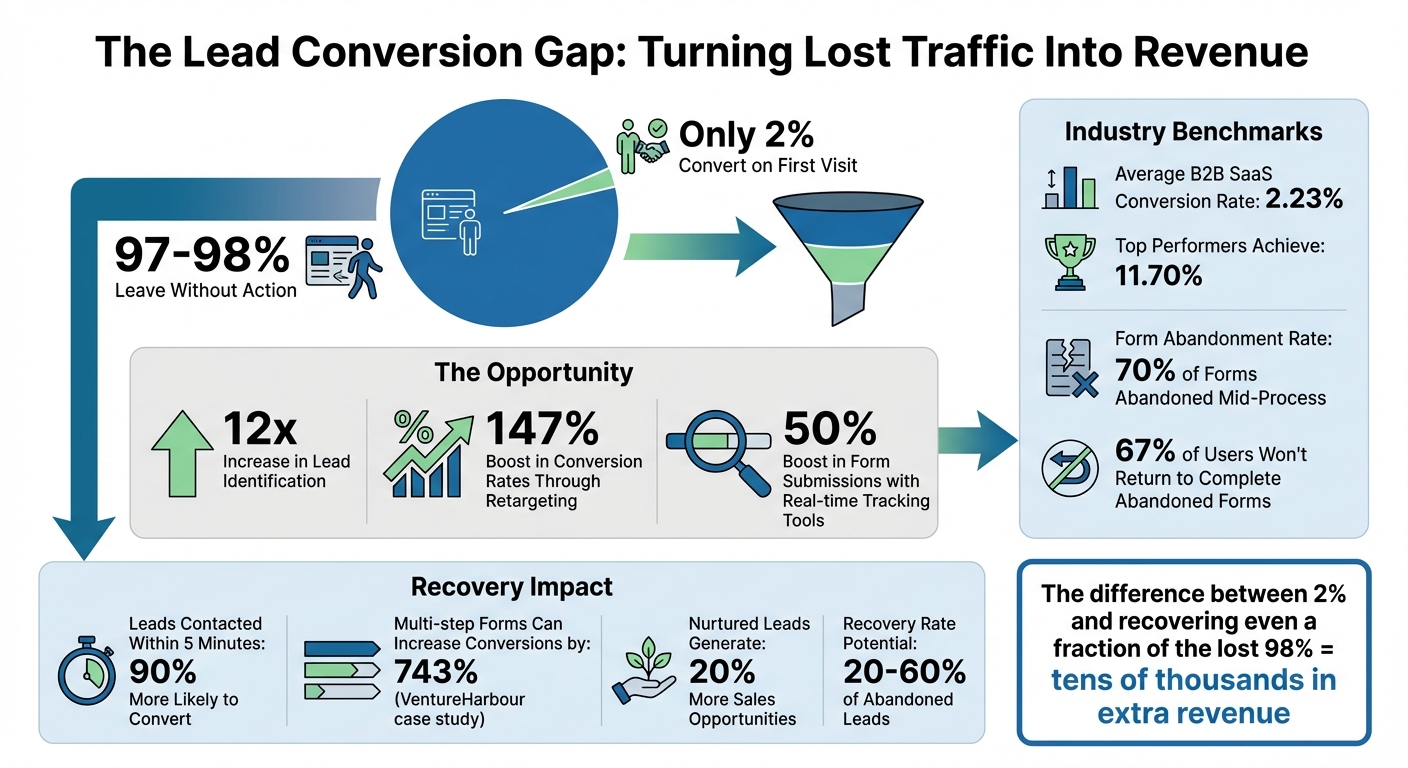
Website Lead Conversion Statistics and Recovery Opportunities
Turn Website Visitors Into Leads Without Them Filling In A Form!
Finding Where You're Losing Leads
Before you can fix a leak in your sales funnel, you need to figure out exactly where it's happening. Many businesses focus heavily on driving traffic but fail to understand why visitors lose interest or drop off the journey. The good news? Your analytics tools already hold the answers.
Measuring Your Lead Loss
Start by calculating your baseline lead capture rate using this formula: (Total Leads / Total Visitors) x 100. For example, if you have 10,000 monthly visitors and capture 200 leads, your conversion rate is 2%. In the B2B SaaS space, the average conversion rate is around 2.23%, while top-performing companies achieve as high as 11.70%. If your numbers fall below average, you could be missing out on a significant chunk of revenue.
An easy way to track leads is by setting up Destination Goals in your analytics platform. These goals track when a visitor lands on a "Thank You" or confirmation page after submitting a form. Ameet Khabra from Hop Skip Media recommends this straightforward method:
"If you're a beginner, simply creating thank-you pages for when someone submits a form on your website is a great way to track leads."
This simple setup gives you a clear view of how many visitors convert and how many abandon the process.
Take it a step further with Google Analytics 4's Funnel Exploration feature. Build a funnel that tracks the entire conversion path - from landing pages to pricing pages, form starts, and form completions. This visualization helps you pinpoint exactly where visitors drop off. Activating the "Show Elapsed Time" option can highlight steps where users are stalling. For example, one business boosted its lead sign-up rate from 3% to 15% by leveraging goal tracking and funnel analysis.
Once you've identified where visitors are dropping off, shift your focus to the pages that signal the highest buying intent.
Finding Your High-Intent Pages
Not all pages are created equal when it comes to buyer intent. Pages like your pricing page, demo request forms, case studies, and checkout pages are prime real estate. Visitors who engage with these pages are showing clear signs of interest.
"The best sales teams don't just chase leads - they prioritize the right ones. A visitor who looks at your pricing page three times in a week is far more valuable than someone who reads one blog post and leaves."
- Alex Parker, Operations Manager, Work Schedule
Pay close attention to pages with high traffic but low conversion rates. These represent your biggest opportunities for improvement. Use GA4's "Next Action" dimension to see where visitors go after leaving a critical page. For instance, if users are exiting your pricing page, it might signal a need for additional trust-building content. Metrics like bounce rate and time on page can also help you identify gaps - high bounce rates often indicate that a page isn't meeting visitor expectations.
To uncover hidden issues, segment your funnel data by device type and traffic source. If mobile users are abandoning forms more often than desktop users, it could point to mobile usability problems. Similarly, if paid search traffic converts at a lower rate than organic traffic, your ad targeting may need refinement.
Building Better Lead Capture Forms
Once you've pinpointed where leads might be slipping through the cracks, the next step is refining your capture methods. By optimizing your forms, you can reduce friction and improve conversion rates.
Designing Simple, Easy-to-Complete Forms
Keep your forms straightforward by limiting fields to the essentials - often just a name and email. Research shows that cutting even a single field can increase conversions by 26% to 50%. For additional details, consider using progressive profiling to gather more information from returning visitors. For instance, Unbounce tested this by reducing an 11-field form to just 4 fields, leading to a 160% increase in form submissions without sacrificing lead quality.
Make sure your forms are mobile-friendly. Features like pre-defined dropdowns for options like "Company Size" can make completion easier on smaller screens. Adding plenty of white space around your forms improves readability, while a bold, attention-grabbing call-to-action (CTA) button ensures users know where to click.
Speaking of CTAs, use action-oriented text like "Get My Free Guide" or "Download Now." These phrases can convert up to 42% more visitors into leads compared to generic alternatives. To address privacy concerns, include trust signals near the CTA, such as "We respect your privacy" or a security badge.
Using Multi-Step Forms and Progress Bars
If you need to collect more detailed information, breaking your forms into smaller, manageable steps can make a big difference. For example, VentureHarbour replaced a static contact form with a multi-step interactive one, resulting in a staggering 743% increase in conversion rates - from 0.96% to 8.1%. Similarly, Vendio saw a 59% rise in total leads after switching to a multi-step form design.
Why do multi-step forms work? They make the process feel less intimidating. Instead of overwhelming users with a long list of fields, showing just a few at a time simplifies the experience. Adding a progress bar at the top helps users see how far along they are, encouraging them to finish.
Start with basic questions like name and email to get users invested. Save more detailed or sensitive questions - such as budget or company size - for later steps. This approach works particularly well for B2B leads, as it allows you to gather the in-depth data your sales team needs without scaring off potential prospects.
When and Where to Show Forms
The design of your forms is only half the battle. Strategic placement and timing are just as important for capturing high-intent leads. Studies show that users engage with content above the fold 84% differently than with content below it. For simple offers like newsletter signups, place your form at the top of the page for immediate visibility. On the other hand, for more complex products that require explanation, forms below the fold can convert up to 220% better once users understand the value.
In long-form content, embed forms at regular intervals - around every 350 words - to keep your offer visible as readers scroll. On high-intent pages like pricing, case studies, or demo request pages, make sure your forms are prominent and easy to find.
Behavioral triggers can also help display forms at the right moment. For example:
- Exit-intent popups appear when a user moves their cursor toward the browser's close button, helping recover abandoning visitors.
- Scroll-triggered forms show up after a user has read 70–80% of your content, signaling genuine interest.
- Time-based triggers display a chatbot or slide-in form after 30–60 seconds, engaging users who linger on your page.
| Lead Capture Method | Optimal Trigger | Best Use Case |
|---|---|---|
| Exit Intent Popup | Cursor moves toward closing | Recovering abandoning visitors |
| Scroll-Point Popup | 70–80% page depth | Offering content upgrades relevant to the article |
| Chatbot Form | 30–60 seconds on page | Answering quick questions and qualifying leads |
| Embedded Form | Immediate (above the fold) | Simple offers like newsletters or basic guides |
| Multi-Step Form | Click-triggered | High-value offers requiring detailed user data |
In April 2025, Arham Khan, founder of Pixated, implemented a "Company Size" dropdown on a B2B software client's lead form. While this change reduced total lead volume by 22%, it increased the number of qualified prospects by 37%. This shows that quality often outweighs quantity when it comes to lead generation.
These strategies lay the groundwork for the automated recovery methods we'll explore next.
Recovering Abandoned Forms Automatically
Once you've fine-tuned your lead capture forms, the next challenge is addressing form abandonment. Turning those incomplete submissions into opportunities can make a big difference in your bottom line.
### Why Visitors Abandon Forms
Form abandonment happens when someone starts filling out a form but leaves before hitting "submit." It's a widespread issue - about 70% of online forms are abandoned mid-process. Even worse, 67% of users won't return to complete a form, especially if they encounter obstacles like confusing layouts or excessive steps. Only 20% will take the initiative to follow up on their own.
The main culprits? Security and privacy concerns (29%), overly long forms (27%), and forms that don't work well on mobile devices (10%). But here's the silver lining: starting a form shows genuine interest. Ignoring these partial entries means losing out on high-potential leads.
How MagicTag Captures Data in Real-Time
This is where MagicTag steps in. It tracks user activity in real time, logging keystrokes, clicks, and selections for every field. This means even if someone abandons a form halfway through, details like names and email addresses are saved. The moment someone begins typing, MagicTag can de-anonymize their entry, revealing contact details like email addresses.
The captured data syncs automatically with your CRM or database, allowing you to set up instant follow-ups like email or SMS reminders. Businesses using MagicTag have reported up to a 50% boost in form submissions. By acting on real-time data, you can quickly re-engage users and keep the conversation going.
Creating Automated Follow-Up Workflows
Once the data is captured, it’s all about putting it to work. Push those partial entries into your CRM - whether it’s HubSpot, Salesforce, or another platform - and tag them for immediate follow-up. You can enrich this data automatically with verified emails or phone numbers using waterfall enrichment processes.
From there, set up automated email campaigns with personalized touches. For example, send a message referencing the specific fields they left incomplete, and include a direct link back to their partially filled form. A simple nudge like this can often get them to finish the submission. If they’ve provided a phone number early in the form, a friendly SMS might be even more effective.
Here’s a real-world example: In November 2024, a dental company using MagicTag’s tools generated $367,000 in revenue and brought in 500 new patients. That’s a 76x return on investment. Mike Hakob, Co-Founder of FormStory, sums it up well:
"Proper form abandonment tracking is needed to gain insights into why users are bailing out and optimize forms to convert more visitors into leads and customers".
Adding incentives to your recovery messages - like a discount, freebie, or exclusive offer - can also help push users to complete their forms. And if you want to take it a step further, AI-driven personalized messages based on the pages they viewed can boost engagement rates by 3.2 times compared to generic outreach. With a well-designed system, you can recover between 20% and 60% of leads that might otherwise slip away.
sbb-itb-77d5bc3
Creating Personalized Follow-Up Campaigns
Once you've added recovered leads to your CRM, the next step is to turn that data into tailored engagement. The key here is to move beyond generic messaging and create meaningful, personalized interactions.
Organizing Leads into Groups
Start by sorting your leads based on their behavior. For example, someone spending over two minutes on your pricing page has a very different level of interest compared to someone who briefly skims a blog post. Group your leads into categories like "added to cart but didn’t purchase", "visited the demo page multiple times", or "returned to the site within seven days". This segmentation helps you identify who’s genuinely interested versus who might just be browsing.
Behavioral segmentation isn’t just a buzzword - it delivers results. Take MusicLawContracts.com, for instance. They added a simple form to their homepage asking visitors to identify their role and goal. The result? An 89% increase in sales (conversion rate jumped from 1.31% to 2.47%), a 58% boost in average order value (from $70.89 to $110.50), and a reduction in purchase time from 20 minutes to under six minutes. Similarly, Paper Style, a wedding products company, segmented their email list into "brides" and "friends/family of brides." Their targeted campaigns saw a 244% increase in open rates, a 161% jump in click-through rates, and a 330% increase in revenue per email.
To take it a step further, use lead scoring to assign values to different actions. For example, visiting a pricing page might be worth 20 points, while clicking on an email earns five points. This system helps you rank leads and identify who’s most likely ready for a sales conversation.
Designing Targeted Nurture Campaigns
Once your leads are sorted, it’s time to craft email campaigns that align with their interests. For example, leads who download whitepapers might appreciate educational resources, while those frequently visiting pricing pages could benefit from case studies or demo invitations. Tailor your emails based on their recent activity on your site.
A good rule of thumb is to keep your content mix at 80% helpful information and 20% product-related pitches. Use behavior-based triggers to send the right message at the right time. For instance, if someone abandons their cart, follow up with a "Wait, you forgot this" email, possibly with a small discount. If they return to your site within a week, greet them with a "Welcome back" email and fresh resources.
Nurtured leads generate 20% more sales opportunities compared to those that aren’t nurtured. Plus, personalized outreach powered by AI can lead to 3.2 times higher engagement rates than generic campaigns. A structured four-week cadence often works well:
- Day 1: Send a thank-you email.
- Day 3: Share a helpful resource.
- Day 7: Invite them to a webinar.
- Day 14: Provide industry insights.
- Day 21: Offer a case study.
- Day 28: Include a direct call-to-action.
To maximize engagement, consider combining emails with SMS, LinkedIn outreach, or retargeting ads. This multi-channel approach can boost response rates by 35%.
When a lead starts showing strong purchase intent, it’s time to pass them along to sales.
When to Hand Off to Sales
The transition from marketing to sales is all about timing. Leads showing bottom-of-funnel behaviors - like revisiting pricing pages, checking out case studies, or viewing "contact us" or "demo" pages - are ready for direct sales engagement. Speed is critical here; leads contacted within five minutes of engagement are 90% more likely to convert.
Set up automated alerts in your CRM or tools like Slack to notify sales reps immediately when high-value prospects are active on your site. Before handing off a lead, ensure your sales team has all the context they need - such as pages visited, resources downloaded, and site return frequency. This information enables a personalized conversation instead of a generic cold pitch.
To avoid confusion, establish clear criteria for what makes a lead "sales-ready." Use your lead scoring system to qualify prospects as "Strong", "Moderate", or "Low" fit based on your Ideal Customer Profile. Mark Daniels, VP of Sales at RevSync, emphasizes the importance of alignment:
"If sales and marketing aren't aligned, leads fall through the cracks. A clear process ensures every opportunity is maximized".
Without proper nurturing, up to 80% of new leads never convert into sales. A well-defined handoff process ensures that every opportunity recovered through tools like MagicTag is given the best chance to succeed.
Optimizing Your Lead Recovery System Over Time
Improving your lead recovery system is an ongoing process. By continually testing and analyzing, you can transform your initial setup into a highly effective system. The key is creating a feedback loop where data reveals what’s working and what isn’t.
Testing and Improving Your Forms
When testing your forms, focus on one element at a time - like headlines or CTA button colors - to clearly identify what drives results. For instance, Blue Fountain Media added a Verisign logo to their landing page, which led to a 42% jump in conversion rates and an 81% increase in form submissions.
Multi-step forms often perform better than single-step ones. Adding a progress bar can help users see how far along they are, reducing the likelihood of them abandoning the process. CityCliq tested various headlines using VWO software and discovered that a clear, descriptive headline - “Create a webpage for your business” - boosted conversions by 90% compared to less specific options.
You can also experiment with adding qualifying fields, such as job title or company size. While this might slightly reduce the number of leads, it can improve the quality of leads your sales team receives. Additionally, headlines with exactly eight words tend to achieve a 21% higher click-through rate than longer ones.
Once you’ve made adjustments, track their effectiveness using performance metrics to ensure your system continues to improve.
Tracking Performance Metrics
Start monitoring key metrics as soon as changes are implemented. Keep a close eye on lead conversion rates and micro-conversions, like form starts or clicks on pricing pages, as these can provide early indications of user intent. To calculate your lead conversion rate, divide the number of leads who become customers by your total leads, then multiply by 100%.
Pay attention to abandonment rates - unfinished forms often point to friction in the process. Use dashboards to identify where users drop off. Also, measure response time: contacting leads within five minutes increases conversion chances by 100 times compared to slower responses. After five minutes, the likelihood of qualifying a lead drops by 80%.
"Lead conversion rates indicate funnel effectiveness."
– Shuai Guan, Co-founder/CEO, Thunderbit
Analyze performance across different traffic sources. For example, email campaigns typically convert at 2.6%, while Google Ads can achieve conversion rates as high as 7.0%. Knowing which channels generate better-quality leads allows you to allocate resources more effectively. Tools like heatmaps and scroll maps can also help you identify where visitors lose interest on high-intent pages, enabling you to refine your design.
Staying Compliant with Privacy Laws
As you optimize your lead recovery system, it’s crucial to stay aligned with privacy laws to maintain trust and protect user data. Implement first-party domain tracking by placing MagicTag’s pixel on a dedicated subdomain (e.g., track.yourbrand.com). This ensures your data is treated as first-party and avoids restrictions from browsers like Safari’s Intelligent Tracking Prevention (ITP) or Firefox’s Enhanced Tracking Protection (ETP).
Incorporate reassuring “microcopy” near your forms to ease visitor concerns. Phrases like “We’ll never spam you” or “Unsubscribe anytime” can build trust while meeting transparency expectations. Avoid purchasing lead lists, as these contacts are often unqualified, and cold outreach can harm your brand and potentially violate privacy regulations. Instead, focus on capturing leads who are genuinely interested in your content.
"In the world of growing concerns around privacy, it's time you start collecting your own customer behavior data i.e. first-party data; and activate your audience throughout the marketing funnel to give a personalized experience for the users."
– Shalini Vijayakumar, Seasoned Content Marketer, CustomerLabs
Keep your CRM data clean by regularly updating, retrieving, and deleting outdated information. This ensures accuracy and compliance with regulations. MagicTag is designed to meet GDPR and LGPD standards, so you can capture leads in real-time without worrying about legal issues - just make sure your follow-up processes are equally compliant.
Conclusion: Converting More Traffic with MagicTag
Most websites manage to capture only 2% to 3% of their visitors through traditional forms, leaving a staggering 97% to 98% of potential leads unseen and untapped. That’s a huge revenue opportunity slipping through the cracks.
MagicTag steps in to solve this problem by identifying anonymous visitors and collecting partial form data in real time - even if users abandon a form before hitting submit.
With MagicTag, you can zero in on high-intent pages, simplify your forms, and use real-time tracking to trigger timely automated follow-ups. By segmenting leads based on their behavior, you can create personalized outreach campaigns that engage prospects when their interest is at its peak.
"In today's marketing world, personalization is where it all needs to be."
– Robert Marusi, Chief Commercial Officer, Turtle Bay
MagicTag uses first-party domain tracking to sidestep browser restrictions like Safari's ITP or Firefox's ETP. Plus, it integrates smoothly with your CRM and marketing tools - whether you’re using HubSpot, ActiveCampaign, Google Ads, or Klaviyo - so you can activate recovered leads across all your channels without missing a beat.
The difference between a 2% conversion rate and recovering just a slice of that lost 98% can translate to tens of thousands of dollars in extra revenue each year. With MagicTag's free plan, which supports up to 1,000 identified users per month, you can start reclaiming lost leads right away. Simply install the tracking pixel, set up automated workflows, and watch your traffic turn into revenue.
FAQs
How does MagicTag help identify anonymous visitors on your website?
MagicTag equips you with cutting-edge tools to reveal insights about website visitors who would otherwise remain anonymous. Through features like form-based lead capture, tailored engagement techniques, and integrations with automation platforms like CRMs or chatbots, MagicTag helps you pinpoint and connect with potential customers more efficiently.
This approach transforms unnoticed website traffic into actionable leads, giving you the opportunity to build relationships and boost revenue. With MagicTag, you can effortlessly turn anonymous visitors into loyal, paying customers.
Why are multi-step forms more effective than single-step forms?
Multi-step forms work well because they divide long forms into smaller, easier-to-handle sections. This approach helps minimize user fatigue and makes the process feel less daunting, often resulting in more people completing the form. In fact, research shows that multi-step forms can boost conversions by over 100% in certain situations.
They also offer a smart way to gather detailed information without intimidating potential leads. By presenting questions step-by-step, you create a more seamless and engaging experience, all while collecting valuable data to better nurture those leads.
How can I make sure my lead recovery system complies with U.S. privacy laws?
To make sure your lead recovery system complies with U.S. privacy laws, start by pinpointing the regulations that apply to your data. For instance, if you manage protected health information (PHI), you'll need to adhere to HIPAA and 42 CFR Part 2 for substance-use-related data. For other types of data, state laws like California’s CCPA/CPRA come into play, governing consent, disclosure, and user rights.
Here’s how you can stay on the right side of compliance:
- Collect only what’s necessary: Focus on gathering only the data essential for your business operations.
- Make consent clear and straightforward: Use simple privacy notices and ensure users actively opt in for things like marketing or profiling.
- Protect your data: Encrypt information, limit access to authorized personnel, and routinely check for system vulnerabilities.
- Respect user rights: Give users the ability to access, update, or delete their data, and let them opt out of communications.
- Define retention timelines: Set clear policies on how long you’ll keep data and securely erase it when it’s no longer needed.
By weaving these practices into your lead capture forms, chatbots, and CRM tools, you can convert visitors into leads while staying compliant and earning their trust. Keep your system up to date to reflect any changes in regulations.