MagicTag and Mailgun together solve a common problem: visitors abandoning forms. MagicTag collects user details (name, email, phone) as they type, even if they don't submit the form. This data integrates with Mailgun, an email automation tool, to send follow-up emails instantly. Here's why this matters:
- MagicTag: Logs user input in real time without needing form submission, helping recover leads that would otherwise be lost.
- Mailgun: Automates personalized email campaigns with a 97% deliverability rate, ensuring timely engagement with potential leads.
- Integration Benefits: Syncs MagicTag's data with Mailgun to trigger automated emails, helping businesses re-engage users and boost conversions by up to 39%.
Setting this up is simple. Add MagicTag to your site, link it with Mailgun via webhooks, and start sending tailored recovery emails. This system helps businesses recover lost leads without additional traffic or marketing expenses, making it an efficient way to improve conversions.
Automating Email With Mailgun
How to Set Up MagicTag and Mailgun Integration
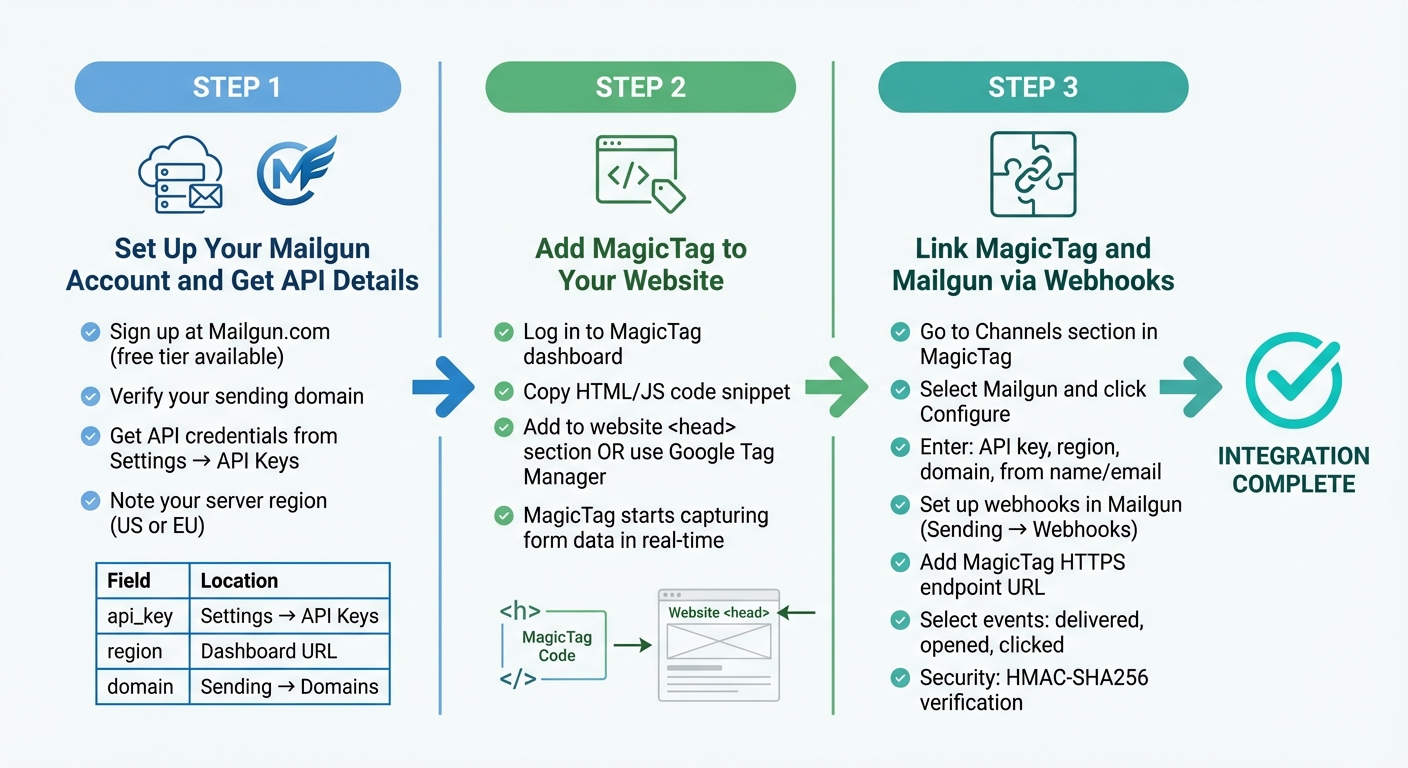
MagicTag and Mailgun Integration Setup Guide - 3 Step Process
Getting MagicTag and Mailgun to work together is a straightforward process. It involves three key steps: setting up your Mailgun account, adding MagicTag to your website, and linking the two platforms using webhooks. Once configured, you’ll be ready to launch targeted email retargeting campaigns.
Step 1: Set Up Your Mailgun Account and Get API Details
Start by heading over to Mailgun.com and signing up for an account. The free tier is perfect for testing purposes. After signing up, verify your sending domain - this is the domain that will appear in the "from" field of your emails. To do this, go to the Sending section in the Mailgun Control Panel and follow the step-by-step domain verification instructions.
Next, grab your API credentials. Navigate to Settings and select API Keys to find your Private API Key. Take note of whether your account is on the US or EU server, as this will affect the integration. You can find this information in your dashboard URL or account settings.
| Parameter | Description | Location |
|---|---|---|
api_key |
Your private Mailgun API key | Settings → API Keys |
region |
Server location (US or EU) | Dashboard URL or account settings |
domain |
Verified sending domain | Sending → Domains |
Step 2: Add MagicTag to Your Website
Installing MagicTag is quick and easy. Log in to your MagicTag dashboard, then go to the installation section. You’ll find a lightweight HTML/JS code snippet that needs to be added to your website’s <head> section. If you’re using Google Tag Manager, you can add it as a Custom HTML tag instead.
Once the script is in place, MagicTag starts capturing data from form fields on your site. It records details like name, email, and phone number in real time, but only tracks fields that users intentionally fill out.
Step 3: Link MagicTag and Mailgun via Webhooks
To connect MagicTag with Mailgun, go to the Channels section in your MagicTag dashboard and select Mailgun. Click on Configure Mailgun and enter the required details: your API key, region (US or EU), verified domain, and the "from" name and email address that will appear in your recovery emails.
Next, set up webhooks in Mailgun to monitor email activity. In the Mailgun Control Panel, navigate to Sending → Webhooks and add the HTTPS endpoint URL provided by MagicTag. Choose the events you want to track, such as "delivered", "opened", and "clicked." Mailgun uses HMAC-SHA256 to verify webhook payloads for security. Once you save these settings, the integration is complete.
Now, you’re ready to create and fine-tune email campaigns to recover lost leads effectively.
Building Email Campaigns with Mailgun
Once your integration is set up, you can start crafting email campaigns designed to turn incomplete form submissions into valuable leads. The key? Personalization, smart automation, and well-timed messages that align with user behavior.
Creating Email Templates
Mailgun makes it easy to create dynamic and personalized email templates using the Handlebars template engine. This tool lets you pull in specific lead data - like a name or recently viewed product - directly into your emails, making them feel less generic and more tailored to the recipient's experience.
For building templates, you have options:
- Use the Drag-and-Drop Template Builder for a no-code approach.
- Opt for the Templates API if you prefer uploading custom HTML designs.
Mailgun also offers mobile-friendly, open-source transactional templates on GitHub, saving you time while ensuring your emails look great on any device.
Want to experiment with different subject lines or calls-to-action? Template Versioning allows you to test multiple variations without changing the template name. Run these tests on a small group of leads, then roll out the best-performing version to your entire audience.
To make your emails even more specific, include a JSON object in the X-Mailgun-Variables header. This allows you to insert lead-specific details seamlessly.
Tagging is another powerful feature. You can assign up to three tags per email to organize and track campaigns. Examples include "lead-recovery", "cart-abandonment", or "welcome-series." Mailgun supports up to 20,000 unique tags per domain, with each tag being up to 128 characters long. This feature integrates directly with the Mailgun Analytics dashboard, helping you analyze email performance with ease.
| Feature | Function | Why It’s Useful |
|---|---|---|
| Handlebars Engine | Adds logic-based personalization | Displays unique content based on user behavior |
| Recipient Variables | Inserts dynamic data | Makes emails feel personal and relevant |
| Template Versioning | Manages multiple versions | Enables testing new ideas without disrupting live campaigns |
| Tagging | Organizes and tracks campaigns | Helps identify which strategies are driving results |
Once your templates are ready, the next step is integrating them into automated workflows for maximum impact.
Configuring Automated Email Workflows
Automated workflows ensure your emails are sent at just the right moment, triggered by specific user actions captured by MagicTag. For instance, if a user starts filling out a form but doesn’t complete it, MagicTag can trigger a follow-up email within hours.
Before launching live campaigns, test your automation logic using the Mailgun sandbox domain (sandbox<ID>.mailgun.org). Once you're ready to go live, ensure your backend application - whether it’s built with Flask, Node.js, or another framework - pulls the right data from MagicTag, such as the user’s name, email address, and abandoned cart details.
To send a recovery email, your backend will make a POST request to the Mailgun Messages API. This request includes the recipient’s email address, a subject line, and either the email content itself or a template ID. Use the o:tag parameter to label your campaign, making it easier to track later.
Webhooks are indispensable for real-time tracking. Configure them in the Mailgun Control Panel to get instant updates when a lead opens an email, clicks a link, or if delivery fails. If an email is opened but doesn’t lead to a conversion, you can trigger a follow-up email to re-engage the recipient.
"Transactional messages are automated emails or notifications that are sent when users sign up, make a purchase, or reset a password. These real-time updates keep users informed and are triggered by specific user actions." - Manish Hatwalne, Coder and Writer, Sinch Mailgun
By combining these workflows with personalized templates, you’ll create a solid foundation for targeted recovery campaigns.
Lead Recovery Campaign Examples
In October 2025, Manish Hatwalne showcased a lead recovery workflow for a fictional ecommerce site called "Gifts & Giveaways." Using a Flask backend, the system detected abandoned cart events. For instance, when a user named "John Smith" left items in his cart, the backend triggered the Mailgun API to send a personalized email with the subject line "Your cart is waiting..." The email included product details, prices, and images of the abandoned items. Delivery and open rates were tracked through the Mailgun Metrics dashboard to measure success.
Here are some campaign ideas to recover lost leads:
- Abandoned Cart Notifications: If a user adds items to their cart but doesn’t complete the purchase, MagicTag can capture the cart details. Mailgun then sends a reminder email featuring product images, the total cart value, and a clear "Complete Your Purchase" button. Including the user’s name and specific items increases the likelihood of conversion.
- Behavior-Based Re-engagement: Tailor follow-ups to specific actions, like signing up for a newsletter or downloading a resource. For instance, if MagicTag detects a partial signup, Mailgun can send a reminder email a few hours later, encouraging the user to finish.
- Segmented Follow-ups: Use tags to deliver customized messages based on campaign sources. For example, leads tagged "Black Friday" might receive a discount code, while "new signup" leads get a welcome email series. You can assign up to three tags per email to analyze which strategies work best.
- Automated List Hygiene: Use webhook data to automatically remove invalid email addresses after bounces, protecting your sender reputation. If a user unsubscribes, you can trigger a final email to address their concerns or open a helpdesk ticket.
"Tags are further enhanced when using Mailgun for open and click tracking. You can understand the full performance of your tag via Analytics in the Mailgun UI, including comparison to other tags." - Mailgun Documentation
These strategies, when implemented effectively, can help you recover leads and boost engagement.
sbb-itb-77d5bc3
Improving Performance and Deliverability
Getting lead recovery emails to land in the inbox isn’t just about hitting "send." Success depends on refining authentication, maintaining clean email lists, and boosting engagement signals. Mailgun reports an impressive average delivery rate of 97.4% among its users. But maintaining this level of performance requires a thoughtful approach to the strategies outlined below.
How to Improve Email Deliverability
To establish trust in your emails, implement SPF, DKIM, and DMARC with a strict policy (p=quarantine or p=reject). As Alison Gootee, Deliverability Advocacy Specialist at Sinch Mailgun, explains:
"Technically, you aren't enforcing DMARC until you implement a policy of p=quarantine or p=reject".
A "reject" policy offers the highest level of protection, blocking spoofed emails entirely and safeguarding your domain’s reputation.
Keep your email lists clean by aiming for bounce rates under 1% and immediately removing hard bounces. Stay below the spam complaint threshold of 0.1% - with an absolute maximum of 0.3% - to avoid damaging your sender reputation. Tools like Mailgun’s tagging feature can help you isolate lead recovery emails, making it easier to track performance and address issues early. To further reduce risks, use double opt-in for new MagicTag leads to verify email addresses and avoid spam traps.
Rotate your DKIM keys every 6 to 12 months to prevent misuse of your domain by bad actors. Before launching large campaigns, conduct seed testing by sending to a small, diverse list of email providers to check inbox placement. Keep email sizes under 10MB to avoid delivery issues. And always include a one-click unsubscribe option (per RFC 8058 standards) to reduce the chances of frustrated recipients marking your emails as spam.
Tracking Campaign Performance
Mailgun’s Analytics dashboard gives you a real-time window into how your lead recovery campaigns are performing. Aim for delivery rates of 95% or higher, and monitor open and click-through rates to measure engagement. Use tags like "lead-recovery" or "cart-abandonment" to compare performance across different segments. The dashboard aggregates data by tag, making it easy to see which strategies are working.
Keep an eye on negative engagement metrics. A spam complaint rate above 0.02% signals trouble, while unsubscribe rates over 0.5% suggest it’s time to clean your list. Track hard bounces (invalid emails) and remove them immediately, while soft bounces (temporary issues like full inboxes) should be monitored if they persist. Signing up for Feedback Loops (FBL) with major ISPs can alert you when recipients mark your emails as spam, enabling you to remove them from future campaigns and protect your sender reputation.
Take advantage of free tools like Google Postmaster Tools to monitor your sender reputation - though surprisingly, 70% of senders don’t use these resources. By combining Mailgun’s analytics with MagicTag’s dashboard, you can track the entire customer journey, from form abandonment to email engagement and final conversions. Metrics like Average Order Value (AOV) and ROI can guide adjustments to your automation rules for better results.
Adjusting Automation Rules
Refine your automation rules by analyzing MagicTag data alongside Mailgun analytics. Use engagement patterns to optimize send times - schedule work-related emails for weekday mornings and leisure-focused emails for evenings. Adjust email frequency based on response rates; for leads that remain unresponsive after several attempts, consider moving them to a reactivation campaign or removing them altogether to protect your sender score.
Segment your audience based on behavior and experiment with variations like subject lines or CTA colors using Mailgun’s tagging system. Behavioral data from MagicTag, such as items added to a cart or pages visited, can trigger personalized email sequences tailored to individual interests.
Establish a sunset policy to automatically remove unengaged leads after a set period, like six months. Before removal, send a final reactivation email with an incentive to re-engage. If there’s no response, it’s best to let them go - keeping inactive subscribers can harm your engagement metrics and signal to ISPs that your content lacks relevance. Better inbox placement means a stronger ROI for your campaigns.
Conclusion
Integrating MagicTag with Mailgun transforms abandoned forms into opportunities. By capturing user data in real time - while visitors are still typing - and combining it with Mailgun's powerful email automation, you create a system designed to engage prospects at just the right moment. With Mailgun boasting a 97.4% delivery rate and evidence showing that 61% of businesses surpass revenue goals with sales automation, this strategy is proven to deliver results. This partnership not only recovers lost leads but also streamlines your technical workflow.
Once integrated, you can set up automated responses triggered by key email events like opens, clicks, or bounces. From there, use tags to segment your audience, create personalized email sequences, and test different recovery strategies. Both platforms provide analytics to track performance and adjust your approach. According to McKinsey, 30% of lead generation activities can be automated with minimal effort, making this workflow a simple yet effective way to drive re-engagement.
To maximize email deliverability, implement SPF, DKIM, and DMARC protocols, and use Mailgun's tools to clean your contact lists, removing invalid addresses before sending. These steps protect your sender reputation and ensure recovery emails land in inboxes, not spam folders.
Start small with a single recovery workflow, such as targeting cart abandonment or form exits, and monitor the results. Use tags like "cart-abandonment" or "lead-recovery" to track performance metrics, then refine your timing, messaging, and frequency based on what the data reveals. With MagicTag capturing up to 12x more leads than traditional form submissions and Mailgun ensuring those leads are delivered, you'll be well-equipped to recover revenue that might otherwise slip away.
Take the first step today and connect these systems to elevate your conversion rates.
FAQs
How does MagicTag collect user data without requiring form submissions?
MagicTag collects user data effortlessly, even when users don't fill out traditional forms. It tracks interactions like button clicks, page views, and other engagement activities on your site, helping you identify and log potential leads.
With this data, you can create a strong lead database and reconnect with users through automated email campaigns - all while keeping their browsing experience smooth and uninterrupted.
What are the benefits of using MagicTag with Mailgun?
Integrating MagicTag with Mailgun sets up an efficient lead-recovery system. Here’s how it works: when someone fills out a form, MagicTag captures their details and collaborates with Mailgun to send personalized follow-up emails. With Mailgun’s dependable email delivery, your messages are more likely to land in inboxes instead of getting lost in spam.
Mailgun also offers a handy tagging feature, letting you label emails (like "welcome" or "re-engagement") to track their performance. You can monitor opens, clicks, and conversions with ease. Plus, real-time data via webhooks streamlines list management, automates follow-ups, and optimizes workflows. Together, MagicTag and Mailgun make recovering leads simpler, save you time, and help boost your conversions.
What steps can I take to improve the deliverability of my recovery emails?
To ensure your recovery emails actually reach your audience, start by keeping a clean and active email list. Remove invalid addresses and disengaged users regularly. This not only improves deliverability but also helps maintain a good sender reputation.
Another key step is to authenticate your domain using SPF and DKIM. These protocols build trust with email providers and reduce the risk of your emails ending up in spam folders.
Don’t forget to address bounces and complaints quickly, as ignoring them can harm your email reputation. Tools like Mailgun’s validation and reputation-monitoring features can make this process easier, helping you maintain a trusted sending IP. By following these practices, you’ll improve the odds of your recovery emails landing where they’re supposed to - your recipients’ inboxes.