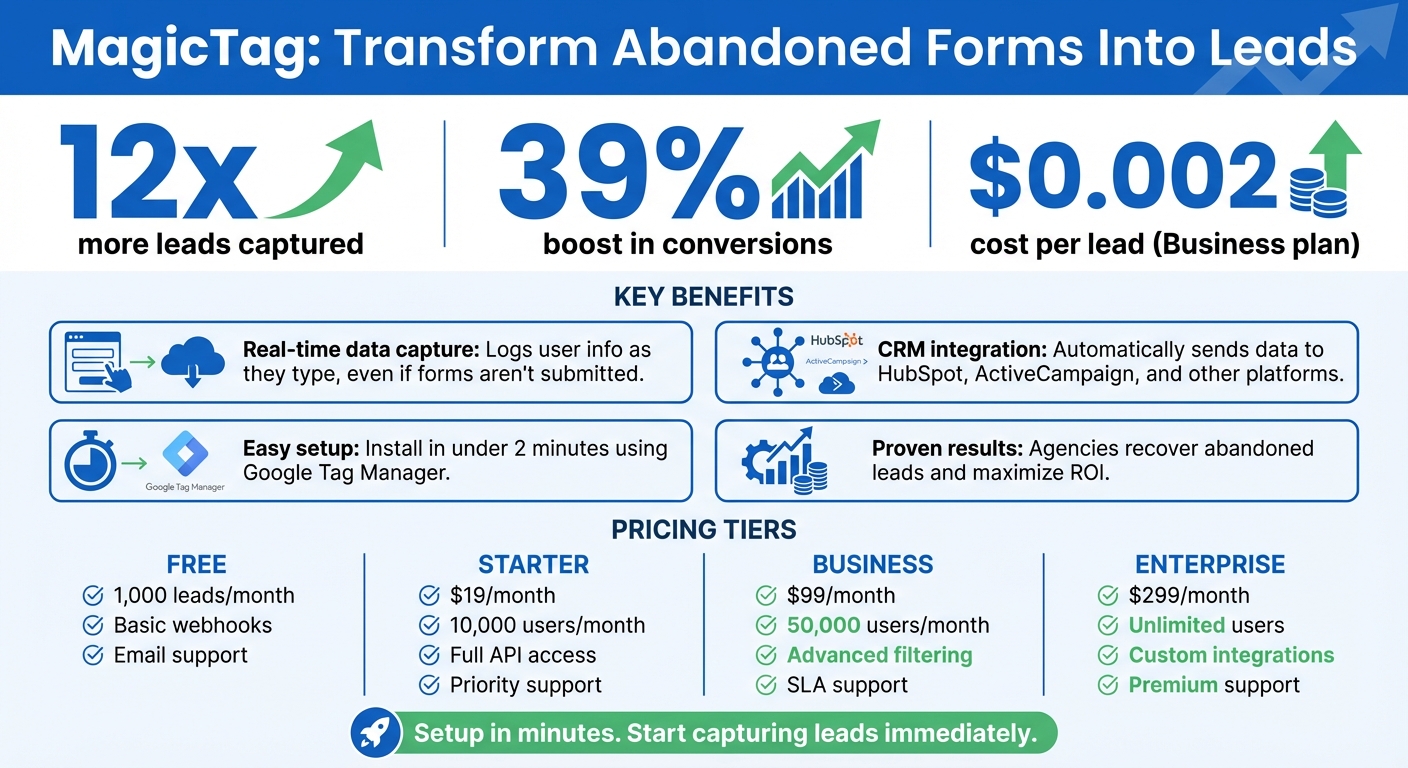
MagicTag solves a major problem for marketing agencies: losing leads when users abandon forms. By logging user details like names, emails, and phone numbers in real time - even if forms aren’t submitted - MagicTag increases lead capture rates by up to 12x. This SaaS tool integrates with CRMs like HubSpot and ActiveCampaign via webhooks and APIs, automating follow-ups and improving campaign efficiency.
Key benefits include:
- Real-time data capture: Logs user info as they type, even if they leave the form incomplete.
- CRM integration: Automatically sends data to platforms for immediate action.
- Easy setup: Install in minutes using Google Tag Manager or a simple code snippet.
- Proven results: Agencies report a 39% boost in conversions by recovering abandoned leads.
With plans starting at $19/month, MagicTag is a cost-effective way to maximize ROI and recover lost opportunities.
MagicTag Lead Capture Statistics and ROI Benefits for Marketing Agencies
Form Abandonment Tracking with GTM (Google Tag Manager)
Lead Recovery Challenges in Marketing Campaigns
Every day, agencies lose potential leads. This happens when users start filling out forms but abandon them before hitting "submit", creating a frustrating blind spot in the sales funnel. The problem? Standard forms only capture data once a user completes and submits them. So, if someone types in their email address but gets distracted or decides to "come back later", that valuable information is gone for good. The money spent driving those visitors to the site essentially goes down the drain because there’s no way to follow up or re-engage with these partially interested users. Let’s dive into how this impacts ROI.
How Lost Leads Impact ROI
Missed leads don’t just hurt the sales funnel - they take a direct toll on your marketing budget. When a visitor abandons a form, agencies lose both the cost of the ad that brought them there and the potential revenue that lead might have generated. Without capturing partial form data, agencies miss out on opportunities to create targeted email remarketing campaigns or trigger automated follow-ups. The result? Conversion rates stay lower than they should be because only fully completed submissions are counted. This makes it harder to demonstrate campaign success to clients and optimize marketing strategies. Beyond the financial hit, agencies lose out on critical insights into user behavior - insights that could improve performance and guide better decision-making.
Why Agencies Struggle to Capture Form Data
Two key challenges stand in the way: technology and user behavior. On the technical side, most analytics tools only track form activity after users click "submit." There’s no built-in way to capture what users type before abandoning the form, and setting up custom tracking often requires additional developer resources.
User behavior adds another layer of complexity. People leave forms unfinished for various reasons - interruptions, indecision, or even second thoughts. Without the right tools, agencies can’t recover those partially entered details or pinpoint exactly where users drop off in the process.
This combination of technical gaps and unpredictable user behavior leaves agencies in the dark. While traffic numbers and completed conversions are visible, the critical middle ground - engaged users who don’t finish forms - remains a mystery. This makes it nearly impossible to accurately measure campaign ROI or identify which marketing channels are attracting the most qualified leads.
Installing and Setting Up MagicTag for Client Websites
Setting up MagicTag on client websites is quick and easy. It’s compatible with all types of sites, including WordPress, Shopify, Webflow, custom-built platforms, and landing pages. This flexibility allows agencies to use the same solution across all their clients, no matter their tech stack.
How to Install MagicTag
The simplest way to install MagicTag is through Google Tag Manager (GTM). This method takes less than two minutes and doesn’t require coding. Here’s how it works: generate a tracking snippet from the MagicTag dashboard, then paste it directly into GTM. No need to touch the site’s source code.
Prefer a different approach? You can also add the HTML/JavaScript snippet directly to the website’s header or footer. This method is just as fast and straightforward, with both options getting MagicTag up and running in minutes.
"Installed through Google Tag Manager in seconds, and it immediately started tracking names, emails, and phone numbers in real time." - Emily Davis, Entrepreneur
Configuring Real-Time Form Data Capture
Once MagicTag is installed, it’s time to confirm it’s capturing data. MagicTag uses on-blur technology to log information as soon as a visitor enters data and moves to another field, even if they don’t click “submit.”
To test this, visit a form on the client’s site, enter some data, and switch focus to another field. The captured data should instantly appear in the MagicTag real-time dashboard. From there, connect a webhook or API to integrate the data with the client’s CRM. This ensures leads are automatically sent to the CRM, enabling immediate follow-ups before potential customers leave the site.
The entire process - from installation to CRM integration - can be completed in one session, making it easy to uncover valuable leads right away.
Connecting MagicTag with CRM Systems
Once MagicTag is set up and collecting data, the next step is to ensure that this information integrates smoothly with your CRM systems. MagicTag achieves this through webhooks and APIs, which allow lead details - like names, emails, and phone numbers - to be sent directly to platforms such as HubSpot and ActiveCampaign. This happens in real time, as soon as a visitor begins filling out a form. No need to wait for form submissions or deal with manual data exports - the process is fully automated.
The Free plan includes basic webhook functionality, but upgrading to the Starter plan ($19/month) or higher unlocks full API access and dedicated CRM integrations. These advanced features give you greater control over how lead data is mapped and enriched within your client’s systems.
Using Webhooks and APIs for CRM Integration
Webhooks work instantly, triggered by MagicTag’s on-blur technology. For example, when a visitor enters their email address and moves to the next field, the webhook immediately sends that information to your CRM - even if the visitor doesn’t complete the form and leaves the site shortly after.
Setting up a webhook is simple. Head to the integrations section in the MagicTag dashboard, select your CRM, and paste the webhook URL provided by your platform, such as HubSpot or ActiveCampaign. The connection is activated right away. For businesses needing more advanced workflows or custom lead scoring, the full API (available with Starter plans and above) allows you to transfer additional data and build segmented pipelines.
"MagicTag reveals who's browsing your site and sends their data to your CRM instantly." – MagicTag.ai
This real-time data transfer enables you to create automated workflows for managing leads effectively.
Automating Lead Management Workflows
Once MagicTag is connected to your CRM, automation takes over to transform raw data into actionable insights. For example, you can set up automated email sequences in ActiveCampaign that trigger as soon as a lead is captured. Similarly, HubSpot workflows can assign leads to sales reps based on the data collected from form fields. MagicTag’s real-time dashboard allows you to verify that everything is working as intended before rolling out campaigns on a larger scale.
Agencies leveraging MagicTag with CRM automation have reported a 39% increase in conversions by re-engaging visitors before they leave the site. The secret lies in acting quickly - contacting prospects while they’re still browsing helps turn abandoned forms into sales opportunities, maximizing your return on investment.
"Webhook/API lets you enrich leads instantly before they drop off." – MagicTag.ai
sbb-itb-77d5bc3
Using MagicTag Data to Improve Campaign Performance
Tracking Leads with the Real-Time Dashboard
The MagicTag dashboard offers agencies instant access to lead activity as it unfolds. Whenever a visitor begins typing their name, email, or phone number into a form field and moves to the next one, that information appears in the dashboard immediately - even if they don’t submit the form. This real-time tracking captures leads that traditional methods often overlook.
"Watching user data appear in real time is mind-blowing. MagicTag gave us immediate visibility we never had before." – Sarah Thompson, Web Developer
The dashboard highlights exactly where visitors abandon forms, providing a clear view of potential problem areas. For instance, if many users enter their email but leave when asked for their phone number, it signals that the form might be asking for too much too soon. This real-time feedback enables agencies to pinpoint and address friction points, paving the way for smarter campaign adjustments.
Making Data-Driven Decisions to Increase Conversions
Armed with these instant insights, agencies can make targeted changes to improve conversion rates. The dashboard helps teams experiment with form lengths, modify field requirements, and fine-tune the user experience based on actual visitor behavior instead of relying on assumptions.
Quick action on this data can transform outcomes. For example, agencies can trigger automated follow-ups - like emails or SMS messages - while the visitor is still browsing. This immediate response can turn abandoned forms into fresh sales opportunities.
"MagicTag has become one of our highest-ROI tools. We now convert visitors who would've vanished forever." – Chris Caveiras, Founder
The dashboard also enables agencies to segment leads by intent. Visitors who fill out multiple fields show higher interest than those who only provide an email address. This segmentation allows sales teams to prioritize follow-ups and customize outreach based on how far each lead progressed, streamlining lead management processes and increasing efficiency.
MagicTag Pricing Plans for Agencies
When it comes to maximizing conversions with integration and automation, picking the right pricing plan can significantly boost your ROI.
Selecting the Right Plan for Your Agency
MagicTag offers four pricing tiers, designed to meet the needs of agencies of all sizes.
- The Free plan supports up to 1,000 leads per month, making it a great choice for smaller clients or testing the platform. It includes a real-time dashboard, basic webhook functionality, and email support - everything you need to try out the service before committing to a paid plan.
- For agencies managing higher traffic or multiple clients, the Starter plan costs $19/month and supports up to 10,000 identified users per month. This plan adds full API and webhook access for smooth CRM integration and offers priority support for quicker assistance.
- The Business plan, priced at $99/month, increases capacity to 50,000 users per month and introduces advanced filtering, segmentation tools, and SLA-backed support. This makes it easier to implement advanced email retargeting strategies for high-value prospects. It's ideal for agencies handling enterprise-level campaigns.
- The Enterprise plan, at $299/month, removes user volume caps entirely. It also provides dedicated infrastructure, custom integrations tailored to your tech stack, and premium support. This tier is perfect for agencies running large-scale campaigns across multiple client websites, where lead recovery plays a critical role in revenue.
Cost Savings and Performance Benefits
Each plan is structured to provide measurable cost savings as you scale. For example, a boutique agency managing three clients might find the Starter plan sufficient, while a mid-sized agency handling 20+ websites could see the Business plan as a better fit based on the volume of recovered leads.
The numbers speak for themselves. With the Business plan at $99/month for 50,000 identified users, the cost per lead works out to just $0.002 - significantly lower than typical paid advertising or lead generation costs. MagicTag can recover up to 12x more leads, often covering its subscription cost within the first billing cycle thanks to higher conversion rates and reduced customer acquisition costs.
Conclusion
When forms are abandoned, agencies miss out on potential leads. MagicTag tackles this issue head-on by capturing user data in real time as visitors type, boosting conversions by an impressive 39%. This directly addresses one of the biggest challenges agencies face: improving ROI on campaigns.
What makes MagicTag even more appealing is how quick and simple it is to set up. Installation takes less than two minutes via Google Tag Manager, and there’s no coding required. Plus, its seamless CRM integration and real-time dashboard allow agencies to make smarter, data-driven decisions to refine campaigns. With the ability to uncover up to 12x more leads, MagicTag ensures no opportunity slips through the cracks.
And the cost? Just $0.002 per lead on the Business plan. This is a fraction of what traditional advertising methods cost, yet it delivers far better conversion rates. These savings make MagicTag a smart investment for agencies looking to operate more efficiently.
For agencies aiming to boost client ROI and create lasting growth, MagicTag is a game-changer. Its combination of advanced CRM integration and measurable performance improvements makes it an essential tool for capturing leads and driving campaign success.
FAQs
How does MagicTag collect user information without requiring form submissions?
MagicTag employs a simple JavaScript snippet to monitor keystrokes in form fields. It collects details such as names, emails, and phone numbers as they are typed, even if users decide not to click the submit button. This way, important lead information is preserved and immediately sent to the MagicTag platform for processing.
How does integrating MagicTag with a CRM benefit marketing agencies?
Integrating MagicTag with a CRM takes the hassle out of managing lead data. It captures everything - whether it’s from fully completed forms or partially filled ones - and syncs it in real time. This means no more manual data entry, fewer errors, and the ability to recover leads that might have slipped through the cracks. For sales teams, this translates to more opportunities to connect with potential customers, giving them a better shot at increasing conversions.
With real-time syncing, CRMs can spring into action immediately. They can send out automated emails, score leads, or assign them to the right sales reps without delay. This speed not only helps agencies engage prospects faster but also keeps workflows smooth and efficient. The result? Better campaign performance, saved time, and a stronger ROI for agency clients.
How long does it take to set up MagicTag on a client’s website?
Setting up MagicTag on a client’s website is simple and fast - it usually takes just seconds to a few minutes. All that's required is adding a lightweight JavaScript snippet or installing it through Google Tag Manager. The best part? You don’t need a developer’s help. Once it’s in place, data capture starts right away, effortlessly fitting into your existing workflows and saving you both time and energy.